When you only ran one program per server, "deployment" didn't carry the weight it does today. You bought a machine, installed an OS, added the libraries you needed, copied your application over, and ran it. The problem was that servers were expensive and slow to provision. CPU sat idle, memory went unused, disk space was wasted — yet nobody dared run a second application on the same box for fear that one program would bring down the whole system.
That discomfort is where the long road to Docker begins.
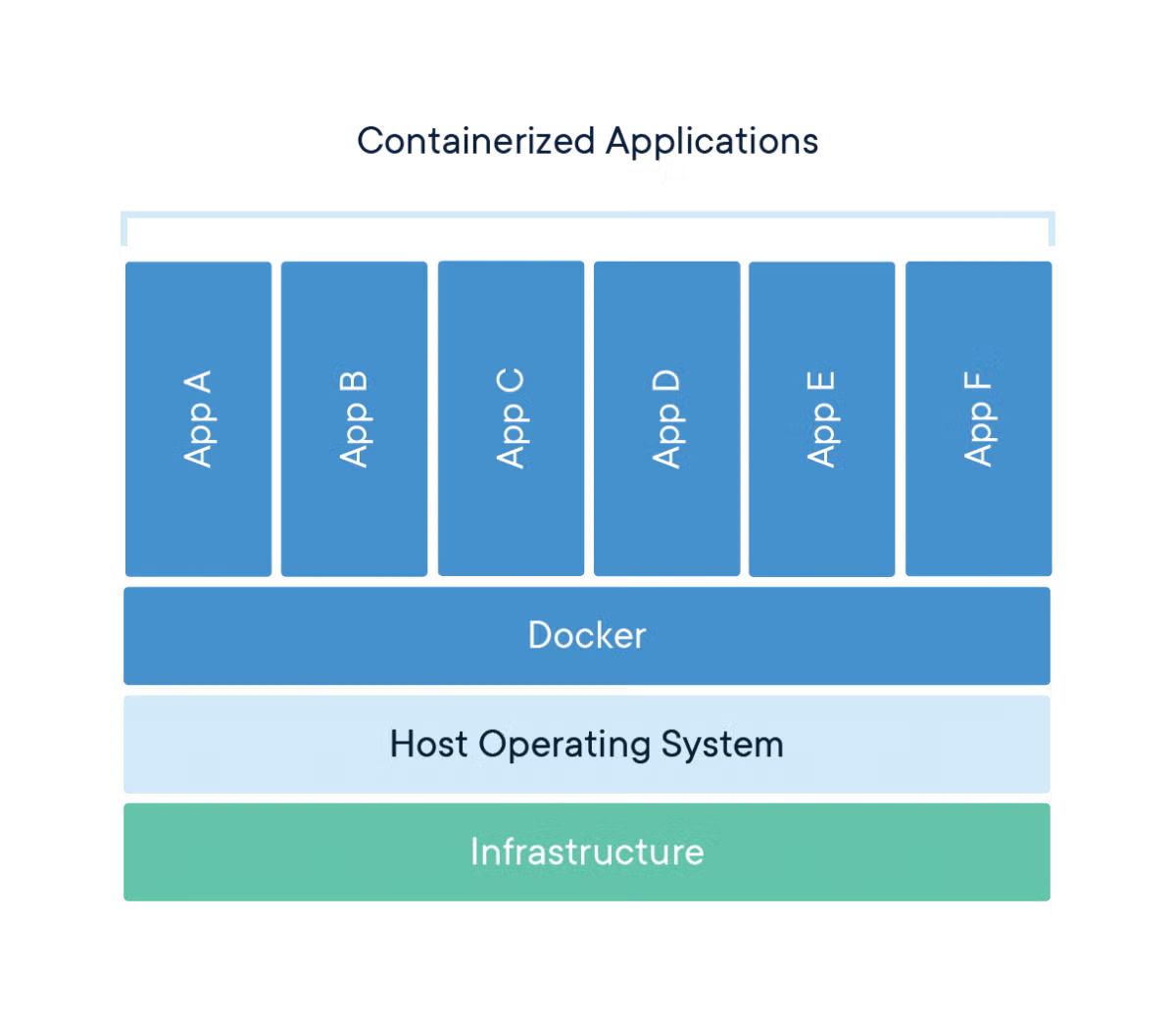
A Docker container is a deployment unit that bundles an application and its runtime dependencies into an image.
Docker can look like it came out of nowhere and upended the world, but in reality it is closer to a thin wrapper that appeared after hardware and operating system advances had been accumulating for years — in the best possible sense of "wrapper." Docker didn't invent the CPU, and it didn't build Linux's isolation primitives from scratch. It took isolation mechanisms, filesystems, networking, and image distribution that already existed, and packaged them in a form developers could actually understand. That difference mattered. The technology was there, but it wasn't accessible; Docker brought it down to a single docker run.
The Era When Servers Were Expensive: One Machine, One World

The progression from physical servers through hardware virtualization, VMs, Linux kernel isolation, Docker, and Kubernetes.
Early server operations were built entirely around physical hardware. Deploying an application meant provisioning a physical server with a CPU, RAM, disks, and a NIC. You racked it, installed an OS, opened firewall rules, and matched runtime versions. The model was easy to reason about: one machine, one execution environment.
Simple, but enormously wasteful.
A web server is busy during the day and quiet at night. A batch server is busy only at specific times. A database server might be disk-I/O bound while an API server spends more time waiting on the network than on CPU. But if physical servers are your only unit of deployment, you can't easily subdivide leftover capacity. You could run multiple services on the same server, but then library version conflicts and failure propagation kicked in. Upgrade a shared library under /usr/lib and the neighboring service dies.
For operations teams, the scariest thing was unpredictability. If service A floods the disk with logs, disk fills up and service B goes down with it. If service C steadily leaks memory, the kernel's OOM killer takes out some unrelated process. Processes look like separate programs, but inside the same OS they share a great deal: filesystem, network stack, process table, user accounts, and the kernel itself.
People wanted stronger boundaries — a way to carve multiple environments out of a single physical server, each looking like its own machine.
What Virtualization Solved First
Virtualization is the technology of splitting one physical server into multiple virtual ones. "Virtual" isn't a put-down here. A guest OS runs fully convinced that it has its own CPU, memory, disk, and NIC in front of it. Underneath, a hypervisor partitions the real hardware.
The hypervisor is the layer that manages virtual machines. VMware ESX, Xen, and KVM are the landmark technologies in this space. KVM is hypervisor functionality built directly into the Linux kernel; Linux included it in the 2.6.20 release, as documented in the kernelnewbies.org Linux 2.6.20 changelog. From that point on, running virtual machines on a Linux server became substantially more natural.
The big advantage of VMs is strong isolation. Each VM contains a complete OS. You can run Ubuntu 20.04 in one VM and CentOS 7 in another. A kernel panic inside one VM doesn't immediately kill the others. Because isolation is at the OS level, the security and operational model maps closely to physical servers.
The problem is weight.
Spinning up a VM requires a guest operating system — kernel, init system, base utilities — all of it. To run a single application you effectively boot another OS. Server hardware improved fast enough that this cost became manageable, and at the time the tradeoff was clearly worth it: pay the overhead and stop wasting physical server capacity.
Virtualization and containers both grew out of the push to subdivide physical server resources more finely.
Hardware pushed virtualization forward as well. CPUs went multi-core, RAM prices fell, x86 server performance climbed, and it became feasible to pack multiple VMs onto a single host. Hardware virtualization support — Intel VT-x, AMD-V — let hypervisors handle CPU instructions more efficiently. Storage expanded through SANs, NAS, and eventually distributed storage; networking moved from 1 GbE to 10 GbE and beyond. As infrastructure scaled up, devoting an entire physical server to one workload started to feel increasingly wrong.
VMs won this era. Cloud computing was built on top of this model. Services like AWS EC2 let users consume VMs without buying physical hardware. The fundamental unit of infrastructure shifted from a machine to an instance.
The Deployment Frustration VMs Didn't Fix
Virtual machines solved the problem of subdividing servers. They didn't cleanly solve application deployment.
A developer runs code locally. The production server has a different OS version, a different OpenSSL, a different glibc, a different Python minor version. Staging is different again. Documentation lists a long sequence of apt install commands and someone always skips a step. Deployment scripts accumulate conditionals over time. The longer a server runs, the further it drifts from its original provisioned state. This is commonly called a snowflake server — like snowflakes, every server ends up slightly different.
VM images help to a degree: build a VM image that includes the application and ship that. But images are heavy, builds are slow, and transfers are slow. A small code change means rebuilding and moving a large disk image. Because the entire OS is included, this approach is too cumbersome for frequent, application-level deployments.
That's where containers come in.
A container shares the same kernel while partitioning the process's view of the world. It doesn't boot another full OS the way a VM does. On top of a single Linux kernel, multiple groups of processes each see what looks like their own environment. From inside, a container appears to have its own filesystem root, its own process list, its own network interface. In reality, it's isolated by kernel-level mechanisms within a single kernel instance.
That distinction matters. Sharing the kernel means fast startup and small images, because you only need to bundle the application and its dependencies. Launching a container is closer to starting a process than to booting an operating system.
The Building Blocks Already Inside the Linux Kernel
The components of containers existed in Linux before Docker. What Docker did well was assemble those components into a product.
The first piece to understand is namespaces. Namespaces partition the system resources a process can see. A PID namespace isolates the process ID space — run ps inside a container and you see only the processes in that container. A mount namespace isolates filesystem mount points. A network namespace isolates network interfaces and routing tables. The Linux namespace types and their behavior are documented in the namespaces(7) man page.
cgroups limit and measure resource consumption: how much CPU a process group can use, how much memory, how to throttle block I/O. This is what prevents a single container from consuming unbounded memory. The design and controller structure of cgroups v2 are described in the Linux kernel documentation.
chroot is older still. It changes a process's root directory so the process cannot see anything outside a designated subtree. chroot alone doesn't provide strong isolation, but the idea of giving a process a different view of the filesystem is foundational to understanding containers.
Union filesystems are also essential. A container image is built from stacked layers: a base image, a layer where packages are installed, a layer where application files are copied in, a layer where configuration is added. Containers that share the same base image reuse those layers. Docker originally used AUFS; today the overlay2 driver is standard on Linux. Docker's own storage driver documentation recommends overlay2 as the preferred driver.
Combine these four and you have the skeleton of a container:
- Namespaces partition what the process can see.
- cgroups limit resource consumption.
- chroot and mount isolation create filesystem boundaries.
- Union filesystems let images be layered and reused.
Containers feel like deep magic when you first encounter them, but from the kernel's perspective they're closer to a precise set of restrictions on how a process runs. That's why containers are lighter than VMs. The flip side is that because the kernel is shared, you cannot expect the same degree of kernel-level isolation that VMs provide. Where a strong security boundary is required, you need additional mechanisms: seccomp, AppArmor, SELinux, user namespaces, rootless mode.
Containers Existed Before Docker
The container idea didn't originate with Docker. FreeBSD Jails were a well-known example of OS-level isolation around the year 2000. Solaris Zones created isolated execution environments within a single server. On Linux, OpenVZ, Linux-VServer, and LXC all pushed in this direction. LXC used Linux namespaces and cgroups to provide system containers.
Mass adoption, however, is a different problem.
Working directly with LXC required substantial knowledge of OS internals. Users had to figure out how to attach networking, how to construct a rootfs, how to configure cgroups, where to fetch images from, and how to share deployment artifacts — all on their own. The kernel capabilities were ready; the developer-facing interface wasn't.
Docker attacked exactly that gap. In 2013, dotCloud unveiled Docker at PyCon. Solomon Hykes's talk is still available under the title The future of Linux Containers. It's also worth noting that Docker originally ran on top of LXC; over time it was restructured through libcontainer, runc, and containerd into its current layered runtime architecture.
The underlying technology was containers, but what developers actually experienced was images and workflow.
How Dockerfile Changed the Language of Deployment
The Dockerfile is arguably the most powerful invention to come out of the Docker ecosystem — more impactful, I'd argue, than the container runtime itself.
Traditional deployment documentation was a procedure written for humans:
sudo apt update
sudo apt install -y python3 python3-pip
pip install -r requirements.txt
export APP_ENV=production
python app.py
That document rots over time. Package repositories change, the default Python version changes, some server already has a package installed. The moment a human interprets and executes the steps, environmental drift creeps in.
A Dockerfile describes the execution environment as code:
FROM python:3.12-slim

WORKDIR /app
COPY requirements.txt .
RUN pip install --no-cache-dir -r requirements.txt

COPY . .
CMD ["python", "app.py"]
This single file encodes a lot: which base OS family to use, which runtime version, when to install dependencies, where to put application files, what command to start with. The build produces an image. That image is pushed to a registry, pulled on another server, and run.
This shifts the unit of deployment. The center of gravity is no longer SSHing into a server and installing things. You build an image and you run that image. A production server is no longer a place where you install software — it's a place where you run images. That model fit naturally with CI/CD: after a git push, run tests, build the image, push it to the registry, and let the deployment system pull and run it.
The Dockerfile syntax can feel unfamiliar at first. But once you're comfortable with it, it beats a deployment runbook. A runbook is a procedure a person reads and follows; a Dockerfile is a procedure the build system executes directly. If something is wrong, the build fails. That difference changes operational quality.
The Economics of Reuse That Image Layers Created
A Docker image looks like a single monolithic file, but internally it's a stack of layers. A RUN pip install layer sits on top of FROM python:3.12-slim, and a source code copy layer sits on top of that. Each instruction generally creates a new layer.
This structure directly affects build and deployment speed. If the dependency installation layer is already cached, a build where only source code changed is dramatically faster. If a server already has the base image, it only needs to pull the changed layers. When multiple services share the same base image, disk usage shrinks too.
That's why the order of instructions in a Dockerfile matters. Copying frequently changed files early invalidates the cache for every layer that follows. This is exactly why the pattern of copying requirements.txt first, installing dependencies, and then copying the full source is so widely used in Python projects.
COPY requirements.txt .
RUN pip install --no-cache-dir -r requirements.txt

COPY . .
Reverse that order and you'll reinstall dependencies every time you change a single line of code. It's a small difference, but in team-scale CI it shows up immediately in cost.
Image layers also affect deployment reliability. Two images may look identical from the tag alone, but it's the digest that actually identifies image content. In production deployments, pinning to explicit version tags or digest-based references is better than relying on the latest tag. latest is convenient, but it'll bite you the moment you try to reproduce a deployment later.
Why Docker Swallowed the Development Environment Too
If Docker had stayed a server deployment tool, it wouldn't be as dominant as it is today. Docker moved into the development environment as well.
Imagine a new developer joining a project. In the old days, they'd read the README, install PostgreSQL locally, install Redis, match the Node version, set up a Python virtual environment, and configure environment variables. Package names differ between macOS and Ubuntu, Apple Silicon vs. x86 image issues crop up, and if a port is already in use, everything stops. That process could eat an entire day. That's not an exaggeration.
Docker Compose addressed this problem in a pretty practical way.
services:
  api:
    build: .
    ports:
      - "8000:8000"
    environment:
      DATABASE_URL: postgres://app:app@db:5432/app
    depends_on:
      - db

  db:
    image: postgres:16
    environment:
      POSTGRES_USER: app
      POSTGRES_PASSWORD: app
      POSTGRES_DB: app
    ports:
      - "5432:5432"
Run docker compose up and both the API and the database come up together. No need to install PostgreSQL directly on the local machine. Different projects can use different DB versions with minimal conflicts. Tearing it down and recreating it is trivial. Because it stores the development environment as code, Docker Compose is especially valuable for small teams.
Local Docker doesn't eliminate every problem, of course. Filesystem performance, volume permissions, platform architecture differences, and network debugging are all still real concerns. But the advantage of giving the entire team a roughly consistent starting point far outweighs those friction points. As far as I'm concerned, there's almost no reason to go back to installing databases, caches, and message brokers directly on the host for backend projects.
The Power of Docker Hub and Registries
Registries were decisive in Docker's ecosystem growth. You can build container images all day, but if sharing them is painful, the ecosystem grows slowly. Docker Hub became the default place to find and pull images. Commands like docker pull nginx, docker pull redis, and docker pull postgres fundamentally changed what it means to install server software.
Previously, installing PostgreSQL meant consulting your OS package repository, matching the version, finding the config file locations, and getting the data directory permissions right. With Docker, you can just run the image and verify it works.
docker run --rm -e POSTGRES_PASSWORD=pass -p 5432:5432 postgres:16
This isn't the right answer for production. Data volumes, backups, upgrades, and security hardening all need separate attention. But the time-to-first-run got dramatically shorter. In technology adoption, the time from discovery to a working demo matters more than people realize. Tools that a developer can run in five minutes spread.
Registries also fit naturally into internal deployment workflows. A team builds an image, pushes it to an internal registry, and the deployment system pulls from there. This creates a clean contract between build and execution. The container image becomes a deployment artifact that bundles the application binary, runtime, and a slice of OS userland together.
Kubernetes Made Docker Even Bigger
If Docker made containers familiar to developers, Kubernetes elevated containers to the fundamental unit of large-scale operations. Kubernetes schedules containers across multiple servers, restarts them when they die, and provides service discovery and rolling updates. Google's 2014 open-source release of Kubernetes is documented in the Kubernetes blog's 10th anniversary post.
In the early days, many people understood Kubernetes and Docker as nearly inseparable. The flow of building a Docker image and having Kubernetes run it as a Pod felt natural. Over time, Kubernetes moved away from a direct dependency on Docker Engine. As layers like CRI, containerd, and runc were separated out, Kubernetes nodes could run container images without Docker itself. The removal of dockershim in Kubernetes 1.24 is explicitly documented in the Kubernetes 1.24 release announcement.
This shift doesn't signal Docker's defeat. If anything, it confirms that the image format and development workflow Docker created hardened into industry standards. containerd handles the production runtime, developers still write Dockerfiles, and images are pushed to registries in OCI-compliant format. The Docker product name and the standard components of the container ecosystem have simply diverged.
Docker Wouldn't Have Scaled Without Hardware Progress
Docker is remembered as a software innovation, but the hardware headroom underneath it made it all possible. As CPU core counts rose, memory grew, SSDs became ubiquitous, and network bandwidth increased, frequently building and pulling large images became a realistic workflow.
Containers are lighter than VMs, but they're not free. You need disk to store images, CPU to compress and decompress layers, and network to pull from registries. CI servers build dozens of images and spin up test containers in parallel. That workload hits a bottleneck fast on slow disks and narrow pipes.
The spread of SSDs is especially noticeable. Reading and writing image layers, package managers creating thousands of small files, and test containers starting and stopping — all of this generates heavy random I/O. Docker works on HDD-based servers, but it's a far cry from the fast iteration cycle developers expect.
Multi-core CPUs matter too. Lighter containers mean you can pack more processes onto a single machine, which puts more pressure on scheduling and parallel builds. Modern build systems like BuildKit parallelize eligible stages and cache aggressively. Without the hardware to back it up, those advantages are only half-visible.
Why Docker Won the Ecosystem
Docker's dominance isn't a victory for a single technology. It's a victory for a product that delivered the right abstraction at the right moment.
The Linux kernel had namespaces and cgroups. The server market had already embraced virtualization and cloud. Development teams were exhausted by deployment reproducibility failures. Open-source server software kept multiplying, microservices as an architectural style was fragmenting single applications into many components, and CI/CD pipelines demanded a clear, concrete build artifact. All of these trends pointed in the same direction: bundle the application and its runtime environment together and run it consistently anywhere.
Docker built the interface that answered that demand.
docker build -t my-app .
docker run -p 8080:8080 my-app
Two lines. Simple. Behind them sit namespaces, cgroups, overlay filesystems, bridge networks, NAT, image manifests, and registry authentication. Users don't need to understand any of that to get started — they learn it gradually as they go deeper. Good tools hide internal complexity while leaving a staircase down for when you need it. Docker built that staircase reasonably well.
In a VM-centric world, the deployment unit was close to a server. After Docker, the deployment unit moved down to the process and application level. That shift aligned perfectly with cloud infrastructure. Servers became interchangeable resources; applications flowed around as images. Operators deploy a new image rather than SSH-ing into a server and hand-editing packages.
The Mental Model Beginners Should Build First
When learning Docker for the first time, internalizing this model will serve you better than memorizing commands.
A container is a process — one that the kernel surrounds with its own isolated world. That world has its own filesystem, network, process list, and resource limits. An image is the read-only bundle of materials used to construct that world. A container is what you get when you run an image; it adds a thin writable layer on top. A registry is the store where you push and pull images. A Dockerfile is the recipe for building an image. Compose is the local orchestration file that brings multiple containers up together.
With that model in place, commands stop feeling scattered.
# Build an image
docker build -t demo-api .

# Run a container
docker run --name demo -p 8000:8000 demo-api

# List running containers
docker ps

# View logs
docker logs demo

# Remove the container
docker rm -f demo
docker build produces an image. docker run creates a container from an image and starts it. docker ps shows running containers. docker logs shows stdout and stderr from a container. docker rm -f force-removes a container. Confusing images and containers is a constant source of confusion early on — keeping them separate pays off quickly.
Volumes are the other concept you need to nail down early. Files written inside a container are tied to the container's lifecycle. If database data lives only in the container's writable layer, it can disappear when the container is removed. Production data goes in a volume or external storage.
docker volume create pgdata

docker run -d \
  --name pg \
  -e POSTGRES_PASSWORD=pass \
  -v pgdata:/var/lib/postgresql/data \
  postgres:16
Networking works the same way. Containers start inside an isolated network by default. To connect to the host, you map ports with -p 8080:80. Services within a Compose file communicate using service names. Code that worked with localhost on the host can behave differently inside a container — localhost inside a container refers to the container itself, not the host.
The Problems That Come From Over-Trusting Docker
Docker reduces environment differences; it doesn't eliminate environment problems. CPU architecture still matters. An image built for linux/amd64 may run under emulation — or fail outright — on linux/arm64. Python packages with native extensions, binaries tied to a specific libc, and GPU drivers that must match the host all require extra care.
Security isn't automatically resolved either. Running as root inside a container makes you root inside that container. Misconfiguration can grant dangerous access to host resources. Mounting the Docker socket into a container is a particularly powerful privilege escalation path. A container with access to /var/run/docker.sock can control the host's Docker daemon. It's a tempting shortcut, but in production it almost always deserves a second look.
Image size grows without discipline. Pack build tools and runtime tools into the same image, skip cleaning the package cache, copy unnecessary files, and you'll hit hundreds of megabytes to several gigabytes fast. Multi-stage builds are the clean solution.
FROM golang:1.22 AS build
WORKDIR /src
COPY . .
RUN go build -o app ./cmd/server

FROM debian:bookworm-slim
WORKDIR /app
COPY --from=build /src/app ./app
CMD ["./app"]
The first stage has the compiler. The second stage has only the binary. Separating the build environment from the runtime environment keeps the final image small and reduces the attack surface.
The World After Docker
In modern production environments, the word "Docker" appears less often than it used to. The container runtime on a Kubernetes node may be containerd; images follow the OCI standard. Tools like Podman, Buildah, and nerdctl exist alongside Docker. But the grammar of usability that Docker established remains. The flow — write a Dockerfile, build an image, push to a registry, run as a container — is unchanged.
Beginners learning Docker don't need to fixate on the product name alone. Thinking in layers will serve you longer.
- Kernel primitives: namespaces, cgroups, mount, network stack
- Image format: layers, manifest, digest, OCI image spec
- Runtime: runc, containerd, Docker Engine
- Developer tooling: Docker CLI, Dockerfile, Compose
- Orchestration layer: Kubernetes, ECS, Nomad, and similar systems
You don't need to know all of this up front. But when something breaks, you need to be able to identify which layer it's in. Is the image build failing? Is the docker run command wrong? Is it a network mapping issue? Is it a configuration problem inside the application? People who are genuinely good with Docker aren't the ones who've memorized the most commands — they're the ones who can quickly isolate which layer the problem lives in.
The container's role in development environments has also expanded recently. Dev Containers package the editor's entire development environment into a container. CI pipelines spin up test databases as containers. Local LLM and GPU workloads use container images to manage CUDA runtime and driver compatibility. In that space, the boundary between host drivers and the container runtime becomes important.
Understanding Docker takes you beyond being able to type docker run correctly — it gives you the ability to read the basic grammar of modern deployment systems. If VMs turned servers into software, containers turned the execution environment into a shippable artifact. The next layer worth digging into is the boundary between containerd and runc. Trace what a single docker run command actually becomes in terms of process invocations and namespace creation, and a lot of Docker's apparent magic dissolves into something quite concrete.