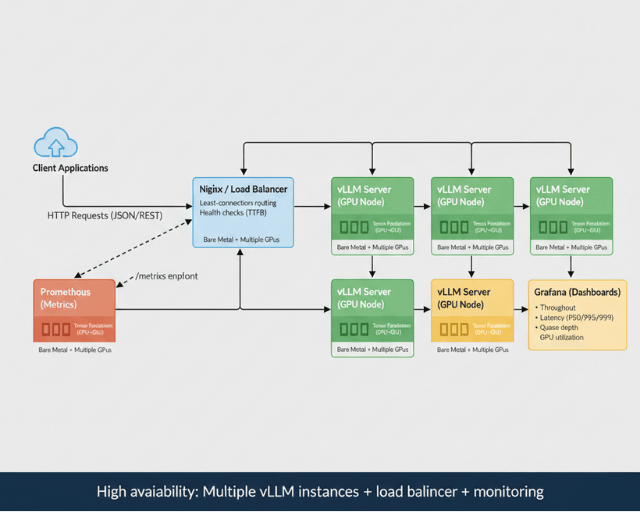
vLLM serving architecture (출처: blog.easecloud.io)
When serving models with vLLM, the first thing you encounter is the vllm serve command. It has a lot of arguments, and the right combination varies by model type, which makes it hard to know where to start. This post covers the most commonly used arguments in vLLM 0.21.0 one by one, along with serving examples organized by model type.
Environment Setup
vLLM is typically installed in a venv or conda environment. Make sure to activate that environment before serving.
source /path/to/venv/bin/activate
Without activation, the vllm command may not be found, or a different version may run instead.
Basic Structure of vllm serve
vllm serve <model path or HuggingFace ID> [arguments...]
You can specify a local path (/data/model/...) directly, or use a HuggingFace model ID (Qwen/Qwen3-8B) as-is. Using a local path serves the model without any network access.
Common Arguments
These arguments appear in almost every invocation regardless of model type.
--host / --port
--host 0.0.0.0 --port 10010
--host 0.0.0.0 binds the server to all network interfaces. This is required when the server needs to be reachable from outside. For local testing only, 127.0.0.1 is sufficient.
--port sets the serving port. When running multiple models simultaneously, each must use a different port.
--tensor-parallel-size
--tensor-parallel-size 2
Specifies how many GPUs to shard the model across. Use 2 for two GPUs, 4 for four, and so on. This must be set when the model size exceeds a single GPU's VRAM.
--max-model-len
--max-model-len 131072
The maximum token length the server will handle. This must be at or below the model's supported maximum; higher values consume more VRAM. Tuning this to match your actual usage patterns saves memory.
--gpu-memory-utilization
--gpu-memory-utilization 0.75
The fraction of GPU VRAM vLLM is allowed to use. Accepts a value between 0 and 1; the default is 0.9. When running multiple models on the same GPU, lower this value to divide memory between them.
--served-model-name
--served-model-name Qwen3.5-27B
Sets an alias used as the model name in API requests. With this set, OpenAI-compatible clients can call it with model="Qwen3.5-27B". If omitted, the model path is used as the name.
Serving by Model Type
1. Standard LLM (Non-thinking)
The baseline configuration for models without thinking capability, or when thinking is disabled.
vllm serve /path/to/model \
  --host 0.0.0.0 \
  --port 10010 \
  --tensor-parallel-size 2 \
  --max-model-len 131072 \
  --gpu-memory-utilization 0.75 \
  --served-model-name my-model
No additional arguments needed — this is the most basic setup.
2. Thinking / Reasoning Models
Models with thinking capability, such as Qwen3.5 and QwQ, can be served in two modes.
Thinking enabled
vllm serve /path/to/Qwen3.5-27B \
  --host 0.0.0.0 \
  --port 10010 \
  --tensor-parallel-size 2 \
  --max-model-len 131072 \
  --gpu-memory-utilization 0.75 \
  --served-model-name Qwen3.5-27B \
  --reasoning-parser qwen3
Adding --reasoning-parser qwen3 parses the thinking output and returns it as a separate field.
Thinking disabled
vllm serve /path/to/Qwen3.5-27B \
  --host 0.0.0.0 \
  --port 10010 \
  --tensor-parallel-size 2 \
  --max-model-len 131072 \
  --gpu-memory-utilization 0.75 \
  --served-model-name Qwen3.5-27B \
  --default-chat-template-kwargs '{"enable_thinking": false}'
Adding --default-chat-template-kwargs '{"enable_thinking": false}' disables thinking and returns plain text responses only. Use this when you need faster responses or when the thinking overhead is unnecessary.
Using --reasoning-parser together with {"enable_thinking": false} gives a flexible setup where thinking is off by default but can be enabled on a per-request basis — the combination recommended in the official guide.
3. Embedding Models
Serving embedding models that convert text to vectors. Unlike LLMs, these have no generation capability, so generation-related arguments are not needed.
vllm serve /path/to/Qwen3-Embedding-8B \
  --host 0.0.0.0 \
  --port 10020 \
  --tensor-parallel-size 2 \
  --max-model-len 16384 \
  --gpu-memory-utilization 0.2
Embedding models generally use less VRAM than LLMs, so --gpu-memory-utilization can be set low. Adjust this value when co-locating an embedding model with an LLM on the same server.
4. Tool Calling
Two additional arguments are required to enable function calling / tool use.
vllm serve /path/to/Qwen3.5-27B \
  --host 0.0.0.0 \
  --port 10010 \
  --tensor-parallel-size 2 \
  --max-model-len 131072 \
  --gpu-memory-utilization 0.75 \
  --served-model-name Qwen3.5-27B \
  --enable-auto-tool-choice \
  --tool-call-parser qwen3_coder
--enable-auto-tool-choice: Allows the model to automatically decide whether to use a tool.--tool-call-parser qwen3_coder: Specifies the parser that extracts tool call format from model output. The parser varies by model; Qwen3-series models useqwen3_coder.
5. OCR / Multimodal Models
OCR-specialized models like DeepSeek-OCR-2 require additional arguments not needed for standard LLMs.
vllm serve deepseek-ai/DeepSeek-OCR-2 \
  --host 0.0.0.0 \
  --port 8000 \
  --gpu-memory-utilization 0.1 \
  --max-model-len 8192 \
  --max-num-batched-tokens 8192 \
  --logits_processors vllm.model_executor.models.deepseek_ocr:NGramPerReqLogitsProcessor \
  --no-enable-prefix-caching \
  --mm-processor-cache-gb 0
Three arguments differ from a standard LLM setup:
--logits_processors: Specifies a custom logits processor to improve OCR output quality. DeepSeek-OCR-2 requires an N-gram-based processor; serving without it causes a significant performance drop.--no-enable-prefix-caching: Disables prefix caching. OCR tasks have a different image on every request, so cache hit rates are near zero and the hashing overhead isn't worth it.--mm-processor-cache-gb 0: Disables the multimodal processor cache. Setting this to0skips the cache entirely.--max-num-batched-tokens: The maximum number of tokens processed in a single batch. Because OCR models convert images into tokens, it's safest to align this with--max-model-len.
6. Guard / Safety Models
Safety classification models like Qwen3Guard-Gen can be served without any special arguments, since they are small and purpose-built.
vllm serve Qwen/Qwen3Guard-Gen-0.6B \
  --host 0.0.0.0 \
  --max-model-len 32768
On ROCm (AMD GPU) environments, an additional environment variable is required.
export VLLM_ROCM_USE_AITER=1

vllm serve Qwen/Qwen3Guard-Gen-0.6B \
  --host 0.0.0.0 \
  --max-model-len 32768
Argument Reference
| Argument | Purpose | Example value |
|---|---|---|
--host | Bind interface | 0.0.0.0 |
--port | Port number | 10010 |
--tensor-parallel-size | Number of GPUs to shard across | 2, 4, 8 |
--max-model-len | Maximum token length | 131072 |
--gpu-memory-utilization | Fraction of GPU VRAM to use | 0.75 |
--served-model-name | Model alias for API calls | my-model |
--reasoning-parser | Enable thinking parser | qwen3 |
--default-chat-template-kwargs | Template options including thinking control | '{"enable_thinking": false}' |
--enable-auto-tool-choice | Auto tool selection | (flag) |
--tool-call-parser | Tool call parser | qwen3_coder |
--logits_processors | Custom logits processor | (class path) |
--no-enable-prefix-caching | Disable prefix caching | (flag) |
--mm-processor-cache-gb | Multimodal cache size in GB | 0 |
--max-num-batched-tokens | Maximum tokens per batch | 8192 |
Serving Multiple Models Simultaneously
Running an LLM alongside an embedding model on the same server is a common production setup. Use different ports and divide --gpu-memory-utilization appropriately.
# Terminal 1 — LLM
vllm serve /path/to/Qwen3.5-27B \
  --port 10010 \
  --tensor-parallel-size 2 \
  --gpu-memory-utilization 0.75 \
  --served-model-name Qwen3.5-27B \
  --enable-auto-tool-choice \
  --tool-call-parser qwen3_coder

# Terminal 2 — Embedding
vllm serve /path/to/Qwen3-Embedding-8B \
  --port 10020 \
  --tensor-parallel-size 2 \
  --gpu-memory-utilization 0.2 \
  --max-model-len 16384
Both processes share the same GPUs, so make sure the sum of the two --gpu-memory-utilization values does not exceed 1.0.