1편에서는 PDF의 내부 구조를 정리했다. PDF는 Header, Body, xref, trailer로 구성되고, Catalog에서 Pages 트리로 이어지며, Page 객체는 Contents와 Resources를 통해 실제 렌더링 명령과 자원을 연결한다.
2편에서는 이 구조를 편집기 설계 철학으로 옮겼다. 핵심은 PDF를 워드프로세서처럼 직접 수정하지 않고, 페이지와 의존 객체를 새 문서로 조립하는 것이다. 원본은 읽기 전용 입력으로 두고, 결과물은 새 PDF로 재작성한다. 페이지 순서 변경과 병합은 Pages 트리를 다시 구성하고 객체 번호를 재매핑하는 문제로 다룬다.
3편에서는 이 철학을 실제 구현 흐름으로 옮긴다. 범위는 단일 PDF를 파싱하고, 페이지 목록을 추출하고, 선택된 페이지를 새 문서로 재작성하는 최소 구현이다. 여러 PDF 병합도 같은 구조 위에 올라간다. 입력 문서가 하나인지 여러 개인지보다 중요한 것은 원본 객체 번호 공간을 새 출력 객체 번호 공간으로 변환하는 과정이다.
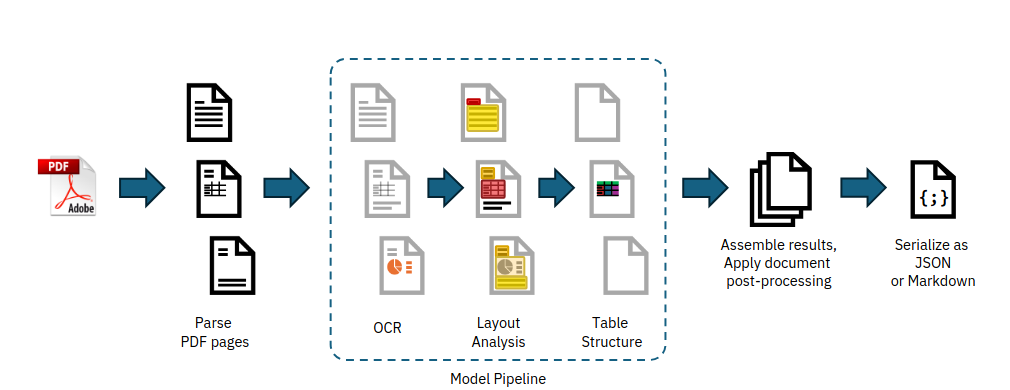
PDF 입력을 구조화된 중간 표현으로 바꾸는 파이프라인. 출처: Nicolas’ Notebook
구현 범위
이 글에서 다루는 구현 범위는 다음과 같다.
- PDF 바이트 입력
startxref탐색- xref table 파싱
- trailer dictionary 파싱
- Root Catalog 탐색
- Pages 트리 순회
- Page 객체 목록 flatten
- 선택된 Page 객체의 의존 객체 수집
- 새 객체 번호 할당
- indirect reference 재작성
- 새 Catalog와 Pages 트리 생성
- xref table 작성
- trailer와
startxref작성
초기 구현은 전통적인 xref table을 기준으로 설명한다. PDF 1.5부터 도입된 xref stream과 object stream은 별도 처리가 필요하다. qpdf 문서는 object stream과 xref stream이 PDF 1.5에서 도입된 구조라고 설명한다. 이 글의 목표는 모든 PDF 변형을 한 번에 다루는 것이 아니라, 페이지 조립 엔진의 핵심 흐름을 분해하는 것이다.
전체 파이프라인
최소 PDF 편집 엔진의 흐름은 다음처럼 잡을 수 있다.
read bytes
parse xref
parse trailer
resolve Root Catalog
resolve Pages tree
flatten Page list
build output page plan
collect dependencies
assign new object ids
rewrite references
write objects
write xref
write trailer
이 구조에서 가장 중요한 점은 파싱과 쓰기를 분리하는 것이다. 입력 PDF는 다양한 형태일 수 있지만, 내부 모델로 정규화한 뒤 출력은 단순한 형태로 쓴다. 2편에서 정리한 "파서는 관대하게, writer는 엄격하게"라는 원칙이 구현 단계에서는 이 파이프라인으로 나타난다.
코드 구조도 같은 방향으로 나눌 수 있다.
class PdfParser:
    def parse(self, data: bytes) -> "PdfDocument":
        ...

class PagePlanner:
    def build_plan(self, document: "PdfDocument", page_indices: list[int]) -> "OutputPlan":
        ...

class PdfWriter:
    def write(self, plan: "OutputPlan") -> bytes:
        ...
PdfParser는 원본 PDF를 내부 객체 모델로 바꾼다. PagePlanner는 사용자가 선택한 페이지 순서를 출력 계획으로 바꾼다. PdfWriter는 출력 계획을 실제 PDF 바이트로 직렬화한다.
내부 모델 설계
구현을 시작하기 전에 최소 내부 모델을 먼저 잡아야 한다. PDF는 간접 객체와 간접 참조를 중심으로 움직이므로, 객체 번호와 generation 번호를 분리해서 다루는 편이 안전하다.
from dataclasses import dataclass
from typing import Any

@dataclass(frozen=True)
class ObjRef:
    obj_num: int
    gen_num: int = 0

@dataclass
class PdfObject:
    ref: ObjRef
    value: Any
    raw: bytes | None = None

@dataclass
class PdfDocument:
    objects: dict[ObjRef, PdfObject]
    trailer: dict[str, Any]
    root: ObjRef
    pages: list[ObjRef]
ObjRef는 12 0 R 같은 참조를 표현한다. PdfObject는 실제 객체 값을 담는다. 초기 구현에서는 모든 PDF 타입을 완전한 AST로 만들지 않고, dictionary, array, name, number, string, stream, reference 정도만 처리해도 페이지 조립 흐름을 만들 수 있다.
PDF 객체 타입은 PDF Reference 1.7에서 boolean, number, string, name, array, dictionary, stream, null, indirect object 등으로 설명된다. 편집 엔진에서는 이 타입들이 중첩될 수 있다는 점이 중요하다. dictionary 안에 array가 있고, array 안에 indirect reference가 있으며, stream dictionary 안에도 reference가 들어갈 수 있다.
1단계: startxref 찾기
PDF 파싱의 시작점은 파일 끝이다. PDF 파일은 마지막 부분에 startxref를 두고, 그 뒤에 xref 위치를 적는다.
startxref
123456
%%EOF
따라서 파서는 파일 끝에서 역방향으로 startxref를 찾는다.
def find_startxref(data: bytes) -> int:
    marker = b"startxref"
    pos = data.rfind(marker)
    if pos == -1:
        raise ValueError("startxref not found")

    tail = data[pos + len(marker):]
    lines = tail.strip().splitlines()
    if not lines:
        raise ValueError("startxref offset not found")

    return int(lines[0])
startxref는 xref table 또는 xref stream의 시작 위치를 가리킨다. 이 글에서는 xref table을 기준으로 구현한다.
현실의 PDF는 incremental update를 여러 번 포함할 수 있다. 이 경우 마지막 startxref가 최신 xref를 가리키고, trailer의 /Prev가 이전 xref 위치를 가리킨다. 초기 구현에서는 마지막 revision을 읽고, /Prev가 있으면 이전 xref를 따라가며 객체 테이블을 누적하는 방식으로 확장할 수 있다.
2단계: xref table 읽기
전통적인 xref table은 다음 형태다.
xref
0 4
0000000000 65535 f
0000000015 00000 n
0000000081 00000 n
0000000142 00000 n
trailer
<< /Size 4 /Root 1 0 R >>
각 항목은 객체 번호에 대한 바이트 오프셋을 제공한다. 이 오프셋을 이용하면 파일 전체를 순차 스캔하지 않고도 특정 객체로 바로 이동할 수 있다.
@dataclass
class XrefEntry:
    obj_num: int
    offset: int
    gen_num: int
    in_use: bool


def parse_xref_table(data: bytes, offset: int) -> tuple[dict[ObjRef, XrefEntry], int]:
    cursor = offset
    if not data[cursor:cursor + 4] == b"xref":
        raise ValueError("xref table expected")

    cursor = skip_line(data, cursor)
    entries: dict[ObjRef, XrefEntry] = {}

    while True:
        line, cursor = read_line(data, cursor)
        line = line.strip()

        if line == b"trailer":
            return entries, cursor

        start_obj, count = map(int, line.split())
        for i in range(count):
            entry_line, cursor = read_line(data, cursor)
            offset_bytes = entry_line[0:10]
            gen_bytes = entry_line[11:16]
            flag = entry_line[17:18]

            obj_num = start_obj + i
            gen_num = int(gen_bytes)
            ref = ObjRef(obj_num, gen_num)
            entries[ref] = XrefEntry(
                obj_num=obj_num,
                offset=int(offset_bytes),
                gen_num=gen_num,
                in_use=(flag == b"n"),
            )
위 코드는 개념을 보여주는 형태다. 실제 구현에서는 공백, CRLF, 빈 줄, 손상된 xref entry를 더 조심스럽게 처리해야 한다. 그래도 핵심은 같다. xref는 객체 번호를 파일 오프셋으로 바꾸는 인덱스다.
3단계: trailer 읽기
xref table 뒤에는 trailer dictionary가 온다.
trailer
<<
  /Size 10
  /Root 1 0 R
  /Info 9 0 R
>>
trailer에서 가장 중요한 값은 /Root다. /Root는 Catalog 객체를 가리키고, Catalog의 /Pages가 Pages 트리의 루트가 된다.
def parse_trailer(data: bytes, cursor: int) -> dict[str, Any]:
    parser = PdfSyntaxParser(data, cursor)
    trailer = parser.parse_object()

    if not isinstance(trailer, dict):
        raise ValueError("trailer dictionary expected")
    if "Root" not in trailer:
        raise ValueError("Root not found in trailer")

    return trailer
이 단계부터는 PDF 문법 파서가 필요하다. dictionary는 <<와 >>, array는 [와 ], name은 /Name, reference는 1 0 R 형식을 가진다. 페이지 조립만 목표로 하더라도 dictionary와 reference를 정확히 읽어야 한다.
4단계: 객체 읽기
xref entry의 offset으로 이동하면 indirect object가 나온다.
3 0 obj
<< /Type /Page /Parent 2 0 R /Contents 4 0 R >>
endobj
객체 파서는 object header를 읽고, 그 뒤의 값을 파싱한 다음 endobj까지 소비한다. stream 객체라면 dictionary 뒤의 stream부터 endstream까지 바이트를 별도로 보관해야 한다.
def parse_indirect_object(data: bytes, entry: XrefEntry) -> PdfObject:
    cursor = entry.offset
    obj_num, gen_num, cursor = parse_object_header(data, cursor)

    if obj_num != entry.obj_num:
        raise ValueError("xref offset points to different object")

    value, raw = parse_pdf_value_or_stream(data, cursor)
    return PdfObject(
        ref=ObjRef(obj_num, gen_num),
        value=value,
        raw=raw,
    )
stream 객체는 원본 바이트 보존 전략과 구조 파싱 전략을 나누어 생각해야 한다. 페이지 조립에서는 콘텐츠 stream 내부를 수정하지 않는 경우가 많다. 그러면 stream 바이트를 해석하지 않고 그대로 복사할 수 있다. 반대로 stream dictionary 안의 참조는 재작성 대상이 될 수 있으므로 dictionary는 파싱해야 한다.
@dataclass
class PdfStream:
    dict: dict[str, Any]
    data: bytes
초기 writer에서는 stream data를 그대로 쓰고 /Length만 실제 data 길이에 맞게 갱신하는 편이 안전하다. 콘텐츠 stream을 압축 해제하지 않는다면 filter 처리 범위도 줄어든다.
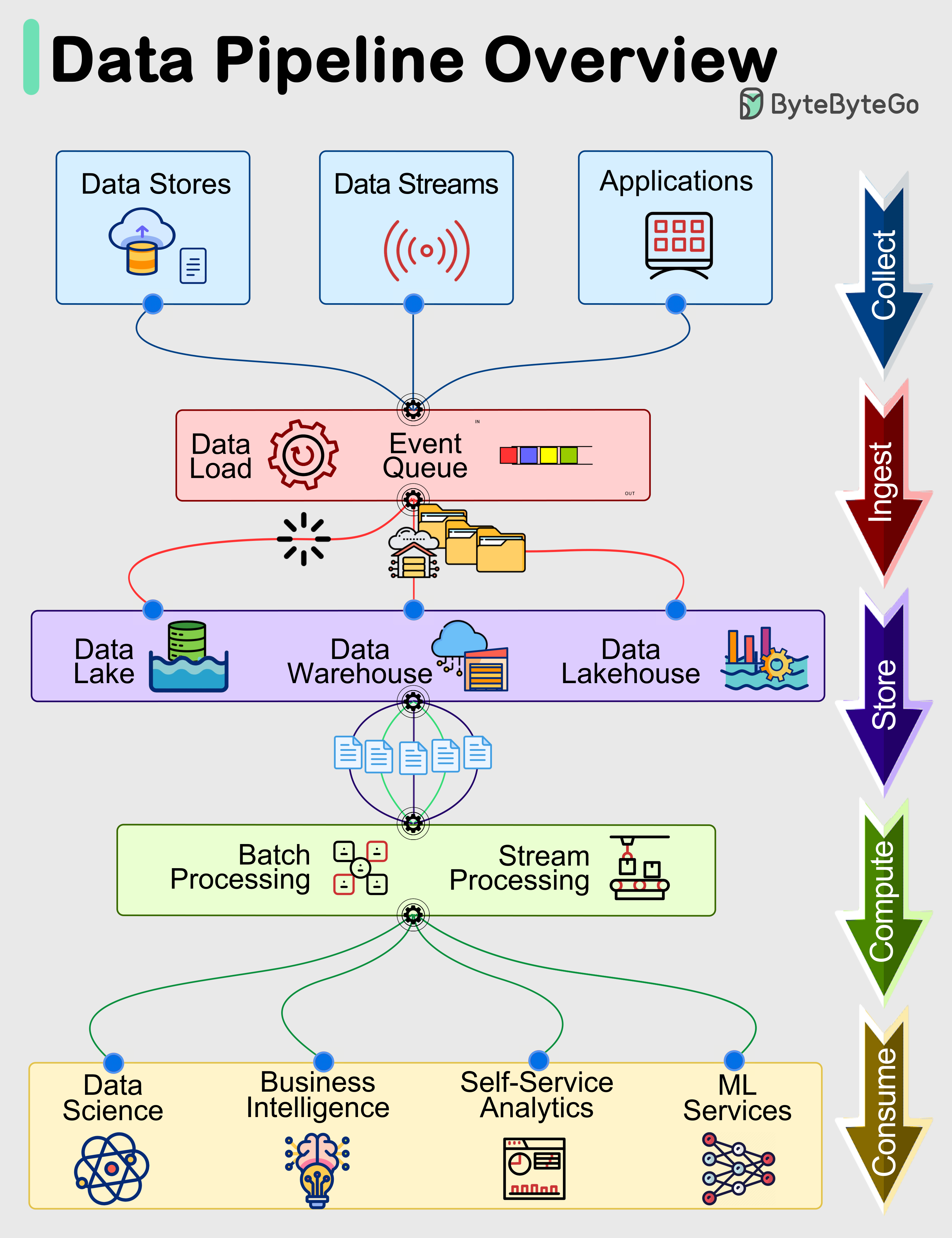
입력, 처리, 저장, 출력으로 이어지는 파이프라인 구조. 출처: ByteByteGo
5단계: Root Catalog에서 Pages 찾기
trailer의 /Root를 따라가면 Catalog 객체가 나온다.
1 0 obj
<< /Type /Catalog /Pages 2 0 R >>
endobj
Catalog에서 /Pages 참조를 찾고, 이 참조부터 Pages 트리를 순회한다.
def resolve_catalog(document: PdfDocument) -> dict[str, Any]:
    catalog_obj = document.objects[document.root]
    catalog = catalog_obj.value

    if catalog.get("Type") != "Catalog":
        raise ValueError("Root is not Catalog")
    if "Pages" not in catalog:
        raise ValueError("Catalog.Pages not found")

    return catalog
PDF dictionary의 Name 객체를 문자열로 정규화할지, 별도 PdfName 타입으로 둘지는 구현 선택이다. 안정성을 생각하면 PdfName("Catalog")처럼 타입을 분리하는 편이 낫지만, 설명을 단순화하기 위해 문자열로 표현한다.
6단계: Pages 트리 flatten
Pages 트리는 계층 구조다. /Kids에는 Page 객체 또는 하위 Pages 객체가 들어갈 수 있다.
2 0 obj
<< /Type /Pages /Kids [3 0 R 4 0 R] /Count 2 >>
endobj
페이지 순서 변경을 단순하게 만들려면 Pages 트리를 일단 Page 객체 배열로 flatten한다.
def flatten_pages(document: PdfDocument, pages_ref: ObjRef) -> list[ObjRef]:
    result: list[ObjRef] = []

    def visit(ref: ObjRef, inherited: dict[str, Any]) -> None:
        obj = document.objects[ref]
        node = obj.value
        node_type = node.get("Type")

        current_inherited = merge_page_inherited_attrs(inherited, node)

        if node_type == "Page":
            apply_inherited_attrs(node, current_inherited)
            result.append(ref)
            return

        if node_type == "Pages":
            for kid in node.get("Kids", []):
                visit(kid, current_inherited)
            return

        raise ValueError(f"unexpected page tree node: {node_type}")

    visit(pages_ref, {})
    return result
여기서 상속 속성 처리가 중요하다. PDF의 Page 객체는 /Resources, /MediaBox, /CropBox, /Rotate 같은 값을 상위 Pages 노드에서 상속받을 수 있다. Page 객체에 직접 값이 없다고 해서 누락된 페이지로 판단하면 안 된다.
INHERITABLE_PAGE_KEYS = {
    "Resources",
    "MediaBox",
    "CropBox",
    "Rotate",
}


def merge_page_inherited_attrs(parent: dict[str, Any], node: dict[str, Any]) -> dict[str, Any]:
    merged = dict(parent)
    for key in INHERITABLE_PAGE_KEYS:
        if key in node:
            merged[key] = node[key]
    return merged
이 과정을 거치면 UI는 단순한 페이지 배열을 다룰 수 있다.
pages = flatten_pages(document, catalog["Pages"])
# [ObjRef(3, 0), ObjRef(4, 0), ObjRef(8, 0), ...]
7단계: 출력 페이지 계획 만들기
사용자가 페이지 순서를 바꾸거나 일부 페이지만 선택하면, 엔진은 원본 Page 객체 참조 배열을 출력 계획으로 바꾼다.
@dataclass
class OutputPage:
    source_document_id: str
    source_page_ref: ObjRef
    source_page_index: int

@dataclass
class OutputPlan:
    documents: dict[str, PdfDocument]
    pages: list[OutputPage]
단일 PDF에서 3, 1, 2번째 페이지 순서로 출력하려면 다음처럼 표현할 수 있다.
def build_single_document_plan(
    document_id: str,
    document: PdfDocument,
    order: list[int],
) -> OutputPlan:
    pages = []
    for page_index in order:
        page_ref = document.pages[page_index]
        pages.append(OutputPage(
            source_document_id=document_id,
            source_page_ref=page_ref,
            source_page_index=page_index,
        ))

    return OutputPlan(
        documents={document_id: document},
        pages=pages,
    )
여러 PDF 병합도 같은 모델로 처리한다. source_document_id만 다르면 된다. 출력 writer는 각 페이지가 어느 원본 문서에서 왔는지 확인하고, 해당 문서의 객체 그래프를 복사한다.
8단계: 의존 객체 그래프 수집
Page 객체만 복사하면 PDF는 깨진다. Page 객체가 참조하는 Contents, Resources, Font, Image XObject, Annots 같은 객체를 함께 복사해야 한다.
의존 객체 수집은 PDF 객체 안의 indirect reference를 재귀적으로 따라가는 방식으로 구현할 수 있다.
def collect_dependencies(document: PdfDocument, root_ref: ObjRef) -> set[ObjRef]:
    visited: set[ObjRef] = set()

    def visit_ref(ref: ObjRef) -> None:
        if ref in visited:
            return
        visited.add(ref)

        obj = document.objects[ref]
        for child_ref in iter_indirect_refs(obj.value):
            visit_ref(child_ref)

    visit_ref(root_ref)
    return visited
iter_indirect_refs는 dictionary, array, stream dictionary를 순회하면서 ObjRef를 찾아낸다.
def iter_indirect_refs(value: Any):
    if isinstance(value, ObjRef):
        yield value
    elif isinstance(value, dict):
        for child in value.values():
            yield from iter_indirect_refs(child)
    elif isinstance(value, list):
        for child in value:
            yield from iter_indirect_refs(child)
    elif isinstance(value, PdfStream):
        yield from iter_indirect_refs(value.dict)
초기 구현에서는 Page 객체에서 시작해 도달 가능한 모든 indirect object를 복사하는 방식이 단순하다. 다만 /Parent 참조는 원본 Pages 트리를 가리키므로 출력에서는 새 Pages 노드를 가리키도록 바꿔야 한다. 따라서 모든 참조를 무조건 따라가는 전략에는 예외 규칙이 필요하다.
SKIP_KEYS_WHEN_COPYING_PAGE = {"Parent"}
Page 객체의 /Parent는 원본 문서의 Pages 트리로 이어지는 역방향 참조다. 출력 PDF에서는 새 Pages 객체가 부모가 되어야 한다. 원본 /Parent를 그대로 복사하면 출력 문서 안에서 잘못된 트리를 만들 수 있다.
9단계: 객체 번호 재매핑
출력 PDF는 새 객체 번호 공간을 가진다. 따라서 원본 객체 참조를 새 객체 참조로 매핑해야 한다.
@dataclass(frozen=True)
class SourceObjKey:
    document_id: str
    ref: ObjRef

class ObjectIdAllocator:
    def __init__(self) -> None:
        self.next_obj_num = 1

    def alloc(self) -> ObjRef:
        ref = ObjRef(self.next_obj_num, 0)
        self.next_obj_num += 1
        return ref
매핑 테이블은 원본 문서 식별자와 원본 객체 참조를 함께 키로 사용한다. 그래야 서로 다른 PDF의 10 0 obj가 충돌하지 않는다.
mapping: dict[SourceObjKey, ObjRef] = {}
allocator = ObjectIdAllocator()

for page in plan.pages:
    document = plan.documents[page.source_document_id]
    deps = collect_dependencies(document, page.source_page_ref)

    for old_ref in deps:
        key = SourceObjKey(page.source_document_id, old_ref)
        if key not in mapping:
            mapping[key] = allocator.alloc()
이 단계에서 Catalog와 새 Pages 객체 번호도 함께 예약한다.
catalog_ref = allocator.alloc()
pages_root_ref = allocator.alloc()
객체 번호 할당 순서는 구현 정책이다. 중요한 것은 한 번 정한 매핑을 끝까지 일관되게 사용하는 것이다.
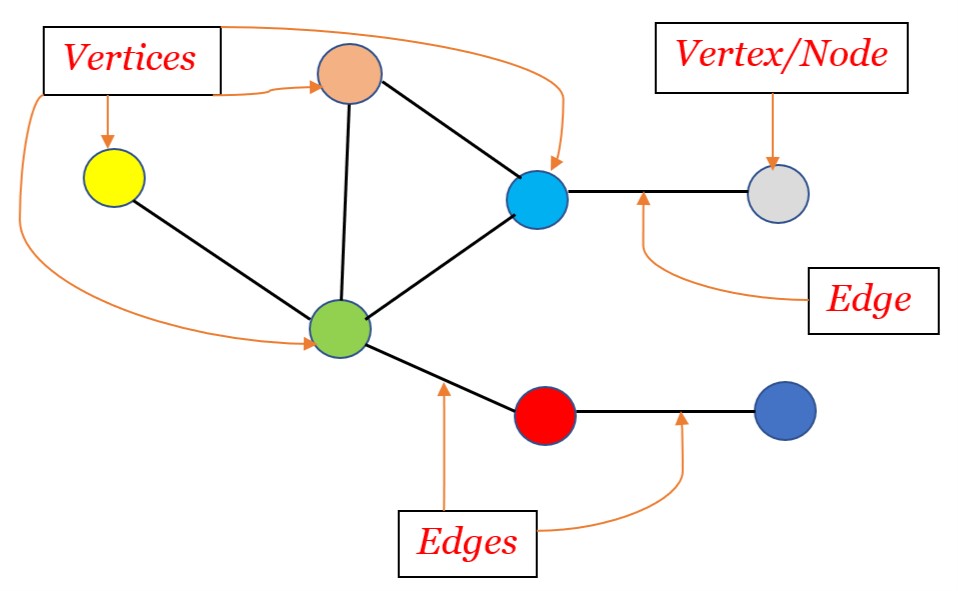
PDF 객체도 참조로 연결된 그래프 구조로 다루는 편이 구현에 유리하다. 출처: OpenGenus IQ
10단계: indirect reference 재작성
객체 번호를 새로 할당했다면, 객체 내부의 indirect reference도 새 번호로 바꿔야 한다.
def rewrite_refs(value: Any, document_id: str, mapping: dict[SourceObjKey, ObjRef]) -> Any:
    if isinstance(value, ObjRef):
        return mapping[SourceObjKey(document_id, value)]

    if isinstance(value, dict):
        return {
            key: rewrite_refs(child, document_id, mapping)
            for key, child in value.items()
        }

    if isinstance(value, list):
        return [rewrite_refs(child, document_id, mapping) for child in value]

    if isinstance(value, PdfStream):
        return PdfStream(
            dict=rewrite_refs(value.dict, document_id, mapping),
            data=value.data,
        )

    return value
Page 객체를 재작성할 때는 /Parent를 새 Pages 루트로 바꿔야 한다.
def rewrite_page_object(
    page_obj: PdfObject,
    document_id: str,
    mapping: dict[SourceObjKey, ObjRef],
    new_parent_ref: ObjRef,
) -> PdfObject:
    new_value = rewrite_refs(page_obj.value, document_id, mapping)
    new_value["Parent"] = new_parent_ref

    new_ref = mapping[SourceObjKey(document_id, page_obj.ref)]
    return PdfObject(ref=new_ref, value=new_value)
이 작업이 PDF 병합의 핵심이다. 원본 객체를 새 번호로 복사하는 것뿐 아니라, 원본 객체 내부에 박혀 있는 모든 참조를 새 번호 체계로 바꾸어야 한다.
11단계: 새 Pages 트리 만들기
출력 PDF의 Pages 트리는 단순하게 만들 수 있다. 초기 구현에서는 모든 Page 객체를 하나의 /Kids 배열에 넣는 구조가 가장 명확하다.
def build_pages_root(pages_root_ref: ObjRef, page_refs: list[ObjRef]) -> PdfObject:
    return PdfObject(
        ref=pages_root_ref,
        value={
            "Type": "Pages",
            "Kids": page_refs,
            "Count": len(page_refs),
        },
    )
페이지가 아주 많다면 Pages 트리를 여러 단계로 나누는 편이 좋다. 하지만 초기 구현에서는 단일 Pages 노드가 디버깅과 검증에 유리하다. /Kids 배열과 /Count 값만 일관되면 대부분의 뷰어에서 정상적으로 읽을 수 있다.
Catalog도 새로 만든다.
def build_catalog(catalog_ref: ObjRef, pages_root_ref: ObjRef) -> PdfObject:
    return PdfObject(
        ref=catalog_ref,
        value={
            "Type": "Catalog",
            "Pages": pages_root_ref,
        },
    )
기존 Catalog의 outlines, metadata, AcroForm을 보존하려면 별도 정책이 필요하다. 초기 페이지 조립 엔진에서는 새 Catalog를 단순하게 만드는 편이 구현 안정성에 유리하다.
12단계: 객체 직렬화
이제 출력 객체 목록을 PDF 문법에 맞게 직렬화한다.
def serialize_indirect_object(obj: PdfObject) -> bytes:
    body = serialize_pdf_value(obj.value)
    return (
        f"{obj.ref.obj_num} {obj.ref.gen_num} obj\n".encode()
        + body
        + b"\nendobj\n"
    )
기본 값 직렬화는 타입별로 나눈다.
def serialize_pdf_value(value: Any) -> bytes:
    if isinstance(value, ObjRef):
        return f"{value.obj_num} {value.gen_num} R".encode()

    if isinstance(value, str):
        if value.startswith("/"):
            return value.encode()
        return f"/{value}".encode()

    if isinstance(value, int | float):
        return str(value).encode()

    if isinstance(value, list):
        return b"[" + b" ".join(serialize_pdf_value(v) for v in value) + b"]"

    if isinstance(value, dict):
        parts = []
        for key, child in value.items():
            parts.append(f"/{key}".encode())
            parts.append(serialize_pdf_value(child))
        return b"<< " + b" ".join(parts) + b" >>"

    if isinstance(value, PdfStream):
        stream_dict = dict(value.dict)
        stream_dict["Length"] = len(value.data)
        return (
            serialize_pdf_value(stream_dict)
            + b"\nstream\n"
            + value.data
            + b"\nendstream"
        )

    if value is None:
        return b"null"

    raise TypeError(f"unsupported pdf value: {type(value)}")
실제 구현에서는 문자열 객체와 Name 객체를 구분해야 한다. 위 코드는 설명을 위한 단순화다. PDF의 literal string, hex string, name escaping을 제대로 처리하려면 별도 타입을 두는 편이 맞다.
13단계: xref table 작성
객체를 쓰면서 각 객체의 시작 offset을 기록한다. xref table은 이 offset을 사용한다.
def write_pdf(objects: list[PdfObject], root_ref: ObjRef) -> bytes:
    output = bytearray()
    offsets: dict[int, int] = {}

    output.extend(b"%PDF-1.7\n")
    output.extend(b"%\xff\xff\xff\xff\n")

    for obj in sorted(objects, key=lambda o: o.ref.obj_num):
        offsets[obj.ref.obj_num] = len(output)
        output.extend(serialize_indirect_object(obj))

    xref_offset = len(output)
    output.extend(write_xref_table(offsets))
    output.extend(write_trailer(root_ref, size=max(offsets) + 1, xref_offset=xref_offset))

    return bytes(output)
xref table은 0번 free object를 포함한다.
def write_xref_table(offsets: dict[int, int]) -> bytes:
    max_obj_num = max(offsets)
    lines = []
    lines.append(b"xref\n")
    lines.append(f"0 {max_obj_num + 1}\n".encode())
    lines.append(b"0000000000 65535 f \n")

    for obj_num in range(1, max_obj_num + 1):
        offset = offsets.get(obj_num, 0)
        if offset == 0:
            lines.append(b"0000000000 00000 f \n")
        else:
            lines.append(f"{offset:010d} 00000 n \n".encode())

    return b"".join(lines)
xref offset은 반드시 10자리로 맞춰야 한다. 객체를 직렬화한 뒤 offset을 계산해야 하므로, xref는 마지막에 쓴다.
14단계: trailer 작성
trailer는 Root와 Size를 포함한다. 마지막에는 startxref와 %%EOF를 쓴다.
def write_trailer(root_ref: ObjRef, size: int, xref_offset: int) -> bytes:
    trailer = (
        b"trailer\n"
        + b"<< "
        + f"/Size {size} ".encode()
        + f"/Root {root_ref.obj_num} {root_ref.gen_num} R".encode()
        + b" >>\n"
        + b"startxref\n"
        + f"{xref_offset}\n".encode()
        + b"%%EOF\n"
    )
    return trailer
이 단계까지 오면 최소 출력 PDF가 완성된다. 뷰어는 startxref에서 xref를 찾고, trailer의 /Root를 따라 Catalog를 찾고, Catalog의 /Pages를 따라 Page 목록을 렌더링한다.
15단계: 단일 PDF 재작성 흐름
지금까지의 조각을 하나의 함수로 묶으면 다음과 같은 흐름이 된다.
def rebuild_pdf_with_pages(data: bytes, page_order: list[int]) -> bytes:
    parser = PdfParser()
    document = parser.parse(data)

    plan = build_single_document_plan(
        document_id="doc-1",
        document=document,
        order=page_order,
    )

    writer = PdfWriter()
    return writer.write(plan)
PdfWriter.write 내부는 다음 순서로 움직인다.
class PdfWriter:
    def write(self, plan: OutputPlan) -> bytes:
        allocator = ObjectIdAllocator()
        mapping: dict[SourceObjKey, ObjRef] = {}

        catalog_ref = allocator.alloc()
        pages_root_ref = allocator.alloc()

        dependencies = self.collect_all_dependencies(plan)
        for key in dependencies:
            mapping[key] = allocator.alloc()

        output_pages = self.rewrite_pages(plan, mapping, pages_root_ref)
        copied_objects = self.rewrite_dependency_objects(plan, mapping)

        pages_root = build_pages_root(
            pages_root_ref,
            [page.ref for page in output_pages],
        )
        catalog = build_catalog(catalog_ref, pages_root_ref)

        objects = [catalog, pages_root]
        objects.extend(copied_objects)
        objects.extend(output_pages)

        return write_pdf(objects, root_ref=catalog_ref)
실제 구현에서는 copied_objects와 output_pages가 중복되지 않도록 관리해야 한다. Page 객체도 의존 객체 수집에 포함되기 때문이다. 보통은 모든 복사 대상 객체를 한 번에 모은 뒤, Page 객체만 /Parent를 새로 지정하는 방식으로 처리한다.
여러 PDF 병합으로 확장하기
여러 PDF 병합은 단일 PDF 재작성과 본질적으로 같다. 차이는 출력 계획의 page가 서로 다른 document를 참조한다는 점이다.
def build_merge_plan(inputs: list[tuple[str, PdfDocument, list[int]]]) -> OutputPlan:
    documents = {}
    pages = []

    for document_id, document, selected_pages in inputs:
        documents[document_id] = document
        for page_index in selected_pages:
            pages.append(OutputPage(
                source_document_id=document_id,
                source_page_ref=document.pages[page_index],
                source_page_index=page_index,
            ))

    return OutputPlan(documents=documents, pages=pages)
객체 번호 재매핑 키가 (document_id, ObjRef) 형태이기 때문에, 서로 다른 PDF의 같은 객체 번호는 충돌하지 않는다.
(doc-a, 10 0 R) -> 5 0 R
(doc-b, 10 0 R) -> 31 0 R
이 구조를 잡아두면 병합, 분할, 순서 변경은 모두 같은 writer를 사용할 수 있다. 기능별로 PDF 쓰기 로직을 따로 만들 필요가 없다. 입력 계획만 다르고 출력 방식은 동일하다.
구현에서 자주 놓치는 지점
초기 구현에서 가장 자주 문제가 되는 부분은 Page 객체의 상속 속성이다. /Resources가 Page 객체에 직접 없고 상위 Pages 노드에만 있을 수 있다. 이 상태로 Page만 복사하면 폰트와 이미지 리소스를 찾지 못한다.
두 번째는 /Contents의 형태다. /Contents는 하나의 stream reference일 수도 있고, stream reference 배열일 수도 있다.
/Contents 7 0 R
/Contents [7 0 R 8 0 R]
세 번째는 /Resources 내부의 깊은 참조다. Font, XObject, ExtGState, ColorSpace, Pattern 등이 다시 다른 객체를 참조할 수 있다. 얕은 복사로는 부족하다.
네 번째는 annotation이다. Page의 /Annots를 복사하지 않으면 링크, 주석, 폼 위젯이 사라질 수 있다. 반대로 annotation을 복사하면 AcroForm이나 action 객체까지 따라가야 할 수 있다. 초기 구현에서는 annotation 보존 정책을 명확히 정해야 한다.
다섯 번째는 xref offset이다. 객체를 모두 쓴 뒤 실제 바이트 길이 기준으로 offset을 계산해야 한다. 문자열 길이를 문자 수로 계산하면 한글이나 바이너리 stream에서 문제가 생긴다. offset은 반드시 bytes 기준이다.
여섯 번째는 stream의 줄바꿈이다. stream 키워드 뒤에는 줄바꿈이 오고, 그 다음부터 stream data가 시작된다. endstream 앞뒤 처리도 조심해야 한다. stream data 안에 임의의 바이트가 들어갈 수 있으므로 단순 문자열 탐색만으로 처리하면 위험하다.
검증 방법
PDF writer를 만들 때는 눈으로 열어보는 검증만으로 부족하다. 최소한 다음 검증을 반복해야 한다.
- 생성된 PDF가 여러 뷰어에서 열리는지 확인한다.
- 페이지 수가 기대한 값과 일치하는지 확인한다.
- 각 페이지의 텍스트와 이미지가 보존되는지 확인한다.
- 선택한 페이지 순서가 정확한지 확인한다.
- xref offset이 실제 객체 시작 위치와 일치하는지 확인한다.
- trailer의
/Root가 새 Catalog를 가리키는지 확인한다. /Pages /Count가 실제 Page 수와 일치하는지 확인한다.
테스트 코드는 출력 PDF를 다시 파싱하는 방식으로 작성할 수 있다.
def test_rebuild_page_count(sample_pdf: bytes):
    output = rebuild_pdf_with_pages(sample_pdf, [2, 0, 1])

    parsed = PdfParser().parse(output)

    assert len(parsed.pages) == 3
    assert parsed.trailer["Root"] == parsed.root
객체 번호 재매핑도 별도로 테스트해야 한다.
def test_no_old_parent_reference_in_output(sample_pdf: bytes):
    output = rebuild_pdf_with_pages(sample_pdf, [0])
    parsed = PdfParser().parse(output)

    catalog = parsed.objects[parsed.root].value
    pages_root_ref = catalog["Pages"]

    page_ref = parsed.pages[0]
    page = parsed.objects[page_ref].value

    assert page["Parent"] == pages_root_ref
PDF는 정상으로 열려도 내부 구조가 이상할 수 있다. 따라서 뷰어 확인과 구조 검증을 함께 해야 한다.
xref stream과 object stream으로 확장하기
초기 구현이 xref table 기반으로 동작한다면, 다음 확장 지점은 xref stream과 object stream이다. PDF 1.5 이후에는 cross-reference 정보가 stream 객체로 저장될 수 있고, 여러 작은 indirect object가 object stream 안에 압축되어 들어갈 수 있다.
이 경우 파서는 다음 기능을 추가해야 한다.
startxref위치의 객체가 xref stream인지 판단한다.- xref stream dictionary의
/W,/Index,/Size를 해석한다. - xref stream data를 Filter에 따라 decode한다.
- object stream의
/N,/First를 읽고 내부 객체를 분리한다. - object stream 안의 객체도 일반 객체 테이블에 등록한다.
writer는 반드시 xref stream으로 출력할 필요가 없다. 입력이 xref stream이더라도 출력은 전통적인 xref table로 쓸 수 있다. 이 선택은 구현 난이도를 낮춘다. 입력 지원 범위와 출력 형식은 분리해서 생각해야 한다.
Edit2me에서 이 구조가 의미하는 것
Edit2me의 핵심은 온라인 PDF 편집기에서 복잡하게 느껴졌던 페이지 조립 흐름을 단순하게 만드는 것이다. 사용자는 PDF를 올리고, 페이지를 고르고, 순서를 바꾸고, 결과를 받는다. 내부에서는 지금 정리한 파이프라인이 실행된다.
UI 관점에서는 페이지 카드 배열만 있으면 된다.
@dataclass
class PageCard:
    document_id: str
    page_index: int
    thumbnail_url: str | None
    selected: bool = True
엔진 관점에서는 이 배열을 OutputPlan으로 바꾸면 된다.
def page_cards_to_plan(cards: list[PageCard], documents: dict[str, PdfDocument]) -> OutputPlan:
    pages = []
    for card in cards:
        if not card.selected:
            continue

        document = documents[card.document_id]
        pages.append(OutputPage(
            source_document_id=card.document_id,
            source_page_ref=document.pages[card.page_index],
            source_page_index=card.page_index,
        ))

    return OutputPlan(documents=documents, pages=pages)
이 분리가 중요하다. 프론트엔드는 사용자의 의도를 페이지 배열로 표현한다. 백엔드는 그 배열을 PDF 객체 그래프 재작성으로 변환한다. UI와 PDF 내부 구조가 직접 섞이지 않으면 기능을 확장하기 쉽다.
정리
PDF 편집기의 최소 구현은 파일을 직접 고치는 방식이 아니라, 원본 PDF를 읽고 새 PDF를 쓰는 방식으로 잡는 편이 안정적이다. 구현 흐름은 startxref 탐색, xref 파싱, trailer에서 Root 찾기, Pages 트리 flatten, 출력 페이지 계획 생성, 의존 객체 수집, 객체 번호 재매핑, 참조 재작성, 새 Pages 트리 생성, xref와 trailer 작성으로 이어진다.
핵심은 객체 번호 재매핑과 indirect reference 재작성이다. PDF 병합과 페이지 순서 변경은 겉으로는 단순한 기능이지만, 내부적으로는 서로 다른 객체 번호 공간을 하나의 새 객체 번호 공간으로 옮기는 작업이다. Page 객체만 복사해서는 충분하지 않고, Contents, Resources, Font, Image XObject, Annots 같은 의존 객체를 함께 복사해야 한다.
이 구조를 잡으면 단일 PDF 재작성, 여러 PDF 병합, 페이지 재정렬, 페이지 추출이 모두 같은 writer 위에서 동작한다. 기능을 늘리기 전에 이 엔진이 안정적으로 동작해야 한다. PDF 편집 구축기의 핵심은 화려한 UI보다 올바른 객체 그래프 재작성에 있다.