Related Series
See all related posts
- 2024.11.11 - [A.I. & M.L./LLM] - [LangGraph] 1. Managing AI Workflows with LangGraph
- 2024.11.13 - [A.I. & M.L./LLM] - [LangGraph] 2. Conceptual Understanding of LangGraph's Core Components
- 2024.11.14 - [A.I. & M.L./LLM] - [LangGraph] 3. Implementing Workflows with Chains and Agents — Query Extraction Model
- 2024.11.20 - [A.I. & M.L./LLM] - [LangGraph] 4. Building a RAG and Search Agent with LangGraph (current post)
This time, we'll build on what we implemented previously and design an agent with built-in RAG and search capabilities.
Let's start by looking at the overall workflow.
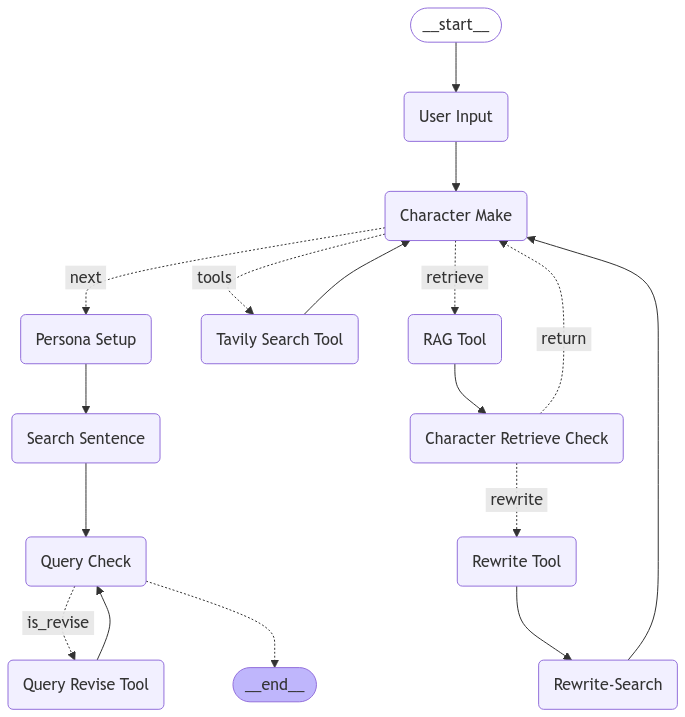
Workflow of the model we'll implement this time
The workflow looks quite complex, but the whole point of LangGraph is that it makes the entire process easy to follow at a glance.
Unlike before, the key piece here is the 'Character Make' Node.
We want to construct a realistic artificial persona and see what kinds of searches that persona would perform while shopping.
To build a convincing persona, we determined that the character needs a well-crafted description that fits who they are.
In other words, this step is the core task that determines overall quality, and we reinforce that quality through three key elements:
- Character Make Tool (information retrieval via web search)
- RAG Tool and Character Retrieve Check (search pre-indexed RAG data and evaluate whether the retrieved results are relevant)
- Rewrite Tool and Rewrite-Search (if RAG results are inadequate, rewrite the query appropriately and perform a web search)
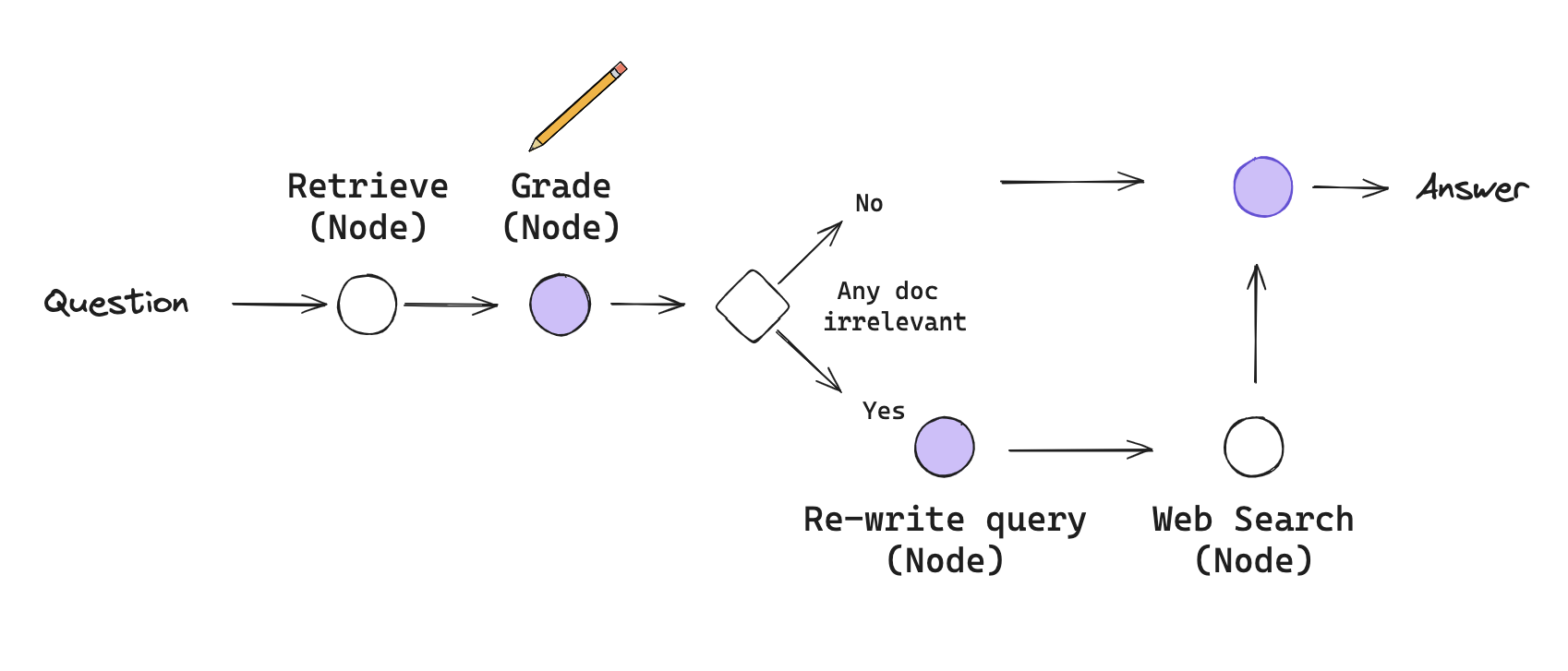
Corrective RAG (Yan et al., 2024)
This combines two modules:
one is a generation-augmentation module backed by general web search (LangGraph guide),
and the second is a DB retrieval, verification, and augmentation module based on Corrective RAG (paper / guide).

The system running live — it sees the keyword "latest game" and triggers a search.
Let's walk through each part.
1. Implementing RAG with Chroma DB
import os
from langchain_community.document_loaders import WebBaseLoader
from langchain_community.vectorstores import Chroma
from langchain_openai import OpenAIEmbeddings
from langchain_text_splitters import RecursiveCharacterTextSplitter

with open('API_KEY.txt', 'r') as api:
    os.environ["OPENAI_API_KEY"] = api.read()

urls = [
    "https://the-edit.co.kr/65111",
    "https://blog.naver.com/sud_inc/223539001961?trackingCode=rss",
    "https://mochaclass.com/blog/직장인을-위한-취미생활-가이드-요즘-취미-트렌드부터-취미-추천까지-7797",
    "https://www.hankyung.com/article/2024072845441",
]

docs = [WebBaseLoader(url).load() for url in urls]
docs_list = [item for sublist in docs for item in sublist]

text_splitter = RecursiveCharacterTextSplitter.from_tiktoken_encoder(
    chunk_size=100, chunk_overlap=50
)
doc_splits = text_splitter.split_documents(docs_list)

# Add to vectorDB
vectorstore = Chroma.from_documents(
    documents=doc_splits,
    collection_name="rag-chroma",
    embedding=OpenAIEmbeddings(),
    persist_directory="./chroma_db",
)

vectorstore.persist("./chroma_data")
Documents are organized in the format shown above.
The URLs are arbitrary examples. To build a more accurate agent, you should include only high-quality information.
Feeding inaccurate information will hurt both processing time and answer quality.
text_splitter = CharacterTextSplitter.from_tiktoken_encoder(
    # chunk size
    chunk_size=100,
    # how much overlap is allowed between chunks
    chunk_overlap=50,
)
The choice of splitter also affects quality.
If chunks are too small, they may not carry enough meaning to provide useful context.
Without overlap, information can get cut off at chunk boundaries.
Tuning these parameters carefully matters.
The values of 100 and 50 used here are intentionally small — this is a demo designed to trigger the re-search path by producing imprecise results.
(In practice, chunk sizes of 300 or more seem necessary to provide adequate context.)
With this, the RAG setup using the URL-sourced data is complete.
# Designing the Node that uses RAG
# First, load the data from the previously saved DB.
# OpenAI embeddings are used as the embedding function.

from langchain_chroma import Chroma
from langchain_openai import OpenAIEmbeddings
from langchain.tools.retriever import create_retriever_tool
from langgraph.prebuilt import ToolNode

vectorstore = Chroma(
    collection_name="rag-chroma",
    embedding_function=OpenAIEmbeddings(),
    persist_directory="./chroma_db",
)
retriever = vectorstore.as_retriever()

# Define the tool.
# This is what binds the retriever to the LLM as a callable tool.
retriever_tool = create_retriever_tool(
    retriever,
    # Name of this tool when invoked via a tool call
    "retrieve_trends",
    # Instruction that helps the agent decide when to call this tool
    "Search for the latest trends in fashion and hobbies and return relevant information.",
)

# Define the tool node.
# It needs to be wrapped as a Node to be used in the graph.
retrieve = ToolNode([retriever_tool])
We load the saved DB, then define a retriever tool backed by it.
When defining the tool, you must provide a name and an instruction that tells the agent when to use it.
Finally, we wrap it as a node using LangGraph's ToolNode class.
##### STATE #####
from typing import Annotated
from typing_extensions import TypedDict
from langgraph.graph.message import add_messages

class PersonaState(TypedDict):
    user_input: str
    messages: Annotated[list, add_messages]
    character_persona_dict: dict
    retrieve_check: bool
    retrieval_msg: str
    rewrite_query: str

##### NODE #####
from langchain_openai import ChatOpenAI
from langchain_core.prompts import ChatPromptTemplate
from langchain_core.messages import HumanMessage, ToolMessage

character_model = ChatOpenAI(model="gpt-4o", temperature=0.2)
character_model_with_tools = character_model.bind_tools([retriever_tool])

def character_make_node(state: PersonaState):
    prompt_with_tools = ChatPromptTemplate.from_messages([
        ("system","""
        You are an expert in creating characters for fiction.\n
        Whatever input the user is presented with, you must return a description of the completed character.\n
        If no information is available, randomly generate and return the character's attributes.\n
        Based on the values entered by the user, envision and present the character, including the character's age, gender, job, location, interests, hobbies and etc.\n
        If you have difficulty creating an appropriate character, use an online search to solve the problem.\n
        The returned value must be in Korean.\n
        """),
        ("human", "Input: {human_input}\n Retrieve: {context}"),
    ])

    # As noted earlier, add_messages in the state continuously appends new messages to the list.
    # After a tool is invoked, it returns a ToolMessage, which gets appended via add_messages.
    # To use the value the tool provided, we need to read the last element of state['messages'].

    # However, the last message could be a HumanMessage, so we validate before proceeding.
    messages_list = state['messages']
    last_human_message = next((msg for msg in reversed(messages_list) if isinstance(msg, HumanMessage)), None).content
    last_msg = state['messages'][-1].content

    # No ToolMessage in the previous messages
    if last_human_message == last_msg:
        last_msg = ""
        print(f"==================================== INPUT ====================================\nHuman Input: {last_human_message}")
    # A ToolMessage exists in the previous messages
    # The tool message content may come back as a string, so we parse it as JSON
    else:
        try:
            last_msg_data = json.loads(state['messages'][-1].content)
            last_msg = "\n\n".join([d["content"] for d in last_msg_data])
        except:
            ...
        print(f"==================================== INPUT ====================================\nHuman Input: {last_human_message}\nContext: {last_msg}")

    chain_with_tools = prompt_with_tools | character_model_with_tools
    response = chain_with_tools.invoke({"human_input": last_human_message, "context": last_msg})

    # When the model decides to call a tool, it returns an empty string for content
    # and populates the tool_calls field with information about the tool being invoked.
    # We can inspect this to determine which tool was called.

    if hasattr(response, "tool_calls") and len(response.tool_calls) > 0 and (response.tool_calls[0]["name"]) == "retrieve_trends":
        print("=============================== Search Retrieval ===============================")
    else:
        print("============================= Chracter Information =============================")
        print(response.content)

    return {"messages": [response], "user_input": last_human_message}
With this setup, the node uses the retrieve tool it created earlier based on its own judgment.
If it can complete the task with the information already available, it returns a response directly.
Otherwise, it returns an AIMessage containing tool_calls as the response.
##### EDGE #####
def simple_route(state: PersonaState):
    """
    Simplery Route
    """
    if isinstance(state, list):
        ai_message = state[-1]
    elif messages := state.get("messages", []):
        ai_message = messages[-1]
    else:
        raise ValueError(f"No messages found in input state to tool_edge: {state}")

    # If the given AIMessage contains a RAG function call, return 'retrieve'
    if hasattr(ai_message, "tool_calls") and len(ai_message.tool_calls) > 0 and ai_message.tool_calls[0]["name"] == "retrieve_trends":
        print("Retrieve Call")
        return "retrieve"

    # Otherwise, return 'next'
    return "next"

# Determines which node to transition to based on the returned value.
graph_builder.add_conditional_edges(
    "Character Make",
    simple_route,
    {"next": "Persona Setup", "retrieve": "RAG Tool"}
)
Once you understand that a message is returned, implementing routing is straightforward.
Just check whether the given message has tool_calls and return a different value accordingly.
Even if multiple tools exist, routing can be implemented the same way.
2. Implementing Search with Tavily Search
Implementing search with Tavily is not difficult, as the library support is quite solid.
This post covers the basic implementation along with cases where it is provided alongside RAG.
import os
from langchain_community.tools.tavily_search import TavilySearchResults
from langgraph.prebuilt import ToolNode

with open('./api_key/TAVILY_API.txt', 'r') as api:
    os.environ["TAVILY_API_KEY"] = api.read()

tool = TavilySearchResults(max_results=3)
tool_node = ToolNode(tools=[tool])
Building a node with Tavily Search capability is very straightforward.
A node constructed this way automatically uses the preceding HumanMessage to perform a search.
To use this feature, you must provide a TAVILY_API_KEY.
tool.invoke("랭그래프가 뭐야?")

##### output

[{'url': 'https://m.blog.naver.com/dabomai/223605684205',
  'content': "랭그래프가 무엇인가? 2달 전에 랭체인을 공부할 수 있는 기회를 얻었습니다. 항상 '공부해야지~공부해야지~' 하다가 시간이 나서 이때다 싶어 바로 Docs를 키고 튜토리얼을 따라 하며 공부했습니다. 이때 전까지만 해도 랭체인에서 지원하는 RAG, 대화 기록 보존"},
 {'url': 'https://teddylee777.github.io/langchain/langchain-tutorial-08/',
  'content': '⑥ 테스트\n태그:\nChatGPT,\nChatOpenAI,\nGPT3.5,\nGPT4,\nlangchain,\nlangchain tutorial,\nOpenAI,\nPDF,\n랭체인,\n랭체인 튜토리얼,\n문서요약,\n질의응답,\n크롤링\n카테고리:\nlangchain\n업데이트: 2023년 10월 13일\n참고\n[Assistants API] Code Interpreter, Retrieval, Functions 활용법\n2024년 02월 13일\n35 분 소요\nOpenAI의 LangChain 한국어 튜토리얼\n바로가기 👀\n랭체인(langchain) + PDF 기반 질의응답(Question-Answering) (8)\n2023년 10월 13일\n2 분 소요\n이번 포스팅에서는 랭체인(LangChain) 을 활용하여 PDF 문서를 로드하고, 문서의 내용에 기반하여 질의응답(Question-Answering) 하는 방법에 대해 알아보겠습니다.\n 후반부에는 langchain hub 에서 프롬프트를 다운로드 받고, 이를 ChatGPT 모델과 결합하여 문서에 기반한 질의응답 Chain 을 생성합니다.\n✔️ (이전글) LangChain 튜토리얼\n🌱 환경설정\n🔥 PDF 기반 질의 응답(Question-Answering)\n다음은 비구조화된 데이터를 QA 체인(Question-Answering chain) 으로 변환하는 파이프라인에 대한 기술적 번역입니다:\n데이터 로드: 우선, 데이터를 로드해야 합니다. 특히, Assistant API 가 제공하는 도구인 Code Interpreter, Retrieval...\n[LangChain] 에이전트(Agent)와 도구(tools)를 활용한 지능형 검색 시스템 구축 가이드\n2024년 02월 09일\n41 분 소요\n이 글에서는 LangChain 의 Agent 프레임워크를 활용하여 복잡한 검색과 문서 기반 QA 시스템 설계 방법 - 심화편\n2024년 02월 06일\n23 분 소요\nLangChain의 RAG 시스템을 통해 문서(PDF, txt, 웹페이지 등)에 대한 질문-답변을 찾는 과정을 정리하였습니다.\n'},
 {'url': 'https://velog.io/@kwon0koang/로컬에서-Llama3-돌리기',
  'content': '1부. 랭체인 (LangChain) 정리 (LLM 로컬 실행 및 배포 & RAG 실습) 2부. 오픈소스 LLM으로 RAG 에이전트 만들기 (랭체인, Ollama, Tool Calling 대체)'}]
The TavilySearchResults class defined this way can perform a search simply by calling invoke.
Like the RAG tool, this tool also has a name and a description.
Defaults are provided, but you can modify them to run various experiments.
Here we use the defaults.
tool = TavilySearchResults(
    # The name used when the tool is called. Defaults to tavily_search_results_json
    name="example_tavily_name",
    # This is the default description
    description="A search engine optimized for co" "Useful for when you need to answ" "Input should be a search query.",
    # Number of search results to return
    max_results=3)
If modifications are needed, you can adjust it as shown above.
The node implementation reuses the same code from before.
The only change is the name of the bound tool.
##### STATE #####
from typing import Annotated
from typing_extensions import TypedDict
from langgraph.graph.message import add_messages

class PersonaState(TypedDict):
    user_input: str
    messages: Annotated[list, add_messages]
    character_persona_dict: dict
    retrieve_check: bool
    retrieval_msg: str
    rewrite_query: str

##### NODE #####
from langchain_openai import ChatOpenAI
from langchain_core.prompts import ChatPromptTemplate
from langchain_core.messages import HumanMessage, ToolMessage

character_model = ChatOpenAI(model="gpt-4o", temperature=0.2)
character_model_with_tools = character_model.bind_tools([tool])

def character_make_node(state: PersonaState):
    prompt_with_tools = ChatPromptTemplate.from_messages([
        ("system","""
        You are an expert in creating characters for fiction.\n
        Whatever input the user is presented with, you must return a description of the completed character.\n
        If no information is available, randomly generate and return the character's attributes.\n
        Based on the values entered by the user, envision and present the character, including the character's age, gender, job, location, interests, hobbies and etc.\n
        If you have difficulty creating an appropriate character, use an online search to solve the problem.\n
        The returned value must be in Korean.\n
        """),
        ("human", "Input: {human_input}\n Retrieve: {context}"),
    ])

    # As mentioned earlier, the add_messages function in state continuously appends messages to the end.
    # After a tool is used, it returns a ToolMessage, which is inserted at the end via add_messages.
    # Therefore, to use the value provided by the tool, we need to grab the last element in state['messages'].

    # However, in this case the last message may be a HumanMessage, so we validate before proceeding.
    messages_list = state['messages']
    last_human_message = next((msg for msg in reversed(messages_list) if isinstance(msg, HumanMessage)), None).content
    last_msg = state['messages'][-1].content

    # If there is no ToolMessage in the previous messages
    if last_human_message == last_msg:
        last_msg = ""
        print(f"==================================== INPUT ====================================\nHuman Input: {last_human_message}")
    # If there is a ToolMessage in the previous messages
    # In this case, the content of the received tool message may be a str, so convert it to JSON
    else:
        try:
            last_msg_data = json.loads(state['messages'][-1].content)
            last_msg = "\n\n".join([d["content"] for d in last_msg_data])
        except:
            ...
        print(f"==================================== INPUT ====================================\nHuman Input: {last_human_message}\nContext: {last_msg}")

    chain_with_tools = prompt_with_tools | character_model_with_tools
    response = chain_with_tools.invoke({"human_input": last_human_message, "context": last_msg})

    # When a tool is called, the AI returns an empty string along with a tool_calls argument.
    # That is, content = "" is returned, and tool_calls contains information about the invoked tool.
    # We can inspect this to identify which tool was called.

    if hasattr(response, "tool_calls") and len(response.tool_calls) > 0 and (response.tool_calls[0]["name"]) == "tavily_search_results_json":
        print("=============================== Search Retrieval ===============================")
    else:
        print("============================= Chracter Information =============================")
        print(response.content)

    return {"messages": [response], "user_input": last_human_message}

##### EDGE #####
def simple_route(state: PersonaState):
    """
    Simplery Route
    """
    if isinstance(state, list):
        ai_message = state[-1]
    elif messages := state.get("messages", []):
        ai_message = messages[-1]
    else:
        raise ValueError(f"No messages found in input state to tool_edge: {state}")

    # If the given AIMessage contains a search function call, return 'tools'
    if hasattr(ai_message, "tool_calls") and len(ai_message.tool_calls) > 0 and ai_message.tool_calls[0]["name"] == "tavily_search_results_json":
        print("Tavily Search Call")
        return "tools"
# 노드 1-3. RAG 검증노드
# 노드 1-2의 Tools Output을 받아서, User Input에 잘 맞는지 검증해서 Yes Or No로 대답함.
# 만약 Yes라면 그대로 다시 Character Make Node로 보내서 최종 답변을 생성하도록 하고
# 아니라면 검색을 진행하고 새로운 값을 받아서 보낼거임.

class GradeDocuments(BaseModel):
    """Binary score for relevance check on retrieved documents."""
    binary_score:str = Field(..., description="Documents are relevant to the question, 'yes' or 'no'", enum=['yes', 'no'])
The code is long, but what's actually needed to implement this is minimal.
Keep just the core ideas in mind:
- Define a Tool, then bind it to the LLM that will use it
- Implement a routing function and conditional edges to handle Tool calls
- Implement a Node that can receive and use the Tool's return value (ToolMessage)
Steps 1 and 2 are straightforward to implement, so the most important part is combining the ToolMessage into the context using LangChain.
In this code, that is done by comparing the last HumanMessage in state['messages'] against the last message in the list.
3. Now Let's Put It All Together! RAG + Tavily Search + Validation Node
Time to bring everything together!
We'll combine the validation Node from post 3 with RAG and Tavily Search into a single implementation.
The code looks complex, but building it step by step makes it manageable.
The two key points are: binding two Tools, and routing between them correctly.
It's also tempting to let Tools call themselves recursively, but that risks an infinite loop.
To prevent this, this implementation adds a boolean tools_call_switch state that acts as a one-shot switch for tool calls.
Let's walk through it.
##### STATE #####
from typing import Annotated
from typing_extensions import TypedDict
from langgraph.graph.message import add_messages

class PersonaState(TypedDict):
    user_input: str
    messages: Annotated[list, add_messages]
    character_persona_dict: dict
    retrieve_check: bool
    retrieval_msg: str
    rewrite_query: str
    tools_call_switch: Annotated[bool, True]
First, define the State.
A new state field, tools_call_switch, is added here.
Note: Using Annotated to set a default value of True doesn't appear to work correctly.
# Load all required libraries at once
import os
import json
from .states import *
from pydantic import BaseModel, Field
from langchain_chroma import Chroma
from langchain_openai import ChatOpenAI
from langchain_openai import OpenAIEmbeddings
from langchain_core.prompts import ChatPromptTemplate, FewShotChatMessagePromptTemplate
from langchain_core.messages import HumanMessage, ToolMessage
from langgraph.prebuilt import ToolNode
from langchain_community.tools.tavily_search import TavilySearchResults
from langchain.tools.retriever import create_retriever_tool

# Set API keys
with open('./api_key/API_KEY.txt', 'r') as api:
    os.environ["OPENAI_API_KEY"] = api.read()
with open('./api_key/TAVILY_API.txt', 'r') as api:
    os.environ["TAVILY_API_KEY"] = api.read()

# Load ChromaDB
vectorstore = Chroma(
    collection_name="rag-chroma",
    embedding_function=OpenAIEmbeddings(),
    persist_directory="./chroma_db",
)
retriever = vectorstore.as_retriever()

# tool is used for binding to the LLM
tool = TavilySearchResults(max_results=3)

# web_search_tool is used to directly invoke and retrieve search results.
# This function is reserved for cases where a re-search is requested.
web_search_tool = TavilySearchResults(max_results=5)

# Node 1-1. Search node
tool_node = ToolNode(tools=[tool])

# Load the RAG retriever tool and create a node
retriever_tool = create_retriever_tool(
    retriever,
    "retrieve_trends",
    "Search for the latest trends in fashion and hobbies and return relevant information.",
)
# Node 1-2. RAG node.
retrieve = ToolNode([retriever_tool])

# Combine both tools into a list.
tools = [tool, retriever_tool]
Next, load the libraries and define the required Tools, same as before.
Each Tool is then wrapped into a Node using LangGraph's ToolNode class.
# character_make_node with two tools bound
character_model = ChatOpenAI(model="gpt-4o", temperature=0.2)
character_model_with_tools = character_model.bind_tools(tools)

def character_make_node(state: PersonaState):
    prompt = ChatPromptTemplate.from_messages([
        ("system","""
        You are an expert in creating characters for fiction.\n
        Whatever input the user is presented with, you must return a description of the completed character.\n
        If no information is available, randomly generate and return the character's attributes.\n
        Based on the values entered by the user, envision and present the character, including the character's age, gender, job, location, interests, hobbies and etc.\n
        The returned value must be in Korean.\n
        """),
        ("human", "Input: {human_input}\n Retrieve: {context}"),
    ])
    prompt_with_tools = ChatPromptTemplate.from_messages([
        ("system","""
        You are an expert in creating characters for fiction.\n
        Whatever input the user is presented with, you must return a description of the completed character.\n
        If no information is available, randomly generate and return the character's attributes.\n
        Based on the values entered by the user, envision and present the character, including the character's age, gender, job, location, interests, hobbies and etc.\n
        If you have difficulty creating an appropriate character, use an online search to solve the problem.\n
        The returned value must be in Korean.\n
        """),
        ("human", "Input: {human_input}\n Retrieve: {context}"),
    ])
    messages_list = state['messages']
    last_human_message = next((msg for msg in reversed(messages_list) if isinstance(msg, HumanMessage)), None).content
    last_msg = state['messages'][-1].content

    if last_human_message == last_msg:
        last_msg = ""
        print(f"==================================== INPUT ====================================\nHuman Input: {last_human_message}")
    else:
        try:
            last_msg_data = json.loads(state['messages'][-1].content)
            last_msg = "\n\n".join([d["content"] for d in last_msg_data])
        except:
            ...
        print(f"==================================== INPUT ====================================\nHuman Input: {last_human_message}\nContext: {last_msg}")

    if state['tools_call_switch']:
        chain_with_tools = prompt_with_tools | character_model_with_tools
        response = chain_with_tools.invoke({"human_input": last_human_message, "context": last_msg})

        if hasattr(response, "tool_calls") and len(response.tool_calls) > 0 and (response.tool_calls[0]["name"]) == "tavily_search_results_json":
            print("================================ Search Online ================================")
            tool_switch = False
        elif hasattr(response, "tool_calls") and len(response.tool_calls) > 0 and (response.tool_calls[0]["name"]) == "retrieve_trends":
            print("=============================== Search Retrieval ===============================")
            tool_switch = False
        else:
            print("============================= Chracter Information =============================")
            tool_switch = False
            print(response.content)

    else:
        chain = prompt | character_model
        response = chain.invoke({"human_input": last_human_message, "context": last_msg})
        print("============================= Chracter Information =============================")
        tool_switch = False
        print(response.content)

    return {"messages": [response], "user_input": last_human_message, "tools_call_switch": tool_switch}
Same as before, but this time two Tools are bound to the model.
Because tools_call_switch is part of the state, two separate prompts are used to handle both cases.
tools_call_switch arrives as True, set by the input Node upstream.
On the first pass through character_make_node, the node runs with tool-calling enabled. After that single pass, it is flipped to False, so subsequent visits to this node cannot trigger any Tool calls.
This is how the implementation prevents Tools from being called more than once.
If you wanted to allow up to three calls instead of one, you could add an integer counter to the state, increment it each time the node is visited, and only allow Tool calls while the counter stays below a threshold.
# Node 1-3. RAG validation node
# Receives the Tools Output from Node 1-2, checks whether it is relevant to the User Input,
# and responds with Yes or No.
# If Yes, send it back to the Character Make Node to generate the final response.
# If No, trigger a new search and pass the new result forward.

class GradeDocuments(BaseModel):
    """Binary score for relevance check on retrieved documents."""
    binary_score:str = Field(..., description="Documents are relevant to the question, 'yes' or 'no'", enum=['yes', 'no'])

rag_check_model = ChatOpenAI(model="gpt-3.5-turbo", temperature=0)
rag_check_model = rag_check_model.with_structured_output(GradeDocuments)

def retrieve_check_node(state: PersonaState):
    prompt = ChatPromptTemplate.from_messages(
        [
            ("system", """
            You are a consultation expert who provides appropriate information in response to user input.
            Return 'yes' or 'no' if you can provide an accurate answer to the user's question from the given documentation.
            If you can't provide a clear answer, be sure to return NO.
            """),
            ("human", "Retrieved document: \n\n {document} \n\n User's input: {question}"),
        ]
    )

    retrieval_msg = state['messages'][-1].content
    human_msg = state['user_input']
    retrieval_grader = prompt | rag_check_model
    response = retrieval_grader.invoke({"document": retrieval_msg, "question": human_msg})
    retrieve_handle = response.binary_score
    retrieve_check = False

    if retrieve_handle == "no":
        print("=============================== Need to Check ===============================")
        retrieve_check = True
    if retrieve_handle == "yes":
        print("============================== No Need to Check =============================")

    return {"retrieve_check": retrieve_check, "retrieval_msg": retrieval_msg}

# ----------------------------------------------------------------------------
# ----------------------------------------------------------------------------
# ----------------------------------------------------------------------------
# Node 1-4: Query rewrite node
# If the retrieve produced by Node 1-2 does not match the input adequately, the input is rewritten.
# Uses state User_input
# This runs when Node 1-3 returns yes.

class Rewrite_Output(TypedDict):
    """
    Class for generating structured output
    """
    query: Annotated[str, ..., "Rewritten query to find appropriate material on the web"]

rewrite_model = ChatOpenAI(model="gpt-4o-mini", temperature=0)
rewrite_model = rewrite_model.with_structured_output(Rewrite_Output)

def rewrite_node(state: PersonaState):
    prompt = ChatPromptTemplate.from_messages(
        [
            ("system", """
            You're an expert in improving search relevance.\n
            Look at previously entered search queries and rewrite them to better find that information on the internet.
            """),
            ("human", "Previously entered search queries: \n{user_input}"),
        ]
    )

    user_input = state['user_input']
    rewrite_chain = prompt | rewrite_model
    response = rewrite_chain.invoke({"user_input": user_input})
    rewrited_query = response['query']
    print(f"================================ Rewrited Query ================================\nRewritted Query: {rewrited_query}")

    return {"rewrite_query": rewrited_query}

# ----------------------------------------------------------------------------
# ----------------------------------------------------------------------------
# ----------------------------------------------------------------------------
# Node 1-5: Web search node using the rewritten query

def rewrite_search_node(state: PersonaState):
    print("================================ Search Web ================================")
    docs = web_search_tool.invoke({"query": state['rewrite_query']})
    web_results = "\n\n".join([d["content"] for d in docs])
    web_results = web_results + "\n\n" + state['retrieval_msg']
    # print(web_results)

    new_messages = [ToolMessage(content=web_results, tool_call_id="tavily_search_results_json")]

    return {"messages": new_messages}
# Notes on Node 1-5
The validation and search nodes were built using the LangChain techniques covered in post 3.
The search node takes the rewritten query and calls invoke with it.
The results are then combined using only the content field — URLs are stripped out.
In addition, the retrieval_msg from the original RAG call (which the LLM judged as insufficient) is also included and concatenated into the final context.
These values are wrapped in the expected format (ToolMessage) and placed into messages to be returned to the original node.
# Update the routing function.
# Determine whether a web search or RAG retrieval is needed.
def simple_route(state: PersonaState):
    """
    Simplery Route Tools or Next or retrieve
    """
    if isinstance(state, list):
        ai_message = state[-1]
    elif messages := state.get("messages", []):
        ai_message = messages[-1]
    else:
        raise ValueError(f"No messages found in input state to tool_edge: {state}")
    if hasattr(ai_message, "tool_calls") and len(ai_message.tool_calls) > 0 and ai_message.tool_calls[0]["name"] == "tavily_search_results_json":
        # print("Tavily Search Tool Call")
        return "tools"
    elif hasattr(ai_message, "tool_calls") and len(ai_message.tool_calls) > 0 and ai_message.tool_calls[0]["name"] == "retrieve_trends":
        # print("Retrieve Call")
        return "retrieve"

    return "next"

# Validate whether the RAG result is acceptable and route accordingly.
def retrieve_route(state: PersonaState):
    """
    RAG Need Check?
    """
    if state['retrieve_check']:
        return "rewrite"

    return "return"

# Add all nodes built so far to the graph.
graph_builder.add_node("User Input", user_input_node)
graph_builder.add_node("Character Make", character_make_node)
graph_builder.add_node("Character Retrieve Check", retrieve_check_node)
graph_builder.add_node("Rewrite Tool", rewrite_node)
graph_builder.add_node("Rewrite-Search", rewrite_search_node)
graph_builder.add_node("Tavily Search Tool", tool_node)
graph_builder.add_node("RAG Tool", retrieve)

graph_builder.add_edge(START, "User Input")
graph_builder.add_edge("User Input", "Character Make")
graph_builder.add_edge("Tavily Search Tool", "Character Make")
graph_builder.add_edge("RAG Tool", "Character Retrieve Check")
graph_builder.add_edge("Rewrite Tool", "Rewrite-Search")
graph_builder.add_edge("Rewrite-Search", "Character Make")

graph_builder.add_conditional_edges(
    "Character Make",
    simple_route,
    {"tools": "Tavily Search Tool", "next": "Persona Setup", "retrieve": "RAG Tool"}
)
graph_builder.add_conditional_edges(
    "Character Retrieve Check",
    retrieve_route,
    {"rewrite": "Rewrite Tool", "return": "Character Make"}
)
Finally, redefine the routing functions and wire all the nodes built so far into the graph with edges.
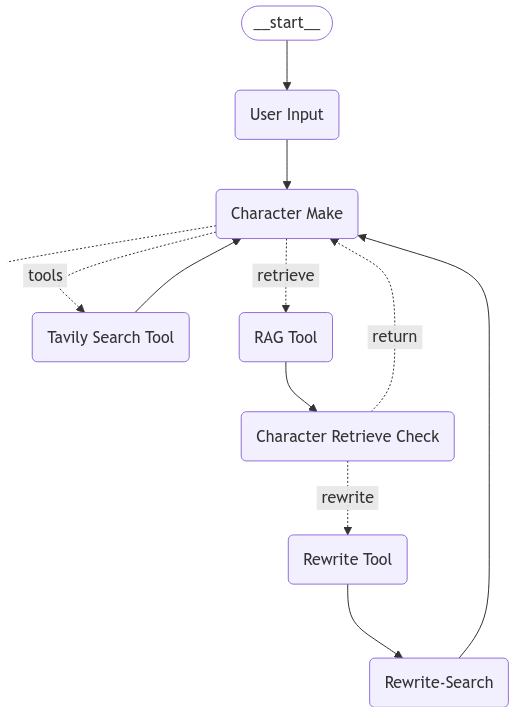
The workflow implemented with these nodes.
This completes the full workflow shown above — the goal for this section.
When the Character Make node returns next, it connects to the Persona Setup node built in the previous post.
The complete code is attached below.
Let's run it again!
It works.
Chaining individual LLM capabilities step by step is a genuinely complex process. LangGraph makes it possible to compose those individual pieces in a clean, sequential way.
One thing that stood out while working with LangGraph: debugging and adding features is surprisingly straightforward. The graph looks large at a glance, but because development proceeds one step at a time, it never feels overwhelming in practice.
Next, let's design an agent that actually uses the search queries generated this way.
Full code used in this post
Split into three files: states.py / nodes.py / edges.py
더보기
######## states.py ########
from typing import Annotated
from typing_extensions import TypedDict
from langgraph.graph.message import add_messages

class OverallState(TypedDict):
    user_input: str
    messages: Annotated[list, add_messages]
    character_persona_dict: dict

class InputState(TypedDict):
    start_input: str

class PersonaState(TypedDict):
    user_input: str
    messages: Annotated[list, add_messages]
    character_persona_dict: dict
    retrieve_check: bool
    retrieval_msg: str
    rewrite_query: str
    tools_call_switch: Annotated[bool, True]

class SearchQueryState(TypedDict):
    messages: Annotated[list, add_messages]
    character_persona_dict: dict
    query_list: list
    previous_query: list
    is_revise: bool

class EndState(TypedDict):
    messages: Annotated[list, add_messages]
    query_list: list

######## nodes.py ########
import os
import json
from .states import *
from pydantic import BaseModel, Field
from langchain_chroma import Chroma
from langchain_openai import ChatOpenAI
from langchain_openai import OpenAIEmbeddings
from langchain_core.prompts import ChatPromptTemplate, FewShotChatMessagePromptTemplate
from langchain_core.messages import HumanMessage, ToolMessage
from langgraph.prebuilt import ToolNode
from langchain_community.tools.tavily_search import TavilySearchResults
from langchain.tools.retriever import create_retriever_tool

with open('./api_key/API_KEY.txt', 'r') as api:
    os.environ["OPENAI_API_KEY"] = api.read()
with open('./api_key/TAVILY_API.txt', 'r') as api:
    os.environ["TAVILY_API_KEY"] = api.read()

# Load ChromaDB
vectorstore = Chroma(
    collection_name="rag-chroma",
    embedding_function=OpenAIEmbeddings(),
    persist_directory="./chroma_db",
)
retriever = vectorstore.as_retriever()

# ----------------------------------------------------------------------------
# ----------------------------------------------------------------------------
# ----------------------------------------------------------------------------
# Start node — prompts the user for persona information
def user_input_node(state: InputState):
    print("================================= Make Persona =================================")
    print("Defining the persona. Please provide details such as gender, age, location, hobbies, etc.")
    # time.sleep(1)
    user_input = input("User: ")

    return {"messages": [("user", user_input)], "tools_call_switch": True}

# ----------------------------------------------------------------------------
# ----------------------------------------------------------------------------
# ----------------------------------------------------------------------------
# Node 1 — generates a new persona from the input text.
# Load Tavily search tool and create the node.
tool = TavilySearchResults(max_results=3)
web_search_tool = TavilySearchResults(max_results=5)

# Node 1-1. Search node
tool_node = ToolNode(tools=[tool])

# Load RAG retriever tool and create the node
retriever_tool = create_retriever_tool(
    retriever,
    "retrieve_trends",
    "Search for the latest trends in fashion and hobbies and return relevant information.",
)
# Node 1-2. RAG node.
retrieve = ToolNode([retriever_tool])

def tool_nodes_exporter():
    return tool_node, retrieve

# Combine both tools into a list.
tools = [tool, retriever_tool]

# ----------------------------------------------------------------------------
# ----------------------------------------------------------------------------
# ----------------------------------------------------------------------------
# Node 1-3. RAG validation node
# Receives the Tools Output from Node 1-2, checks whether it matches the user input,
# and returns Yes or No.
# If Yes, the result is passed back to the Character Make Node to generate the final response.
# If No, a new search is triggered and the result is used instead.

class GradeDocuments(BaseModel):
    """Binary score for relevance check on retrieved documents."""
    binary_score:str = Field(..., description="Documents are relevant to the question, 'yes' or 'no'", enum=['yes', 'no'])

rag_check_model = ChatOpenAI(model="gpt-3.5-turbo", temperature=0)
rag_check_model = rag_check_model.with_structured_output(GradeDocuments)

def retrieve_check_node(state: PersonaState):
    prompt = ChatPromptTemplate.from_messages(
        [
            ("system", """
            You are a consultation expert who provides appropriate information in response to user input.
            Return 'yes' or 'no' if you can provide an accurate answer to the user's question from the given documentation.
            If you can't provide a clear answer, be sure to return NO.
            """),
            ("human", "Retrieved document: \n\n {document} \n\n User's input: {question}"),
        ]
    )

    retrieval_msg = state['messages'][-1].content
    human_msg = state['user_input']
    retrieval_grader = prompt | rag_check_model
    response = retrieval_grader.invoke({"document": retrieval_msg, "question": human_msg})
    retrieve_handle = response.binary_score
    retrieve_check = False

    if retrieve_handle == "no":
        print("=============================== Need to Check ===============================")
        retrieve_check = True
    if retrieve_handle == "yes":
        print("============================== No Need to Check =============================")

    return {"retrieve_check": retrieve_check, "retrieval_msg": retrieval_msg}

# ----------------------------------------------------------------------------
# ----------------------------------------------------------------------------
# ----------------------------------------------------------------------------
# Node 1-4. Query rewrite node
# If the retrieved result from Node 1-2 does not adequately match the input,
# the query is rewritten using the state's user_input.
# This node runs when Node 1-3 returns 'yes' (i.e., retrieval was insufficient).

class Rewrite_Output(TypedDict):
    """
    Class for generating structured output
    """
    query: Annotated[str, ..., "Rewritten query to find appropriate material on the web"]

rewrite_model = ChatOpenAI(model="gpt-4o-mini", temperature=0)
rewrite_model = rewrite_model.with_structured_output(Rewrite_Output)

def rewrite_node(state: PersonaState):
    prompt = ChatPromptTemplate.from_messages(
        [
            ("system", """
            You're an expert in improving search relevance.\n
            Look at previously entered search queries and rewrite them to better find that information on the internet.
            """),
            ("human", "Previously entered search queries: \n{user_input}"),
        ]
    )

    user_input = state['user_input']
    rewrite_chain = prompt | rewrite_model
    response = rewrite_chain.invoke({"user_input": user_input})
    rewrited_query = response['query']
    print(f"================================ Rewrited Query ================================\nRewritted Query: {rewrited_query}")

    return {"rewrite_query": rewrited_query}

# ----------------------------------------------------------------------------
# ----------------------------------------------------------------------------
# ----------------------------------------------------------------------------
# Node 1-5. Web search node using the rewritten query

def rewrite_search_node(state: PersonaState):
    print("================================ Search Web ================================")
    docs = web_search_tool.invoke({"query": state['rewrite_query']})
    web_results = "\n\n".join([d["content"] for d in docs])
    web_results = web_results + "\n\n" + state['retrieval_msg']
    # print(web_results)

    new_messages = [ToolMessage(content=web_results, tool_call_id="tavily_search_results_json")]

    return {"messages": new_messages}

# ----------------------------------------------------------------------------
# ----------------------------------------------------------------------------
# ----------------------------------------------------------------------------
# Node 1 — accepts both human input and retrieved context.

character_model = ChatOpenAI(model="gpt-4o", temperature=0.2)
character_model_with_tools = character_model.bind_tools(tools)

```python
def character_make_node(state: PersonaState):
    prompt = ChatPromptTemplate.from_messages([
        ("system","""
        You are an expert in creating characters for fiction.\n
        Whatever input the user is presented with, you must return a description of the completed character.\n
        If no information is available, randomly generate and return the character's attributes.\n
        Based on the values entered by the user, envision and present the character, including the character's age, gender, job, location, interests, hobbies and etc.\n
        The returned value must be in Korean.\n
        """),
        ("human", "Input: {human_input}\n Retrieve: {context}"),
    ])
    prompt_with_tools = ChatPromptTemplate.from_messages([
        ("system","""
        You are an expert in creating characters for fiction.\n
        Whatever input the user is presented with, you must return a description of the completed character.\n
        If no information is available, randomly generate and return the character's attributes.\n
        Based on the values entered by the user, envision and present the character, including the character's age, gender, job, location, interests, hobbies and etc.\n
        If you have difficulty creating an appropriate character, use an online search to solve the problem.\n
        The returned value must be in Korean.\n
        """),
        ("human", "Input: {human_input}\n Retrieve: {context}"),
    ])
    messages_list = state['messages']
    last_human_message = next((msg for msg in reversed(messages_list) if isinstance(msg, HumanMessage)), None).content
    last_msg = state['messages'][-1].content

    if last_human_message == last_msg:
        last_msg = ""
        print(f"==================================== INPUT ====================================\nHuman Input: {last_human_message}")
    else:
        try:
            last_msg_data = json.loads(state['messages'][-1].content)
            last_msg = "\n\n".join([d["content"] for d in last_msg_data])
        except:
            ...
        print(f"==================================== INPUT ====================================\nHuman Input: {last_human_message}\nContext: {last_msg}")

    if state['tools_call_switch']:
        chain_with_tools = prompt_with_tools | character_model_with_tools
        response = chain_with_tools.invoke({"human_input": last_human_message, "context": last_msg})

        if hasattr(response, "tool_calls") and len(response.tool_calls) > 0 and (response.tool_calls[0]["name"]) == "tavily_search_results_json":
            print("================================ Search Online ================================")
            tool_switch = False
        elif hasattr(response, "tool_calls") and len(response.tool_calls) > 0 and (response.tool_calls[0]["name"]) == "retrieve_trends":
            print("=============================== Search Retrieval ===============================")
            tool_switch = False
        else:
            print("============================= Chracter Information =============================")
            tool_switch = False
            print(response.content)

    else:
        chain = prompt | character_model
        response = chain.invoke({"human_input": last_human_message, "context": last_msg})
        print("============================= Chracter Information =============================")
        tool_switch = False
        print(response.content)

    return {"messages": [response], "user_input": last_human_message, "tools_call_switch": tool_switch}
Node 2 — Extracts persona information from the generated character description and fills in any missing fields.
class Persona_Output(TypedDict):
    """
    Class for generating structured output
    """
    character_age: Annotated[str, ..., "An age of the Persona"]
    character_sex: Annotated[str, ..., "A sex of the Persona"]
    character_location: Annotated[str, ..., "A place where the persona might live"]
    character_interest: Annotated[str, ..., "Interests that the persona might have"]
    character_hobby: Annotated[str, ..., "Hobbies that the persona might have"]
    character_job: Annotated[str, ..., "Job that the persona might have"]
    character_information: Annotated[str, ..., "Additional information to describe the persona"]

persona_model = ChatOpenAI(model="gpt-4o-mini", temperature=0.5)
persona_model = persona_model.with_structured_output(Persona_Output)

# A strictly structured LLM that returns persona fields.
# If a field has no value, it fills in a randomly generated appropriate value.
def persona_setup_node(state: PersonaState):
    messages = [
        ("system", """
         You are the expert in determining your character's persona.
        Extract the character's 'age', 'sex', 'job', 'location', 'interest', and 'hobbies' from the values entered by the user.
        If no information is available, it will return a randomised set of appropriate information that must be entered.
        The returned value must be in Korean.
        """),
        ("human", state['messages'][-1].content)
    ]
    response = persona_model.invoke(messages)

    print("================================= Persona Setup =================================")
    print(f"Sex: {response['character_sex']}")
    print(f"Age: {response['character_age']}")
    print(f"Location: {response['character_location']}")
    print(f"Interests: {response['character_interest']}")
    print(f"Hobbies: {response['character_hobby']}")
    print(f"Job: {response['character_job']}")
    print(f"Additional Info: {response['character_information']}")

    return {"character_persona_dict": response}
Node 3 — Generates appropriate search keywords based on the persona.
class Search_Output(TypedDict):
    """
    Class for generating structured output
    """
    query_list: Annotated[list, ..., "List of queries that customers have entered in your shop"]

search_model = ChatOpenAI(model="gpt-4o")
search_model = search_model.with_structured_output(Search_Output)

examples = [
    {"input":
        """
            User Sex: 여자,
            User Age: 20대,
            User Location: 서울 강남,
            User Interest: 최신 화장법,
            User Hobby: 공원 산책,
            User Job: 그래픽 디자이너,
            User Information: 강아지를 기르고 있음, 피부에 관심이 많음
        """,
    "output":
        ['피부진정용 필링패드', '수분에센스', '스틱형 파운데이션', '강아지 간식', '강아지용 배변패드', '강아지 장난감']
    },
]

example_prompt = ChatPromptTemplate.from_messages(
    [
        ("human", "{input}"),
        ("ai", "{output}"),
    ]
)

few_shot_prompt = FewShotChatMessagePromptTemplate(
    example_prompt=example_prompt,
    examples=examples,
)

def search_setence_node(state: SearchQueryState):
    prompt = ChatPromptTemplate.from_messages([
        ("system","""
        You're a great marketing manager, and you're working on inferring customer search queries.
        Given the customer information, generate appropriate search quries that customers might enter to find products in your shopping mall.
        Make sure to clearly present the actual product names that a user with that persona would search for in your retail mall.
        """),
        few_shot_prompt,
        ("human", """
         User Sex: {sex},
         User Age: {age},
         User Location: {location},
         User Interest: {interest},
         User Hobby: {hobby},
         User Job: {job},
         User Information: {information}
         """),
    ])
graph_builder.add_node("persona_node", persona_node)
graph_builder.add_node("search_node", search_node)
graph_builder.add_node("query_check_node", query_check_node)
graph_builder.add_node("query_revise_node", query_revise_node)
graph_builder.add_node("tools", tool_node)
graph_builder.add_node("retrieve", retrieve)
graph_builder.add_edge(START, "persona_node")
graph_builder.add_edge("persona_node", "search_node")
graph_builder.add_edge("search_node", "query_check_node")
graph_builder.add_conditional_edges("query_check_node", select_next_node, {"is_revise": "query_revise_node", "end": END})
graph_builder.add_edge("query_revise_node", "query_check_node")
graph = graph_builder.compile(checkpointer=memory)
# Node 4 — The node that validates whether the returned search queries are appropriate

The `query_check_node` verifies whether the generated queries actually match the persona. It binds a tool called `QueryReviseAssistance` to the model. If the model decides the queries are a poor fit for the user's profile, it calls this tool to signal that a revision is needed.

```python
class QueryReviseAssistance(BaseModel):
    """Escalate the conversation.
    Use only if the given search query is a strong mismatch with the customer's information.
    ...
    """
    query_list: list
The key logic is straightforward: if the model's response contains a tool_calls entry whose name matches QueryReviseAssistance, the node sets is_revise = True.
if (
    response.tool_calls
    and response.tool_calls[0]["name"] == QueryReviseAssistance.__name__
):
    is_revise = True
Node 4-1 — The node that rewrites the queries when revision is requested
query_revise_node is invoked when is_revise is True. It uses structured output (with_structured_output) to return a clean query_list, removing or rewriting any queries that are irrelevant to the user's persona. After revision it resets is_revise to False and routes back to query_check_node for another validation pass.
Routing and Graph Construction (edges.py)
Two routing functions control the conditional edges.
select_next_node — decides whether to send the state to query_revise_node or to END after the check node runs:
def select_next_node(state: SearchQueryState):
    if state["is_revise"]:
        return "is_revise"
    return '__end__'
simple_route — inspects the last AI message and dispatches to tools, retrieve, or next depending on which tool (if any) was called:
def simple_route(state: PersonaState):
    if hasattr(ai_message, "tool_calls") and ... ai_message.tool_calls[0]["name"] == "tavily_search_results_json":
        return "tools"
    elif hasattr(ai_message, "tool_calls") and ... ai_message.tool_calls[0]["name"] == "retrieve_trends":
        return "retrieve"
    return "next"
retrieve_route — decides whether a RAG rewrite step is needed:
def retrieve_route(state: PersonaState):
    if state['retrieve_check']:
        return "rewrite"
    return "return"
Finally, the graph is assembled with StateGraph, wiring all nodes and edges together, and compiled with a MemorySaver checkpointer:
memory = MemorySaver()
graph_builder = StateGraph(OverallState, input=InputState, output=EndState)

graph_builder.add_node("persona_node", persona_node)
graph_builder.add_node("search_node", search_node)
graph_builder.add_node("query_check_node", query_check_node)
graph_builder.add_node("query_revise_node", query_revise_node)
graph_builder.add_node("tools", tool_node)
graph_builder.add_node("retrieve", retrieve)

graph_builder.add_edge(START, "persona_node")
graph_builder.add_edge("persona_node", "search_node")
graph_builder.add_edge("search_node", "query_check_node")
graph_builder.add_conditional_edges(
    "query_check_node",
    select_next_node,
    {"is_revise": "query_revise_node", "__end__": END}
)
graph_builder.add_edge("query_revise_node", "query_check_node")

graph = graph_builder.compile(checkpointer=memory)
The query_check_node → query_revise_node → query_check_node loop continues until the checker is satisfied with the queries and returns __end__, at which point execution terminates.
graph_builder.add_node("User Input", user_input_node)
graph_builder.add_node("Character Make", character_make_node)
graph_builder.add_node("Character Retrieve Check", retrieve_check_node)
graph_builder.add_node("Rewrite Tool", rewrite_node)
graph_builder.add_node("Rewrite-Search", rewrite_search_node)
graph_builder.add_node("Persona Setup", persona_setup_node)
graph_builder.add_node("Search Sentence", search_setence_node)
graph_builder.add_node("Query Check", query_check_node)
graph_builder.add_node("Query Revise Tool", query_revise_node)
graph_builder.add_node("Tavily Search Tool", tool_node)
graph_builder.add_node("RAG Tool", retrieve)
graph_builder.add_edge(START, "User Input")
graph_builder.add_edge("User Input", "Character Make")
graph_builder.add_edge("Tavily Search Tool", "Character Make")
graph_builder.add_edge("RAG Tool", "Character Retrieve Check")
graph_builder.add_edge("Rewrite Tool", "Rewrite-Search")
graph_builder.add_edge("Rewrite-Search", "Character Make")
graph_builder.add_edge("Persona Setup", "Search Sentence")
graph_builder.add_edge("Search Sentence", "Query Check")
graph_builder.add_edge("Query Revise Tool", "Query Check")
graph_builder.add_conditional_edges(
"Query Check",
select_next_node,
{"is_revise": "Query Revise Tool", END: END}
)
graph_builder.add_conditional_edges(
"Character Make",
simple_route,
{"tools": "Tavily Search Tool", "next": "Persona Setup", "retrieve": "RAG Tool"}
)
graph_builder.add_conditional_edges(
"Character Retrieve Check",
retrieve_route,
{"rewrite": "Rewrite Tool", "return": "Character Make"}
)
Export Graph from edges.py
def Project_Graph():
graph = graph_builder.compile(checkpointer=memory)
return graph
####### run_graph.py #######
from .edges import Project_Graph
graph = Project_Graph()
config = {"configurable": {"thread_id": "1"}}
with open("graph_output.png", "wb") as f:
f.write(graph.get_graph().draw_mermaid_png())
graph.invoke({"start_input": ""}, config=config)