Related Series
Show moreRelated Series List
- 2024.11.11 - [A.I.(Artificial Intelligence) & M.L.(Machine Learning)/LLM] - [LangGraph] 1. Managing AI Workflows with LangGraph
- 2024.11.13 - [A.I.(Artificial Intelligence) & M.L.(Machine Learning)/LLM] - [LangGraph] 2. Conceptual Understanding of LangGraph's Core Components
- 2024.11.14 - [A.I.(Artificial Intelligence) & M.L.(Machine Learning)/LLM] - [LangGraph] 3. Implementing Workflows with Chains and Agents — Query Extraction Model (current post)
- 2024.11.20 - [A.I.(Artificial Intelligence) & M.L.(Machine Learning)/LLM] - [LangGraph] 4. Building a RAG and Search Agent with LangGraph
In this post, we'll walk through implementing a workflow with a concrete example.
The end goal is to design an LLM Agent that operates within an online shopping mall.
We'll implement the sub-tasks needed to get there.
Along the way, I'll briefly introduce the LangGraph features we use as they come up.
1. Overall Workflow Design
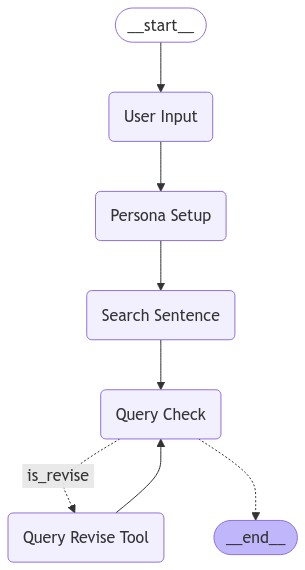
Graph visualization in LangGraph
Before implementing a LangGraph workflow, you need to plan out which steps the process will go through.
The project implemented in this post takes a user's persona as input and generates appropriate search queries — that's the final objective.
The intent is to feed these queries into an actual shopping mall and have an Agent process the results.
To achieve this, I broke the process down into the following stages:
- Use the provided persona clues to generate a character with an arbitrary persona.
- Use the generated persona to produce a set of appropriate search queries.
- Validate whether the list of search queries is suitable.
- 3-1. If the list is not suitable, revise the queries.
- 3-2. If the list is suitable, return it.
2. Implementing Simple Nodes in the Graph
The START node is itself a kind of node, so it requires an input against a specific State.
This means User Input is naturally the first step in the entire flow.
However, I wanted the system description to appear first, followed by the user's input prompt.
To handle this, I added an explicit Input Stage after START.
Let's look at the code.
# Import all required libraries first.
import os
from pydantic import BaseModel
from typing import Annotated
from typing_extensions import TypedDict
from langgraph.graph import StateGraph, START, END
from langgraph.graph.message import add_messages
from langgraph.prebuilt import tools_condition
from langchain_core.prompts import ChatPromptTemplate, FewShotChatMessagePromptTemplate
from langgraph.checkpoint.memory import MemorySaver
from langchain_openai import ChatOpenAI

# Load and set the API key. Here it's read from a saved txt file.
# You can use a model other than OpenAI's — just supply the appropriate API key.
with open('API_KEY.txt', 'r') as api:
    os.environ["OPENAI_API_KEY"] = api.read()
Let's build the START → USER INPUT stage first.
This stage receives None from START and passes it through to the User INPUT node.
The USER INPUT node will then print the system message and prompt the user for input.
# State definition

# START passes None as input here.
# Technically no fields are required, but defining the class with
# pass or ... will raise an error, so we include a placeholder field.
class InputState(TypedDict):
    start_input: str

# The user_input node is defined as follows.
# It receives start_input (which is effectively empty),
# performs the steps below, and returns a dict containing "user_input".
# The next node must have a State that includes this variable.
def user_input_node(state: InputState):
    print("================================= Make Persona =================================")
    print("페르소나를 결정합니다. 성별, 나이, 거주지, 취미 등 정보를 알려주세요.")
    # time.sleep(1)
    user_input = input("User: ")

    return {"user_input": user_input}
Now that we have the user's input, we want to build a structured persona from it.
While we could use the persona information as raw text, here we want to store the values in a structured format.
To do this, I designed a node that uses an LLM to parse the input text into a structured persona dict.
# This node receives user_input from the previous node, so that field must be present.
# We'll store the generated data in character_persona_dict.
class PersonaState(TypedDict):
    user_input: str
    character_persona_dict: dict

# Before defining the node, let's set up the LLM.
# The LLM for this node is configured to return structured output
# using with_structured_output, as shown below.
class Persona_Output(TypedDict):
    """
    Class for generating structured output
    """
    character_age: Annotated[str, ..., "An age of the Persona"]
    character_sex: Annotated[str, ..., "A sex of the Persona"]
    character_location: Annotated[str, ..., "A place where the persona might live"]
    character_interest: Annotated[str, ..., "Interests that the persona might have"]
    character_hobby: Annotated[str, ..., "Hobbies that the persona might have"]

persona_model = ChatOpenAI(model="gpt-4o-mini")
persona_model = persona_model.with_structured_output(Persona_Output)

# The node using this model is defined as follows.
# A system prompt instructs the model on what to do.
# If a field isn't provided by the user, the model fills it in with a reasonable random value.
def persona_setup_node(state: PersonaState):
    messages = [
        ("system", """
         You are the expert in determining your character's persona.
        Extract the character's 'age', 'sex, 'location', 'interest', and 'hobbies' from the values entered by the user.
        If no information is available, it will return a randomised set of appropriate information that must be entered.
        Answers must be in Korean.
        """),
        ("human", state['user_input'])
    ]
    response = persona_model.invoke(messages)

    print("================================= Persona Setup =================================")
    print(f"입력된 정보:{state['user_input']}")
    print(f"성별: {response['character_sex']}")
    print(f"나이: {response['character_age']}")
    print(f"거주지: {response['character_location']}")
    print(f"흥미: {response['character_interest']}")
    print(f"취미: {response['character_hobby']}")

    return {"character_persona_dict": response}
This node uses LangChain's with_structured_output to parse the LLM's response into a dict.
The prompt instructs the model to fill in five fields from the user's input.
Now let's see how it actually runs.
I added the remaining pieces needed to test it below.
# Define the State used across the entire graph
class OverallState(TypedDict):
    user_input: str
    messages: Annotated[list, add_messages]
    character_persona_dict: dict

# Define the graph builder. Without specifying input=InputState,
# START would require OverallState as its input.
graph_builder = StateGraph(OverallState, input=InputState)

# Add nodes to the graph. Each node takes a name and a node function.
graph_builder.add_node("User Input", user_input_node)
graph_builder.add_node("Persona Setup", persona_setup_node)

# Add edges. The graph must always flow from START to END.
graph_builder.add_edge(START, "User Input")
graph_builder.add_edge("User Input", "Persona Setup")
graph_builder.add_edge("Persona Setup", END)

# Compile the graph
graph = graph_builder.compile()

# Render the graph diagram and save it
with open("graph_output.png", "wb") as f:
    f.write(graph.get_graph().draw_mermaid_png())

config = {"configurable": {"thread_id": "1"}}

# Invoke the graph. As discussed, start_input is left empty.
# A dict-style input is required here as well.
graph.invoke({"start_input": ""})
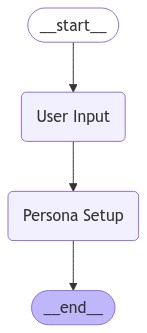
The persona creation process
The graph we've built so far looks like the diagram above.
The graph starts, the User Input node collects the user's input, passes it to the Persona Setup node, and that node returns the structured values.
Let's run it.

Invoking the graph immediately enters the User Input node and prompts for input as shown above.
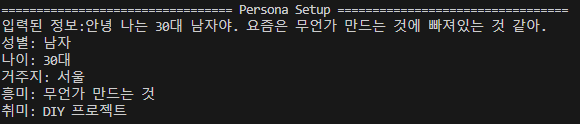
The user's input is passed directly to the Persona Setup node, where the LLM performs its assigned task.
The graph then terminates.
Both nodes appear to be working correctly.
Let's continue and add the stage that takes this information and generates appropriate search queries.
# This node will generate search queries from the given persona information.
# Since the queries will go through validation and rewriting steps,
# we also define messages for Agent functionality along with other variables.
class SearchQueryState(TypedDict):
    messages: Annotated[list, add_messages]
    character_persona_dict: dict
    query_list: list
    is_revise: bool

# As before, we define a structured output parser for reliable outputs.

class Search_Output(TypedDict):
    """
    Class for generating structured output
    """
    query_list: Annotated[list, ..., "List of queries that customers have entered in your shop"]

search_model = ChatOpenAI(model="gpt-4o")
search_model = search_model.with_structured_output(Search_Output)

# To improve output quality, we use LangChain's FewShotPrompt.
# Without at least 1-shot examples, output quality degrades noticeably.
examples = [
    {"input":
        """
            User Sex: 여자,
            User Age: 20대,
            User Location: 서울 강남,
            User Interest: 최신 화장법,
            User Hobby: 공원 산책
        """,
    "output":
        ['피부진정용 필링패드', '수분에센스', '스틱형 파운데이션', '강아지 간식', '강아지용 배변패드', '강아지 장난감']
    },
]

```python
# BaseModel을 이용한 커스텀 툴의 구현.
class QueryReviseAssistance(BaseModel):
    """Escalate the conversation.
    Use only if the given search query is a strong mismatch with the customer's information.
    Use this tool even if given search query is seriously inappropriate to enter into the search bar of an online retailer like Amazon.
    Never call the tool if the same input is still being given as before.
    To use this function, return 'query_list'.
    """
    query_list: list
The key point is still the same: just make sure the input and output States match correctly.
Let's add this newly written node and run things again.
# A node has been added, so let's adjust the nodes and edges slightly.
graph_builder.add_node("User Input", user_input_node)
graph_builder.add_node("Persona Setup", persona_setup_node)
graph_builder.add_node("Search Sentence", search_setence_node) # Add the newly created node.

graph_builder.add_edge(START, "User Input")
graph_builder.add_edge("User Input", "Persona Setup")
graph_builder.add_edge("Persona Setup", "Search Sentence") # Update the edges to match the new node order.
graph_builder.add_edge("Search Sentence", END) # The graph should now terminate after generating the queries.
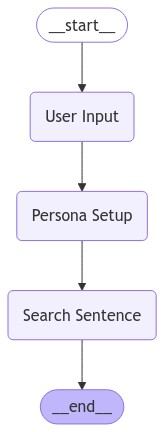
A node for generating search queries has been added.
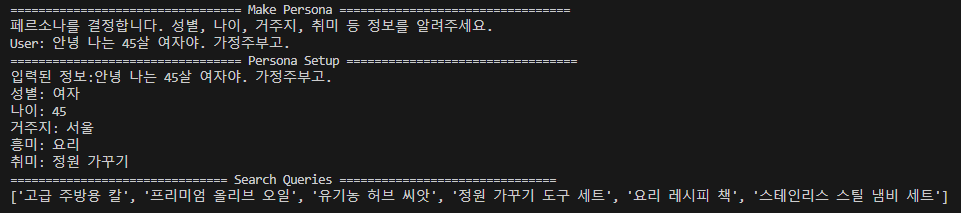
It works correctly.
Up to this point, we've built nodes and a graph that flow in a single direction.
As long as inputs and outputs are properly defined and connected, building a workflow is straightforward.
While this approach uses an LLM to implement functionality, it's also possible to have the LLM decide what actions to take.
3. Implementing an Agent-style Node
One of the most powerful features LangGraph provides is the ability to robustly design agent-style nodes.
The core idea is to have the LLM autonomously decide what to do and then carry it out.
To implement this, you add variables to the State to track its status, check whether the LLM has made a tools_call, decide whether to update the state based on that, and use add_conditional_edges to determine the next path based on the current state.
This may sound complicated at first, but it isn't particularly difficult to implement. Let's walk through it step by step.
First, let's implement the core functionality: the tools.
# Implementing a custom tool using BaseModel.
class QueryReviseAssistance(BaseModel):
    """Escalate the conversation.
    Use only if the given search query is a strong mismatch with the customer's information.
    Use this tool even if given search query is seriously inappropriate to enter into the search bar of an online retailer like Amazon.
    Never call the tool if the same input is still being given as before.
    To use this function, return 'query_list'.
    """
    query_list: list

query_check_model = ChatOpenAI(model="gpt-4o-mini")
query_check_model = query_check_model.bind_tools([QueryReviseAssistance])
LangChain provides a bind_tools method that allows a model to use specific tools.
Creating a custom tool is simply a matter of defining it and providing a clear description of how it should be used.
With this in place, whenever the LLM determines that a particular action is needed based on the input, it will call the corresponding tool.
def query_check_node(state: SearchQueryState):
    print("=============================== Query Check ===============================")
    prompt = ChatPromptTemplate.from_messages([
        ("system","""
        You are a search manager.
        Based on a given customer persona, if you think that customer would search for the given queries, return the given queries as a list.
        Never call the tool if the same input is still being given as before.
        """),
        ("human", """
            User Sex: {sex},
            User Age: {age},
            User Location: {location},
            User Interest: {interest},
            User Hobby: {hobby}
            Queries: {queries}
            """),
        ])
    chain = prompt | query_check_model

    response = chain.invoke(
        {
            "sex": state['character_persona_dict']['character_sex'],
            "age": state['character_persona_dict']['character_age'],
            "location": state['character_persona_dict']['character_location'],
            "interest": state['character_persona_dict']['character_interest'],
            "hobby": state['character_persona_dict']['character_hobby'],
            "queries": state['query_list']['query_list'],
        }
    )
    is_revise = False

    if (
        response.tool_calls
        and response.tool_calls[0]["name"] == QueryReviseAssistance.__name__
    ):
        print("Revise Requires")
        is_revise = True

    return {"messages": [response], "is_revise": is_revise}
The node implementation is nearly identical to before, except here we don't use an output parser — we let the LLM's raw message pass through.
This allows the LLM to decide on its own whether to return a tool_calls response or a plain AI message.
If tool_calls is returned and the invoked tool matches the one we defined earlier, the node is designed to update the State accordingly.
- In short: given a query and a task,
- the LLM decides whether to call a tool or generate a direct response,
- that decision is returned as a message,
- and we inspect that returned value to determine whether to update the State.
This process is how the system decides what action to take next.
# An output parser for returning results as a list,
# nearly identical to the one used before, but defined separately for clarity.
class QueryCheck_Output(TypedDict):
    """
    A class for generating structured output.
    """
    query_list: Annotated[list, ..., "List of queries that customers might have entered in search-bar of your online retail shop"]

query_revise_model = ChatOpenAI(model="gpt-4o")
query_revise_model = query_revise_model.with_structured_output(QueryCheck_Output)

# Node that performs the revision
def query_revise_node(state: SearchQueryState):
    print("=============================== Query Revise ===============================")
    prompt = ChatPromptTemplate.from_messages([
        ("system",
            """
                You are a validator who fixes errors in a given query.
                From the list of queries given, remove or modify the queries that do not match the user's information appropriately.
                Be sure to delete highly irrelevant data.
                Be sure to remove search terms that you wouldn't use on a shopping site like Amazon.
                Return the modified queries as a list.
            """
        ),
        ("human",
            """
                User Sex: {sex},
                User Age: {age},
                User Location: {location},
                User Interest: {interest},
                User Hobby: {hobby}
                Queries: {queries}
            """
        )])

    chain = prompt | query_revise_model
    response = chain.invoke(
        {
            "sex": state['character_persona_dict']['character_sex'],
            "age": state['character_persona_dict']['character_age'],
            "location": state['character_persona_dict']['character_location'],
            "interest": state['character_persona_dict']['character_interest'],
            "hobby": state['character_persona_dict']['character_hobby'],
            "queries": state['query_list'],
        }
    )

    print(response['query_list'])

    return {"query_list": response, "is_revise": False}
Next, we create a node that executes the action when the tool is invoked.
Finally, we define a custom routing function to set up the conditional edge.
# Adding a custom routing function.
def select_next_node(state: SearchQueryState):
    if state["is_revise"]:
        return "is_revise"

    return tools_condition(state)
The tools_condition function is a built-in LangGraph function.
It routes between tool_calls and END, but as shown above, you can pass additional state to change the returned value.
As described earlier, this function validates a condition through state and returns a literal string.
The function defined this way will return one of three values — 'is_revise', 'tools', or '__end__' — depending on the condition (tools and __end__ exist by default).
As noted earlier, an Edge is a Node that performs a routing role,
so if you want a different approach, you can implement it differently.
def select_next_node(state: SearchQueryState):
    if state["is_revise"]:
        return "is_revise"

    return "__end__"
For example, if you only need to check whether a revision is required, implementing it this simply is perfectly fine.
# (source node, function responsible for routing, dict that maps the routing function's return value to the target node)

graph_builder.add_conditional_edges(
    "Query Check",
    select_next_node,
    {"is_revise": "Query Revise Tool", END: END}
    )
Finally, create the conditional edge as shown above and you're done.
When select_next_node returns is_revise, the graph routes to Query Revise Tool;
when it returns __end__, it routes to the END node.
This is what the final graph looks like using this approach.
At the Query Check node, the LLM decides on its own whether to call the tool named Query Revise Tool, and uses that decision to improve the quality of the query.
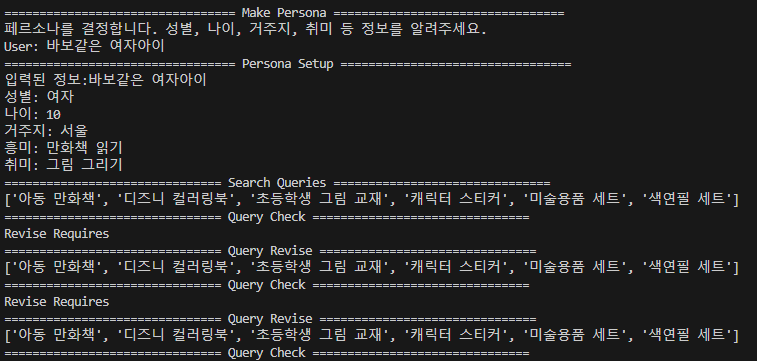
The actual output is shown above.
The model independently determined that the queries needed revision and called the Revise Tool.
The Revise Tool ran its validation but returned the same values; after repeating this a few times, the graph terminates.
In this way, an agent can choose its own action at a given branch,
and by deploying multiple agents or placing them at different branches, you can build more precise LLM-based products.
Next, we'll look at RAG systems and retrieval systems.
Full Code
More
# 라이브러리 임포트.
# 대부분의 상용 LLM 모델을 Langchain 자체 라이브러리에서 로드해야함. 안 그러면 쓰는게 너무 어려움

import os
import time
from typing import Annotated
from typing_extensions import TypedDict
from langgraph.graph import StateGraph, START, END
from langgraph.graph.message import add_messages
from langgraph.prebuilt import ToolNode, tools_condition
from langchain_core.messages import BaseMessage, FunctionMessage, HumanMessage
from langchain_core.prompts import ChatPromptTemplate, FewShotChatMessagePromptTemplate
from langgraph.checkpoint.memory import MemorySaver
from langchain_community.tools.tavily_search import TavilySearchResults
from langchain_community.agent_toolkits import PlayWrightBrowserToolkit
from langchain_community.tools.playwright.utils import create_async_playwright_browser
from langchain_openai import ChatOpenAI
from typing_extensions import TypedDict
from pydantic import BaseModel

# API 키 미리 로드해서 환경변수에 입력.
with open('API_KEY.txt', 'r') as api:
    os.environ["OPENAI_API_KEY"] = api.read()
with open('TAVILY_API.txt', 'r') as api:
    os.environ["TAVILY_API_KEY"] = api.read()

# 메모리 기능. 이전 대화 기록.
memory = MemorySaver()

# State는 노드가 다루는 변수이기도 하면서, 전역적인 상태를 다루게 됨.
# 모든 노드는 TypedDict를 다루기 때문에 모든 입력에서 Dict를 요구함(다른걸 쓰면 다른거 요구)
# 여기서 개별 딕트의 변수가 필요하고, 모든 변수가 입력될 필요는 없음.

class OverallState(TypedDict):
    user_input: str
    messages: Annotated[list, add_messages]
    character_persona_dict: dict

class InputState(TypedDict):
    start_input: str

class PersonaState(TypedDict):
    user_input: str
    character_persona_dict: dict

class SearchQueryState(TypedDict):
    messages: Annotated[list, add_messages]
    character_persona_dict: dict
    query_list: list
    previous_query: list
    is_revise: bool

class EndState(TypedDict):
    messages: Annotated[list, add_messages]
    query_list: list

# Node는 단순하게 생각하면 그냥 함수임. 근데 State로 진행을 결정하는.

# 시작노드 - 페르소나에 대한 정보를 요구하는 노드임
def user_input_node(state: InputState):
    print("================================= Make Persona =================================")
    print("페르소나를 결정합니다. 성별, 나이, 거주지, 취미 등 정보를 알려주세요.")
    # time.sleep(1)
    user_input = input("User: ")

    return {"user_input": user_input}

# 노드2 - 입력된 문장으로부터 페르소나에 관한 정보를 추출하고, 정보가 없는 경우 이를 채워넣는 노드.
class Persona_Output(TypedDict):
    """
    Sturctured_output을 생성하기위한 클래스
    """
    character_age: Annotated[str, ..., "An age of the Persona"]
    character_sex: Annotated[str, ..., "A sex of the Persona"]
    character_location: Annotated[str, ..., "A place where the persona might live"]
    character_interest: Annotated[str, ..., "Interests that the persona might have"]
    character_hobby: Annotated[str, ..., "Hobbies that the persona might have"]

persona_model = ChatOpenAI(model="gpt-4o-mini")
persona_model = persona_model.with_structured_output(Persona_Output)

# 페르소나를 반환하는 매우 경직된 LLM.
# 정보가 없는 경우 임의의 값을 채워넣도록 되어있음.
def persona_setup_node(state: PersonaState):
    messages = [
        ("system", """
         You are the expert in determining your character's persona.
        Extract the character's 'age', 'sex, 'location', 'interest', and 'hobbies' from the values entered by the user.
        If no information is available, it will return a randomised set of appropriate information that must be entered.
        Answers must be in Korean.
        """),
        ("human", state['user_input'])
    ]
    response = persona_model.invoke(messages)

    print("================================= Persona Setup =================================")
    print(f"입력된 정보:{state['user_input']}")
    print(f"성별: {response['character_sex']}")
    print(f"나이: {response['character_age']}")
    print(f"거주지: {response['character_location']}")
    print(f"흥미: {response['character_interest']}")
    print(f"취미: {response['character_hobby']}")

    return {"character_persona_dict": response}

# 노드 3 - 페르소나를 토대로 적절한 검색 키워드를 생성하는 놈. 매우 랜덤하게 했으면 좋겠는데 페르소나가 한정적인게 문제.
# 랜덤한 상황적 설명을 주는 것이 좋다고 생각하는데 어떻게 할지 결정해야 할듯. (이걸 툴로 만들면 참 좋을듯.)

class Search_Output(TypedDict):
    """
    Sturctured_output을 생성하기위한 클래스
    """
    query_list: Annotated[list, ..., "List of queries that customers have entered in your shop"]

search_model = ChatOpenAI(model="gpt-4o")
search_model = search_model.with_structured_output(Search_Output)

examples = [
    {"input":
        """
            User Sex: 여자,
            User Age: 20대,
            User Location: 서울 강남,
            User Interest: 최신 화장법,
            User Hobby: 공원 산책
        """,
    "output":
        ['피부진정용 필링패드', '수분에센스', '스틱형 파운데이션', '강아지 간식', '강아지용 배변패드', '강아지 장난감']
    },
]

example_prompt = ChatPromptTemplate.from_messages(
    [
        ("human", "{input}"),
        ("ai", "{output}"),
    ]
)

few_shot_prompt = FewShotChatMessagePromptTemplate(
    example_prompt=example_prompt,
    examples=examples,
)

def search_setence_node(state: SearchQueryState):
    prompt = ChatPromptTemplate.from_messages([
        ("system","""
        You're a great marketing manager, and you're working on inferring customer search queries.
        Given the customer information, generate appropriate search quries that customers might enter to find products in your shopping mall.
        Make sure to clearly present the actual product names that a user with that persona would search for in your retail mall.
        """),
        few_shot_prompt,
        ("human", """
         User Sex: {sex},
         User Age: {age},
         User Location: {location},
         User Interest: {interest},
         User Hobby: {hobby}
         """),
    ])

    chain = prompt | search_model
    response = chain.invoke(
        {
            "sex": state['character_persona_dict']['character_sex'],
            "age": state['character_persona_dict']['character_age'],
            "location": state['character_persona_dict']['character_location'],
            "interest": state['character_persona_dict']['character_interest'],
            "hobby": state['character_persona_dict']['character_hobby'],
        }
    )
    print("=============================== Search Queries ===============================")
    print(response['query_list'])

    return {"query_list": response}
Node 4, revise_tool — validates whether the returned search queries are appropriate.
class QueryReviseAssistance(BaseModel):
    """Escalate the conversation.
    Use only if the given search query is a strong mismatch with the customer's information.
    Use this tool even if given search query is seriously inappropriate to enter into the search bar of an online retailer like Amazon.
    Never call the tool if the same input is still being given as before.
    To use this function, return 'query_list'.
    """
    query_list: list

query_check_model = ChatOpenAI(model="gpt-4o-mini", temperature=1.3)
query_check_model = query_check_model.bind_tools([QueryReviseAssistance])

def query_check_node(state: SearchQueryState):
    print("=============================== Query Check ===============================")
    prompt = ChatPromptTemplate.from_messages([
        ("system","""
        You are a search manager.
        Based on a given customer persona, if you think that customer would search for the given queries, return the given queries as a list.

        """),
        ("human", """
            User Sex: {sex},
            User Age: {age},
            User Location: {location},
            User Interest: {interest},
            User Hobby: {hobby}
            Queries: {queries}
            """),
        ])
    chain = prompt | query_check_model

    response = chain.invoke(
        {
            "sex": state['character_persona_dict']['character_sex'],
            "age": state['character_persona_dict']['character_age'],
            "location": state['character_persona_dict']['character_location'],
            "interest": state['character_persona_dict']['character_interest'],
            "hobby": state['character_persona_dict']['character_hobby'],
            "queries": state['query_list']['query_list'],
        }
    )
    is_revise = False

    if (
        response.tool_calls
        and response.tool_calls[0]["name"] == QueryReviseAssistance.__name__
    ):
        print("Revise Requires")
        is_revise = True

    return {"messages": [response], "is_revise": is_revise}


class QueryCheck_Output(TypedDict):
    """
    Class for generating structured output
    """
    query_list: Annotated[list, ..., "List of queries that customers might have entered in search-bar of your online retail shop"]

query_revise_model = ChatOpenAI(model="gpt-4o")
query_revise_model = query_revise_model.with_structured_output(QueryCheck_Output)

def query_revise_node(state: SearchQueryState):
    print("=============================== Query Revise ===============================")
    prompt = ChatPromptTemplate.from_messages([
        ("system",
            """
                You are a validator who fixes errors in a given query.
                From the list of queries given, remove or modify the queries that do not match the user's information appropriately.
                Be sure to delete highly irrelevant data.
                Be sure to remove search terms that you wouldn't use on a shopping site like Amazon.
                Return the modified queries as a list.
            """
        ),
        ("human",
            """
                User Sex: {sex},
                User Age: {age},
                User Location: {location},
                User Interest: {interest},
                User Hobby: {hobby}
                Queries: {queries}
            """
        )])

    chain = prompt | query_revise_model
    response = chain.invoke(
        {
            "sex": state['character_persona_dict']['character_sex'],
            "age": state['character_persona_dict']['character_age'],
            "location": state['character_persona_dict']['character_location'],
            "interest": state['character_persona_dict']['character_interest'],
            "hobby": state['character_persona_dict']['character_hobby'],
            "queries": state['query_list'],
        }
    )

    print(response['query_list'])

    return {"query_list": response, "is_revise": False}

# Build the graph and add nodes / edges

# Add a custom node routing function.
def select_next_node(state: SearchQueryState):
    if state["is_revise"]:
        return "is_revise"

    return '__end__'


graph_builder = StateGraph(OverallState, input=InputState, output=EndState)

graph_builder.add_node("User Input", user_input_node)
graph_builder.add_node("Persona Setup", persona_setup_node)
graph_builder.add_node("Search Sentence", search_setence_node)
graph_builder.add_node("Query Check", query_check_node)
graph_builder.add_node("Query Revise Tool", query_revise_node)


graph_builder.add_edge(START, "User Input")
graph_builder.add_edge("User Input", "Persona Setup")
graph_builder.add_edge("Persona Setup", "Search Sentence")
graph_builder.add_edge("Search Sentence", "Query Check")
graph_builder.add_edge("Query Revise Tool", "Query Check")
graph_builder.add_conditional_edges(
    "Query Check",
    select_next_node,
    {"is_revise": "Query Revise Tool", END: END}
    )

graph = graph_builder.compile(checkpointer=memory)
# graph = graph_builder.compile()

with open("graph_output.png", "wb") as f:
    f.write(graph.get_graph().draw_mermaid_png())

config = {"configurable": {"thread_id": "1"}}

graph.invoke({"start_input": ""}, config)