Preparing a PhD application is what first put PDF editing on my radar.
The task was straightforward: merge several PDFs, reorder pages, and pull out a subset of them.
Online PDF editors made this needlessly painful — upload a file and you hit a login wall, try to save and you get a paywall, and features that look free turn out to be heavily restricted.
That frustration is what pushed me to build my own PDF editor. The idea wasn't entirely out of nowhere. I'd spent a good amount of time on PDF parsing while building RAG pipelines for AI agents, and I kept digging into PDF internals while building Contextifier, a tool that chunks and processes documents. Working through PDFs where text extraction fails, coordinates are scrambled, or pages look fine but the underlying text order is completely wrong teaches you quickly that PDF behaves nothing like a typical document format.
So I started building Edit2me. The goal isn't a full-blown design tool — it's something that handles merging PDFs, reordering pages, and assembling just the parts I need, the way I want to work. This series documents that process. Part 1 covers the internal structure of PDF that you need to understand before building any kind of PDF editor.
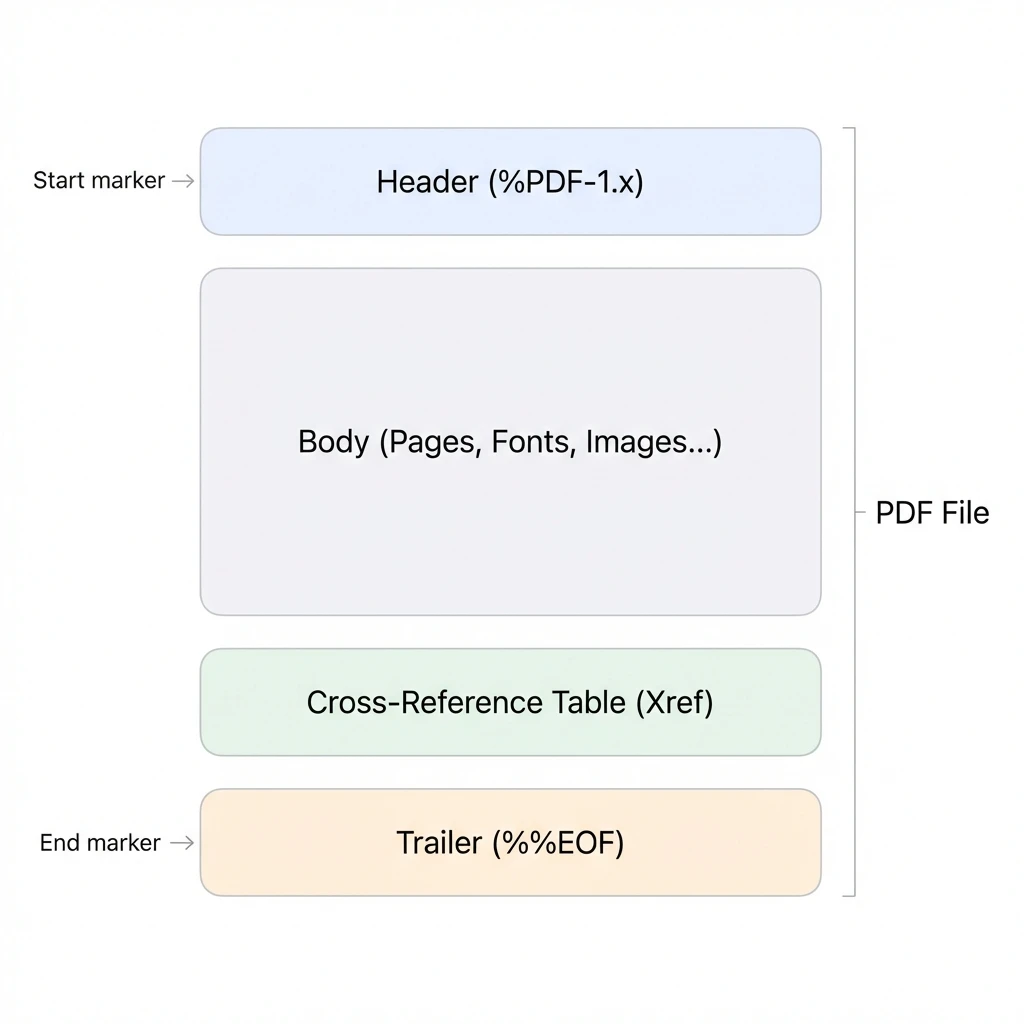
A PDF file is parsed around the object body, cross-reference table, and trailer. Source: dPDF
PDF is closer to a bundle of rendering instructions than a document
The first assumption to drop when working with PDF is that "paragraphs, headings, and tables are stored as structured content inside the file." Some PDFs include tag information that gives them an accessibility structure, but the core of typical PDF rendering is a list of instructions describing what to draw where on a page.
PDF is a fixed-layout document format. As described in the PDF Reference 1.7, page content consists of operators for graphic objects, text objects, image objects, and path-drawing commands. A viewer interprets these instructions and renders the page to a screen or printer.
This distinction matters. HTML lets you rearrange content through the DOM tree and CSS layout, but a PDF is essentially the already-rendered result. Even text isn't stored as "the third sentence of the first paragraph" — it can be stored as instructions to draw specific glyphs at specific coordinates. That's why extracting text from a PDF for a RAG pipeline isn't a simple string read; it means reconstructing coordinates, fonts, encodings, and drawing order.
The high-level structure of a PDF file
A PDF file can be understood in terms of four sections:
- Header: the opening line that declares the PDF version
- Body: where the objects are stored
- Cross-reference table or cross-reference stream: an index of object positions
- Trailer: closing information used to locate the document root and the xref
The simplest possible PDF looks something like this:
%PDF-1.7
1 0 obj
<< /Type /Catalog /Pages 2 0 R >>
endobj

2 0 obj
<< /Type /Pages /Kids [3 0 R] /Count 1 >>
endobj

3 0 obj
<< /Type /Page /Parent 2 0 R /MediaBox [0 0 595 842] /Contents 4 0 R >>
endobj

4 0 obj
<< /Length 44 >>
stream
BT
/F1 24 Tf
100 700 Td
(Hello PDF) Tj
ET
endstream
endobj

xref
0 5
0000000000 65535 f
0000000010 00000 n
...
trailer
<< /Root 1 0 R /Size 5 >>
startxref
...
%%EOF
Real PDFs are far more complex — object streams, compressed content streams, encryption, incremental updates, linearization, font subsets, and image XObjects all get mixed in. But the basic skeleton stays the same. A PDF viewer finds the Root in the trailer, follows it to the Catalog and then the Pages tree, and walks each Page object's Contents to render the page.
Header: the file's entry point
A PDF file typically starts with a header like this:
%PDF-1.7
This single line declares the PDF version. PDF 1.7 was later standardized as ISO 32000-1. The current PDF 2.0 corresponds to ISO 32000-2.
Don't judge a PDF's capabilities solely from its header. A document's Catalog can include a /Version entry that overrides the header version, and a given file may only use a subset of the features defined for its declared version. When building an editor, treat the header as a starting point — determining actual capabilities requires following the object structure.
Body: everything is stored as objects
The body of a PDF is a collection of objects. Each object has an object number and a generation number.
12 0 obj
<< /Type /Page /Parent 2 0 R /Contents 15 0 R >>
endobj
Here, 12 0 obj is an indirect object with object number 12 and generation number 0. Other objects can reference it as 12 0 R. The internal structure of a PDF is essentially an object graph.
The basic PDF object types are:
- Boolean:
true,false - Number:
123,3.14 - String:
(Hello)or<48656C6C6F> - Name:
/Type,/Page,/Contents - Array:
[1 2 3] - Dictionary:
<< /Key /Value >> - Stream: a byte stream attached to a dictionary
- Null:
null - Indirect object:
1 0 obj ... endobj - Indirect reference:
1 0 R
A PDF editor must add or modify objects without breaking this object graph. Reordering pages is really a matter of adjusting the /Kids array and /Count value in the /Pages tree. Merging PDFs means relocating Page and Resource objects into a new document while avoiding object number collisions between the source files.
Dictionary: the core data structure for PDF objects
Nearly every meaningful structure in PDF is expressed as a dictionary — key-value pairs enclosed between << and >>.
<<
  /Type /Page
  /Parent 2 0 R
  /MediaBox [0 0 595 842]
  /Resources << /Font << /F1 10 0 R >> >>
  /Contents 15 0 R
>>
/Type /Page identifies this object as a Page. /MediaBox specifies the page size. /Resources points to the fonts, images, and graphics state objects used on the page. /Contents points to the content stream that holds the actual rendering instructions.
This structure is why simple string substitution doesn't work for PDF editing. Looking at /Contents 15 0 R might suggest you just modify object 15, but in practice /Contents can be an array like [15 0 R 16 0 R] that references multiple streams. Similarly, /Resources may live directly on the Page object or be inherited from a parent Pages node.
Stream: where images, fonts, and content commands live
Streams are how PDF stores large chunks of data. Image bytes, font programs, page content commands, and color profiles are all stored as streams.
15 0 obj
<< /Length 67 /Filter /FlateDecode >>
stream
...compressed bytes...
endstream
endobj
/Length gives the length of the stream data. /Filter /FlateDecode means the data is compressed with zlib/deflate. To read PDF content, you have to parse the stream dictionary, interpret the Filter, decompress the data, and then parse the operators inside.
From an editor's perspective, streams are the most dangerous area to touch. Editing a bit of text isn't as simple as changing a string length — you have to decompress the stream, modify the commands, recompress, and update /Length. When multiple Filters are chained together, or when an image stream uses a predictor, the handling gets more complex still.
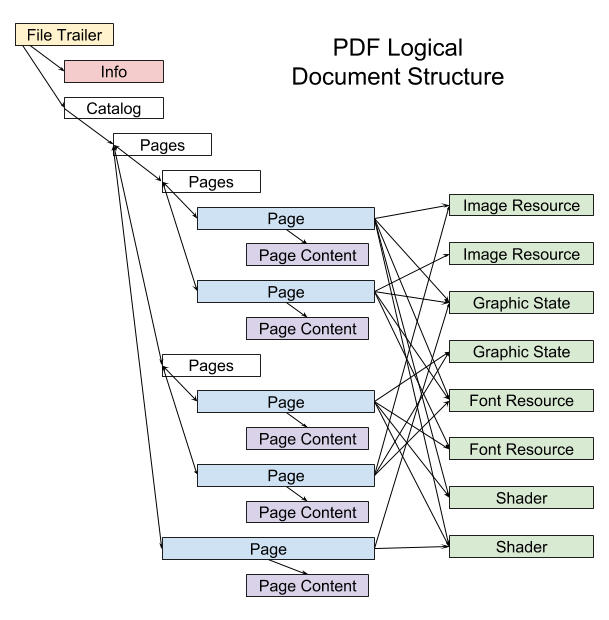
The structure that leads from the Catalog to the Pages tree and individual Page objects. Source: Skia Graphics Engine
Cross-reference: the index for locating objects
If a PDF viewer had to parse a file sequentially from start to finish, opening large PDFs would be slow. PDF addresses this with a cross-reference structure that maps object numbers to byte offsets in the file.
A traditional xref table looks like this:
xref
0 6
0000000000 65535 f
0000000015 00000 n
0000000074 00000 n
0000000131 00000 n
0000000220 00000 n
0000000348 00000 n
Each line gives the byte offset, generation number, and status of an object. n means the object is in use; f marks a free object. The startxref value in the trailer points to where the xref section begins.
Since PDF 1.5, a cross-reference stream can be used instead. An xref stream stores cross-reference information as an ordinary stream object. The qpdf documentation describes object streams and xref streams as structures introduced in PDF 1.5. When these are present, simply scanning for the xref keyword and reading a flat table is no longer sufficient.
Trailer: the last clue for finding the Root
The trailer gives a PDF parser the starting point it needs to locate the document structure.
trailer
<<
  /Size 6
  /Root 1 0 R
  /Info 5 0 R
>>
startxref
492
%%EOF
/Root points to the Catalog object — the root of the entire document, from which the Pages tree, AcroForm, outlines, metadata, and other structures hang. /Size relates to the number of objects tracked in the cross-reference section.
If you build an editor and don't update the trailer correctly, viewers will fail to open the document or will be unable to locate certain objects. This is a key reason why rewriting the file from scratch is safer than patching an existing one in place — writing objects fresh, then rebuilding the xref and trailer, produces predictable results.
Catalog and the Pages tree
The entry point to a PDF document is the Catalog.
1 0 obj
<<
  /Type /Catalog
  /Pages 2 0 R
>>
endobj
The Catalog's /Pages entry points to the root node of the Pages tree, which manages the document's pages in a hierarchy.
2 0 obj
<<
  /Type /Pages
  /Kids [3 0 R 4 0 R]
  /Count 2
>>
endobj
The /Kids array holds Page objects or child Pages nodes. /Count is the total number of pages under that node. Rather than putting every Page object in a single flat array, large documents can manage pages in a tree.
Once you understand this structure, reordering pages becomes straightforward: you don't touch the visual content of the pages at all — you just rearrange the entries in the /Kids array. Merging works the same way: take Page objects from multiple PDFs and attach them to a single Pages tree. The catch is that you also have to bring along every object those Page objects depend on — Resources, Contents, Annots, MediaBox, CropBox, and so on.
Page object: the metadata for a single page
A Page object holds everything needed to render one page.
3 0 obj
<<
  /Type /Page
  /Parent 2 0 R
  /MediaBox [0 0 595 842]
  /CropBox [0 0 595 842]
  /Resources 6 0 R
  /Contents 7 0 R
>>
endobj
The key entries are:
/Parent: the parent Pages node/MediaBox: the default page size/CropBox: the region shown on screen or printed/Rotate: page rotation/Resources: fonts, images, XObjects, color spaces, and other resources/Contents: the page content stream/Annots: annotations, links, and form fields
When implementing PDF merging, copying the Page object alone isn't enough. You have to follow /Contents to its stream, follow /Resources to the fonts and images it references, and follow /Annots to the annotation objects. This is why a full object graph copy is required.
Contents: The List of Commands That Draw a Page
A page object's /Contents is a content stream that describes what to draw on the page. Decompressed, it looks something like this:
q
1 0 0 1 0 0 cm
BT
/F1 12 Tf
72 720 Td
(Hello PDF) Tj
ET
Q
PDF content streams use a postfix notation: operands come first, then the operator. 72 720 Td moves the text position, and (Hello PDF) Tj renders the string.
Commonly encountered operators include:
q: save graphics stateQ: restore graphics statecm: modify the current transformation matrixBT: begin text objectET: end text objectTf: set text font and sizeTd: move text positionTm: set text matrixTj: show stringTJ: show string with individual glyph positioningDo: invoke an XObjectre: append rectangle to pathS: stroke pathf: fill path
One thing worth noting: the text delimiters are BT and ET, not ST and ET. BT stands for Begin Text, ET for End Text. When parsing PDF content streams, stream/endstream and BT/ET appear frequently together, so it's easy to mix up the terminology.
Why Text Extraction Is Hard
The text you see in a PDF and the text actually stored in it can differ. A content stream contains strings, but the bytes in those strings don't necessarily map directly to Unicode text.
For example, this command looks straightforward:
BT
/F13 10 Tf
100 600 Td
<001200130014> Tj
ET
But <001200130014> is not human-readable text. These values may be character codes for a specific font. To recover the actual Unicode text, you have to follow the font dictionary, the Encoding, and the ToUnicode CMap. Without a ToUnicode CMap, text extraction quality can drop dramatically.
Another problem is text ordering. What appears on screen as a single sentence may be drawn in several separate pieces inside the PDF:
[(Hel) 20 (lo) -10 ( PDF)] TJ
TJ takes an array interleaving strings and kerning adjustments. This is useful for fine-tuning character spacing, but it means a text extractor has to reassemble the pieces. The problem gets worse with tables and multi-column layouts. PDF makes no guarantee about logical reading order — rendering order and reading order can differ, and you often have to re-sort elements by coordinates. This is why layout analysis is necessary when parsing PDFs for RAG pipelines.
The Coordinate System and Transformation Matrix
The default coordinate system of a PDF page has its origin at the bottom-left. /MediaBox [0 0 595 842] on an A4 page means (0, 0) at the bottom-left and (595, 842) at the top-right. Units are points; 1 point is 1/72 inch.
In practice, content can't be interpreted from coordinates alone. PDF has a Current Transformation Matrix (CTM), and the cm operator can translate, scale, rotate, or skew the coordinate system:
1 0 0 1 100 200 cm
This command translates the coordinate system by 100 units along the x-axis and 200 along the y-axis. To determine where an image or piece of text is actually drawn, you have to track both the CTM from the current graphics state and the text matrix.
This is why implementing page rotation, cropping, or image insertion in a PDF editor isn't as simple as plugging in coordinate values. You have to account for the page's /Rotate, /MediaBox, /CropBox, and CTM together.
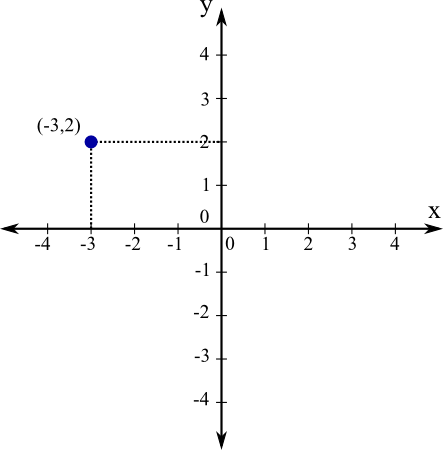
Computing positions in PDF is a matter of tracking the page coordinate system and the transformation matrix simultaneously. Source: Math Insight
Resources: The Name-to-Object Dictionary for Content Streams
Inside a content stream you'll see names like /F1 and /Im0:
BT
/F1 12 Tf
(Hello) Tj
ET

/Im0 Do
These names are resolved to actual objects through the page's /Resources dictionary:
<<
  /Font << /F1 10 0 R >>
  /XObject << /Im0 11 0 R >>
>>
/F1 refers to font object 10, and /Im0 refers to image XObject 11. If you copy a content stream without copying its Resources, the viewer has no way to know what /F1 or /Im0 are.
Resource name conflicts are also an important concern when merging PDFs. Two PDFs may both use the name /F1, but the underlying font objects can be completely different. When resources are scoped per page, the risk is lower, but merging pages or combining content streams onto a single page requires resolving name collisions.
Image XObject: Images in PDFs Are Separate Objects
Images in a PDF are typically stored as Image XObjects:
11 0 obj
<<
  /Type /XObject
  /Subtype /Image
  /Width 600
  /Height 400
  /ColorSpace /DeviceRGB
  /BitsPerComponent 8
  /Filter /DCTDecode
  /Length 12345
>>
stream
...jpeg bytes...
endstream
endobj
The content stream draws the image like this:
q
600 0 0 400 0 0 cm
/Im0 Do
Q
The image data lives in the XObject stream; the page only contains instructions for where and at what size to render it. This is why image-based PDFs yield almost nothing from text extraction — it's the reason scanned PDFs require OCR in a RAG pipeline.
Fonts and ToUnicode
Fonts are the trickiest part of PDF text processing. A font object describes not only how to draw glyphs, but also — at least partially — how to map character codes to glyphs and Unicode code points.
A simple font dictionary looks like this:
10 0 obj
<<
  /Type /Font
  /Subtype /Type1
  /BaseFont /Helvetica
  /Encoding /WinAnsiEncoding
>>
endobj
In real-world PDFs, however, you'll frequently encounter CIDFonts, Type0 fonts, embedded font subsets, and ToUnicode CMaps:
<<
  /Type /Font
  /Subtype /Type0
  /BaseFont /ABCDEE+NotoSansCJKkr-Regular
  /Encoding /Identity-H
  /DescendantFonts [21 0 R]
  /ToUnicode 22 0 R
>>
The arbitrary prefix in /BaseFont /ABCDEE+... typically indicates a font subset — only the glyphs actually used in the document are embedded, which reduces file size.
Text extractors use the ToUnicode CMap to convert character codes to Unicode. If ToUnicode is missing or inaccurate, text that renders correctly on screen can come out garbled during extraction. This is the core reason PDFs are reliable for human readers but difficult for machines to process.
Annotations and AcroForm
Beyond the static content drawn on a page, PDFs support annotations: links, comments, highlights, file attachments, and form field widgets are all represented as annotations.
A page object references its annotations through the /Annots array:
<<
  /Type /Page
  /Annots [30 0 R 31 0 R]
>>
Fillable PDF forms are tied to the AcroForm structure. The Catalog may contain an /AcroForm entry, and each field is linked to a widget annotation.
If a PDF editor only does simple merging, ignoring annotations might not cause obvious visual problems — but links will break and form fields can stop working. Preserving the original PDF's interactive behavior requires handling annotation and AcroForm objects as well.
Incremental Update: PDF Supports Appending Changes
PDF supports incremental updates: rather than rewriting the file in place, you append modified objects, a new xref, and a new trailer to the end of the existing file. This mechanism is important for digital signatures, change history, and fast saves.
Structurally, it looks like this:
original PDF body
original xref
original trailer

new objects
new xref
new trailer with /Prev
new startxref
%%EOF
The new trailer's /Prev points to the offset of the previous xref. A parser starts at the last startxref and follows the /Prev chain to reconstruct the full object state.
This structure cuts both ways for PDF editor implementors. On one hand, you can append only the changed parts while preserving the original file. On the other hand, it means the same object number can appear multiple times in a file — the last revision of an object is the valid one. Naively using the first instance encountered from the start of the file will produce incorrect results.
Linearized PDF and Object Streams
PDFs that open quickly on the web may be linearized. A linearized PDF reorganizes the file structure so the first page can be displayed as quickly as possible. The Library of Congress description of PDF notes that PDF can be structured to support random access and progressive rendering.
PDF 1.5 introduced object streams, which compress multiple small objects into a single stream. This reduces file size but makes parsers harder to implement, because objects are no longer always present in the file body as 12 0 obj ... endobj — they can be packed inside an object stream instead.
A practical PDF parser therefore needs to handle all of the following:
- Traditional xref tables
- xref streams
- Objects inside object streams
- Objects overwritten by incremental updates
- Compressed content streams
- Encrypted PDFs
- Damaged PDFs that viewers recover and open anyway
Trying to handle every case perfectly from the start when building a PDF editor leads to massive scope creep. It's more practical to set an initial goal of page merging and reordering, which focuses on reconstructing the Pages tree and copying objects rather than reinterpreting content streams.
What PDF Merging Actually Does
On the surface, PDF merging is just concatenating file A with file B. Internally, it's closer to the following steps:
- Parse the xref and trailer of each input PDF.
- Find the Pages tree from each Root Catalog.
- Flatten all Page objects in order.
- Trace the dependent objects referenced by each Page object.
- Assign new object numbers for use in the output PDF.
- Build a new Pages tree.
- Write the new Catalog, xref, and trailer.
The critical step is object number remapping. Both PDFs may have a 10 0 obj. Including both in the output as-is causes a conflict. You have to map (file A, 10 0) and (file B, 10 0) to distinct new object numbers:
A: 10 0 obj  ->  new: 15 0 obj
B: 10 0 obj  ->  new: 42 0 obj
All references inside those objects also have to be updated. A reference like:
/Resources 10 0 R
must become /Resources 15 0 R or /Resources 42 0 R in the output document. You need logic that copies the object graph while rewriting all indirect references.
What Page Reordering Actually Does
Page reordering is simpler than merging. You just rearrange the order of Page objects within the same document.
Suppose the existing Pages node looks like this:
<<
  /Type /Pages
  /Kids [3 0 R 4 0 R 5 0 R]
  /Count 3
>>
To change the order to page 3, 1, 2:
<<
  /Type /Pages
  /Kids [5 0 R 3 0 R 4 0 R]
  /Count 3
>>
In practice, because the Pages tree can be multi-level, it's often cleaner to flatten the full list of pages first and then reconstruct the Pages tree from scratch. This approach is straightforward to implement and makes it easy to recompute the /Count value correctly.
Why You Need to Understand PDF the Way You Understand Image Rendering
PDF isn't an image format. It's a compound document format that includes vector graphics, text, images, forms, annotations, and metadata. But when building an editor, it's safer to think of it as "a bundle of drawing commands with predetermined render positions."
This framing enables three practical conclusions.
First, it keeps you from underestimating the difficulty of text editing. Text in a PDF may be glyph placement rather than logical paragraphs. Changing a single character can affect font encoding, string length, position, line breaks, kerning, and ToUnicode mappings.
Second, it clarifies why page-level editing is relatively tractable. Merging, splitting, and reordering don't require reinterpreting the content inside a page — they work by reconstructing Page objects and their dependent objects.
Third, it reveals the connection between RAG parsing and PDF editing. RAG requires recovering reading order and semantic structure from raw rendering commands. PDF editing requires reassembling those commands and the object graph without breaking anything. Both treat a PDF not as a file but as a structured object graph.
Scope for Edit2me Part 1
The following is a reasonable initial scope for Edit2me:
- Accept multiple PDF inputs
- Extract the page list from each PDF
- Display page thumbnails or ordering information
- Allow the user to reorder pages
- Generate a new PDF in the selected order
- Remap object numbers
- Reconstruct the Pages tree
- Rewrite the xref table and trailer
The following features are better deferred to a later phase:
- Direct in-PDF text editing
- Font rewriting
- Preserving complex AcroForms
- Preserving digital signatures
- Editing encrypted PDFs
- Recovering damaged PDFs
- OCR-based text insertion
Drawing this boundary makes the implementation complexity explicit. Part 1 covers understanding the PDF structure. Part 2 can focus on designing the parser and object model. Part 3 can then tackle the actual merge and page reordering logic, along with the UI or API layer.
Summary
A PDF looks like a document on the surface, but internally it is a combination of an object graph and rendering instructions. The Header, Body, xref table, and trailer form the basic skeleton of the file; the Catalog and Pages tree define the document's page structure. Each Page object wires up the rendering commands and resources needed at draw time through its Contents and Resources entries.
Text is drawn inside text objects delimited by BT and ET, using operators such as Tj and TJ. Font encoding, ToUnicode CMaps, coordinate systems, and rendering order all conspire to make text extraction far from straightforward. Images are stored as Image XObjects and invoked from the content stream with the Do operator.
If you are building a PDF editor from scratch, starting with page-level manipulation rather than text editing is the more stable approach. Merging and reordering pages reduces to copying the PDF's object graph and reconstructing the Pages tree. Understanding this structure gives you a solid foundation to implement the features you actually need — without depending on an online editor to do it for you.