In Part 1, I covered the internal structure of PDF: Header, Body, xref, and trailer. The Catalog leads to a Pages tree, and each Page object connects its actual rendering instructions and resources through Contents and Resources.
In Part 2, I translated that structure into an editor design philosophy. The core idea is to avoid modifying the PDF in place like a word processor — instead, assemble the selected pages and their dependent objects into a new document. The original is treated as read-only input, and the result is written out as a new PDF. Reordering and merging pages is framed as rebuilding the Pages tree and remapping object numbers.
In Part 3, I turn that philosophy into a concrete implementation. The scope covers parsing a single PDF, extracting its page list, and rewriting selected pages into a new document — the minimal viable implementation. Merging multiple PDFs sits on the same foundation. What matters more than whether there is one input document or several is the process of mapping the original object number space to the new output object number space.
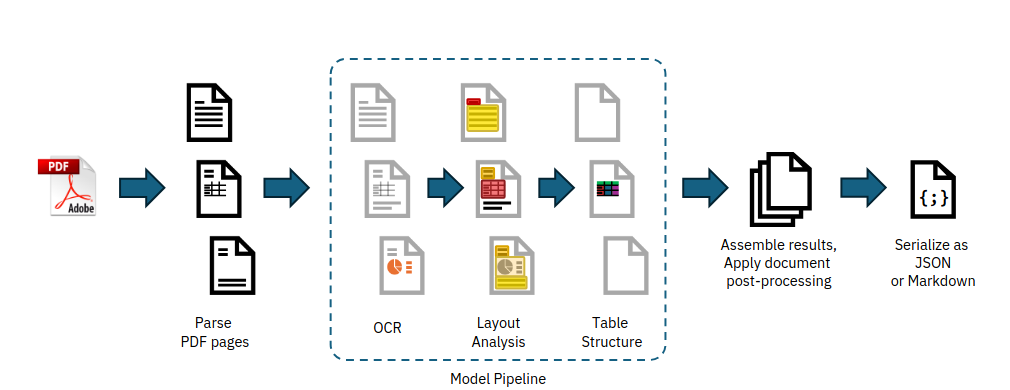
A pipeline that transforms PDF input into a structured intermediate representation. Source: Nicolas' Notebook
Implementation Scope
The implementation covered in this post:
- PDF byte input
startxreflookup- xref table parsing
- trailer dictionary parsing
- Root Catalog resolution
- Pages tree traversal
- Flattening the Page object list
- Collecting dependencies for selected Page objects
- Assigning new object numbers
- Rewriting indirect references
- Building a new Catalog and Pages tree
- Writing the xref table
- Writing the trailer and
startxref
The initial implementation focuses on the traditional xref table. The xref stream and object stream formats introduced in PDF 1.5 require separate handling. The qpdf documentation describes object streams and xref streams as structures introduced in PDF 1.5. The goal here is not to handle every PDF variant at once, but to decompose the core flow of a page assembly engine.
The Full Pipeline
The flow of a minimal PDF editing engine looks like this:
read bytes
parse xref
parse trailer
resolve Root Catalog
resolve Pages tree
flatten Page list
build output page plan
collect dependencies
assign new object ids
rewrite references
write objects
write xref
write trailer
The most important point in this structure is the separation of parsing and writing. Input PDFs can come in many forms, but after normalizing them into an internal model, the output is written in a simple, canonical form. The principle from Part 2 — "parse permissively, write strictly" — manifests at the implementation level as this pipeline.
The code structure mirrors that separation:
class PdfParser:
    def parse(self, data: bytes) -> "PdfDocument":
        ...

class PagePlanner:
    def build_plan(self, document: "PdfDocument", page_indices: list[int]) -> "OutputPlan":
        ...

class PdfWriter:
    def write(self, plan: "OutputPlan") -> bytes:
        ...
PdfParser converts the original PDF into an internal object model. PagePlanner converts the user's selected page order into an output plan. PdfWriter serializes that output plan into actual PDF bytes.
Internal Model Design
Before starting the implementation, define a minimal internal model. Since PDF revolves around indirect objects and indirect references, it's safer to track object numbers and generation numbers separately.
from dataclasses import dataclass
from typing import Any

@dataclass(frozen=True)
class ObjRef:
    obj_num: int
    gen_num: int = 0

@dataclass
class PdfObject:
    ref: ObjRef
    value: Any
    raw: bytes | None = None

@dataclass
class PdfDocument:
    objects: dict[ObjRef, PdfObject]
    trailer: dict[str, Any]
    root: ObjRef
    pages: list[ObjRef]
ObjRef represents a reference like 12 0 R. PdfObject holds the actual object value. For the initial implementation, you don't need to build a full AST for every PDF type — handling dictionary, array, name, number, string, stream, and reference is enough to wire up the page assembly flow.
PDF object types are described in the PDF Reference 1.7 as boolean, number, string, name, array, dictionary, stream, null, and indirect object. The key point for an editing engine is that these types can be nested: a dictionary can contain an array, an array can contain indirect references, and a stream dictionary can also contain references.
Step 1: Finding startxref
PDF parsing starts at the end of the file. A PDF places startxref near the end, followed by the xref offset.
startxref
123456
%%EOF
The parser therefore scans backward from the end of the file to find startxref.
def find_startxref(data: bytes) -> int:
    marker = b"startxref"
    pos = data.rfind(marker)
    if pos == -1:
        raise ValueError("startxref not found")

    tail = data[pos + len(marker):]
    lines = tail.strip().splitlines()
    if not lines:
        raise ValueError("startxref offset not found")

    return int(lines[0])
startxref points to the start of either an xref table or an xref stream. This post uses the xref table.
Real-world PDFs can contain multiple incremental updates. In that case, the last startxref points to the most recent xref, and the trailer's /Prev points to the previous xref position. The initial implementation can be extended to read the last revision first, then follow /Prev entries to accumulate the full object table.
Step 2: Reading the xref Table
A traditional xref table looks like this:
xref
0 4
0000000000 65535 f
0000000015 00000 n
0000000081 00000 n
0000000142 00000 n
trailer
<< /Size 4 /Root 1 0 R >>
Each entry provides a byte offset for an object number. These offsets allow jumping directly to a specific object without scanning the entire file sequentially.
@dataclass
class XrefEntry:
    obj_num: int
    offset: int
    gen_num: int
    in_use: bool


def parse_xref_table(data: bytes, offset: int) -> tuple[dict[ObjRef, XrefEntry], int]:
    cursor = offset
    if not data[cursor:cursor + 4] == b"xref":
        raise ValueError("xref table expected")

    cursor = skip_line(data, cursor)
    entries: dict[ObjRef, XrefEntry] = {}

    while True:
        line, cursor = read_line(data, cursor)
        line = line.strip()

        if line == b"trailer":
            return entries, cursor

        start_obj, count = map(int, line.split())
        for i in range(count):
            entry_line, cursor = read_line(data, cursor)
            offset_bytes = entry_line[0:10]
            gen_bytes = entry_line[11:16]
            flag = entry_line[17:18]

            obj_num = start_obj + i
            gen_num = int(gen_bytes)
            ref = ObjRef(obj_num, gen_num)
            entries[ref] = XrefEntry(
                obj_num=obj_num,
                offset=int(offset_bytes),
                gen_num=gen_num,
                in_use=(flag == b"n"),
            )
The code above is illustrative. A production implementation needs to handle whitespace, CRLF, blank lines, and malformed xref entries more carefully. The core idea remains the same: the xref is an index that maps object numbers to file offsets.
Step 3: Reading the Trailer
The trailer dictionary follows the xref table.
trailer
<<
  /Size 10
  /Root 1 0 R
  /Info 9 0 R
>>
The most important value in the trailer is /Root. /Root points to the Catalog object, and the Catalog's /Pages is the root of the Pages tree.
def parse_trailer(data: bytes, cursor: int) -> dict[str, Any]:
    parser = PdfSyntaxParser(data, cursor)
    trailer = parser.parse_object()

    if not isinstance(trailer, dict):
        raise ValueError("trailer dictionary expected")
    if "Root" not in trailer:
        raise ValueError("Root not found in trailer")

    return trailer
From this step onward, a PDF syntax parser is required. Dictionaries use << and >>, arrays use [ and ], names use the /Name format, and references use the 1 0 R format. Even if the only goal is page assembly, dictionaries and references must be parsed accurately.
Step 4: Reading Objects
Jumping to the offset from an xref entry yields an indirect object.
3 0 obj
<< /Type /Page /Parent 2 0 R /Contents 4 0 R >>
endobj
The object parser reads the object header, parses the value that follows, and consumes through endobj. For stream objects, the bytes from stream to endstream must be stored separately.
def parse_indirect_object(data: bytes, entry: XrefEntry) -> PdfObject:
    cursor = entry.offset
    obj_num, gen_num, cursor = parse_object_header(data, cursor)

    if obj_num != entry.obj_num:
        raise ValueError("xref offset points to different object")

    value, raw = parse_pdf_value_or_stream(data, cursor)
    return PdfObject(
        ref=ObjRef(obj_num, gen_num),
        value=value,
        raw=raw,
    )
For stream objects, it helps to separate the strategy of preserving raw bytes from the strategy of parsing the structure. In page assembly, the content stream body usually doesn't need to be modified — so the stream bytes can be copied as-is without interpretation. On the other hand, references inside the stream dictionary may need to be rewritten, so the dictionary itself must be parsed.
@dataclass
class PdfStream:
    dict: dict[str, Any]
    data: bytes
In the initial writer, the safest approach is to write the stream data verbatim and update only /Length to match the actual data size. If content streams are not decompressed, the scope of filter handling shrinks accordingly.
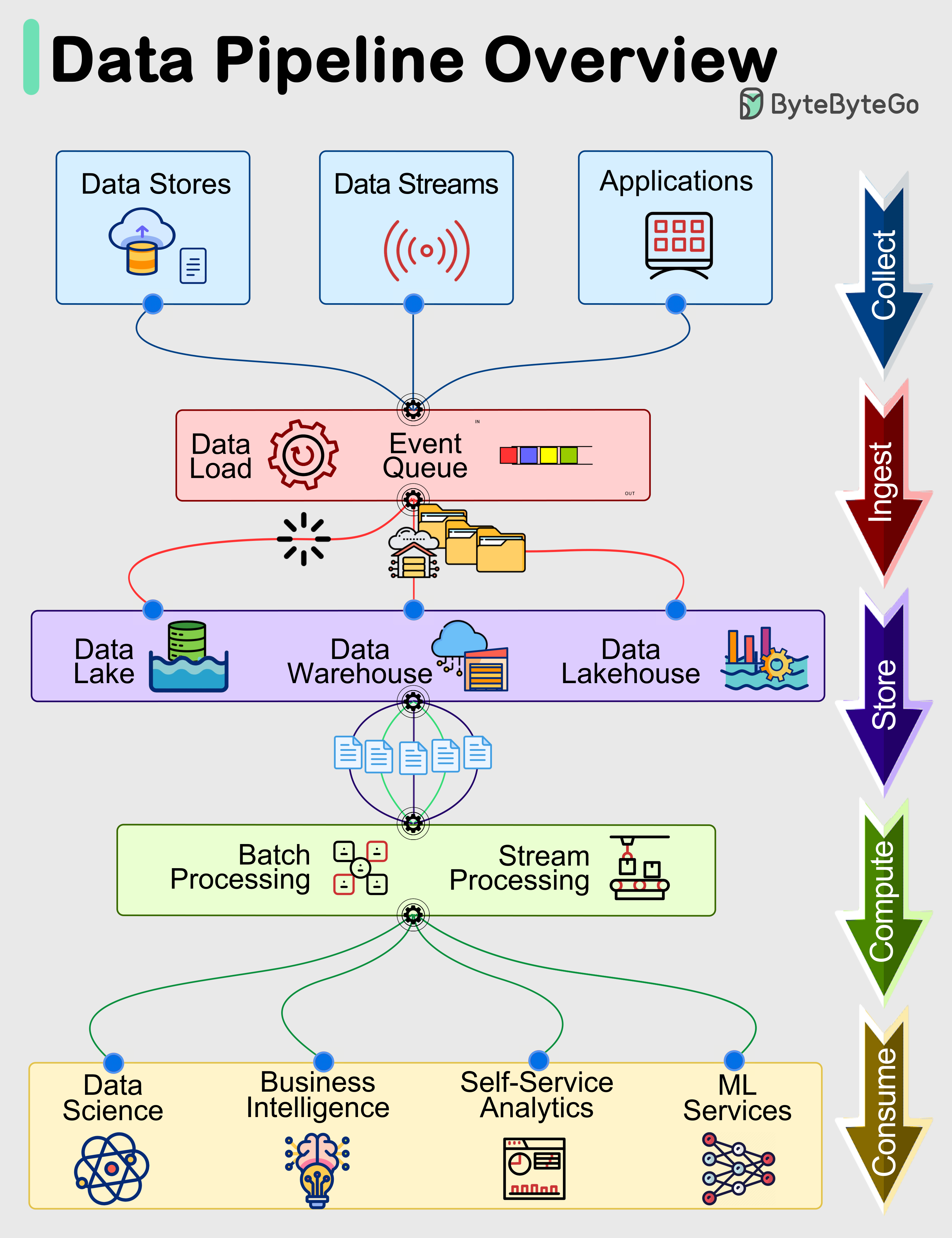
A pipeline structure spanning input, processing, storage, and output. Source: ByteByteGo
Step 5: Finding Pages from the Root Catalog
Following the /Root entry in the trailer leads to the Catalog object.
1 0 obj
<< /Type /Catalog /Pages 2 0 R >>
endobj
Locate the /Pages reference in the Catalog, then traverse the Pages tree starting from that reference.
def resolve_catalog(document: PdfDocument) -> dict[str, Any]:
    catalog_obj = document.objects[document.root]
    catalog = catalog_obj.value

    if catalog.get("Type") != "Catalog":
        raise ValueError("Root is not Catalog")
    if "Pages" not in catalog:
        raise ValueError("Catalog.Pages not found")

    return catalog
Whether to normalize PDF dictionary Name objects to plain strings or keep them as a distinct PdfName type is an implementation choice. For robustness, separating them as PdfName("Catalog") is preferable, but for simplicity the examples here use strings.
Step 6: Flattening the Pages Tree
The Pages tree is hierarchical. /Kids can contain either Page objects or nested Pages objects.
2 0 obj
<< /Type /Pages /Kids [3 0 R 4 0 R] /Count 2 >>
endobj
To simplify page reordering, flatten the Pages tree into a plain array of Page object references.
def flatten_pages(document: PdfDocument, pages_ref: ObjRef) -> list[ObjRef]:
    result: list[ObjRef] = []

    def visit(ref: ObjRef, inherited: dict[str, Any]) -> None:
        obj = document.objects[ref]
        node = obj.value
        node_type = node.get("Type")

        current_inherited = merge_page_inherited_attrs(inherited, node)

        if node_type == "Page":
            apply_inherited_attrs(node, current_inherited)
            result.append(ref)
            return

        if node_type == "Pages":
            for kid in node.get("Kids", []):
                visit(kid, current_inherited)
            return

        raise ValueError(f"unexpected page tree node: {node_type}")

    visit(pages_ref, {})
    return result
Handling inherited attributes correctly here is important. A PDF Page object can inherit values such as /Resources, /MediaBox, /CropBox, and /Rotate from a parent Pages node. The absence of these values on a Page object directly does not mean the page is malformed.
INHERITABLE_PAGE_KEYS = {
    "Resources",
    "MediaBox",
    "CropBox",
    "Rotate",
}


def merge_page_inherited_attrs(parent: dict[str, Any], node: dict[str, Any]) -> dict[str, Any]:
    merged = dict(parent)
    for key in INHERITABLE_PAGE_KEYS:
        if key in node:
            merged[key] = node[key]
    return merged
After this step, the UI can work with a simple flat array of pages.
pages = flatten_pages(document, catalog["Pages"])
# [ObjRef(3, 0), ObjRef(4, 0), ObjRef(8, 0), ...]
Step 7: Building an Output Page Plan
When the user reorders pages or selects a subset, the engine converts the source Page object reference array into an output plan.
@dataclass
class OutputPage:
    source_document_id: str
    source_page_ref: ObjRef
    source_page_index: int

@dataclass
class OutputPlan:
    documents: dict[str, PdfDocument]
    pages: list[OutputPage]
To output pages 3, 1, 2 (in that order) from a single PDF:
def build_single_document_plan(
    document_id: str,
    document: PdfDocument,
    order: list[int],
) -> OutputPlan:
    pages = []
    for page_index in order:
        page_ref = document.pages[page_index]
        pages.append(OutputPage(
            source_document_id=document_id,
            source_page_ref=page_ref,
            source_page_index=page_index,
        ))

    return OutputPlan(
        documents={document_id: document},
        pages=pages,
    )
Merging multiple PDFs uses the same model — pages from different source documents simply have different source_document_id values. The output writer checks which source document each page came from and copies the corresponding object graph.
Step 8: Collecting the Dependency Object Graph
Copying only the Page object will produce a broken PDF. You must also copy every object the Page references: Contents, Resources, Font, Image XObjects, Annots, and so on.
Dependency collection works by recursively following every indirect reference found inside a PDF object.
def collect_dependencies(document: PdfDocument, root_ref: ObjRef) -> set[ObjRef]:
    visited: set[ObjRef] = set()

    def visit_ref(ref: ObjRef) -> None:
        if ref in visited:
            return
        visited.add(ref)

        obj = document.objects[ref]
        for child_ref in iter_indirect_refs(obj.value):
            visit_ref(child_ref)

    visit_ref(root_ref)
    return visited
iter_indirect_refs walks dictionaries, arrays, and stream dictionaries to yield every ObjRef it encounters.
def iter_indirect_refs(value: Any):
    if isinstance(value, ObjRef):
        yield value
    elif isinstance(value, dict):
        for child in value.values():
            yield from iter_indirect_refs(child)
    elif isinstance(value, list):
        for child in value:
            yield from iter_indirect_refs(child)
    elif isinstance(value, PdfStream):
        yield from iter_indirect_refs(value.dict)
For an initial implementation, copying all indirect objects reachable from a Page object is the simplest approach. However, the /Parent reference points back to the original Pages tree, so in the output it must be updated to point to the new Pages node. This means a blanket "follow every reference" strategy requires at least one exception.
SKIP_KEYS_WHEN_COPYING_PAGE = {"Parent"}
A Page object's /Parent is a back-reference into the source document's Pages tree. In the output PDF, the new Pages object becomes the parent. Copying the original /Parent as-is can produce an invalid tree in the output document.
Step 9: Remapping Object Numbers
The output PDF has its own object number space, so every source object reference must be mapped to a new one.
@dataclass(frozen=True)
class SourceObjKey:
    document_id: str
    ref: ObjRef

class ObjectIdAllocator:
    def __init__(self) -> None:
        self.next_obj_num = 1

    def alloc(self) -> ObjRef:
        ref = ObjRef(self.next_obj_num, 0)
        self.next_obj_num += 1
        return ref
The mapping table uses both the source document identifier and the source object reference as the key, so that 10 0 obj from two different PDFs does not collide.
mapping: dict[SourceObjKey, ObjRef] = {}
allocator = ObjectIdAllocator()

for page in plan.pages:
    document = plan.documents[page.source_document_id]
    deps = collect_dependencies(document, page.source_page_ref)

    for old_ref in deps:
        key = SourceObjKey(page.source_document_id, old_ref)
        if key not in mapping:
            mapping[key] = allocator.alloc()
Reserve object numbers for the new Catalog and Pages objects at this same stage.
catalog_ref = allocator.alloc()
pages_root_ref = allocator.alloc()
The order in which object numbers are allocated is an implementation policy. What matters is that once a mapping is established, it is applied consistently throughout.
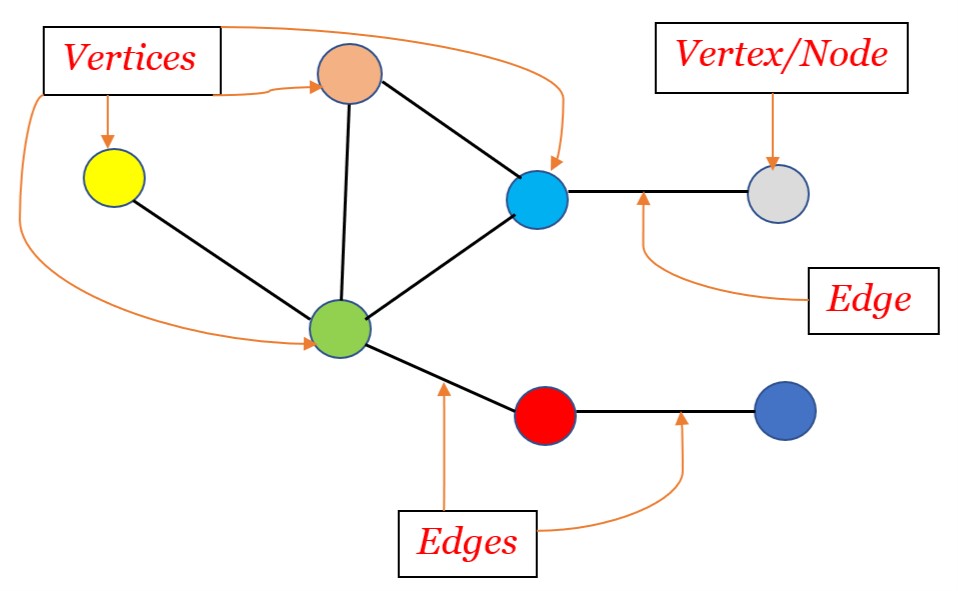
Treating PDF objects as a graph of references makes the implementation considerably more straightforward. Source: OpenGenus IQ
Step 10: Rewriting Indirect References
Once new object numbers have been assigned, every indirect reference inside each object must be updated to use the new numbers.
def rewrite_refs(value: Any, document_id: str, mapping: dict[SourceObjKey, ObjRef]) -> Any:
    if isinstance(value, ObjRef):
        return mapping[SourceObjKey(document_id, value)]

    if isinstance(value, dict):
        return {
            key: rewrite_refs(child, document_id, mapping)
            for key, child in value.items()
        }

    if isinstance(value, list):
        return [rewrite_refs(child, document_id, mapping) for child in value]

    if isinstance(value, PdfStream):
        return PdfStream(
            dict=rewrite_refs(value.dict, document_id, mapping),
            data=value.data,
        )

    return value
When rewriting a Page object, replace /Parent with the new Pages root reference.
def rewrite_page_object(
    page_obj: PdfObject,
    document_id: str,
    mapping: dict[SourceObjKey, ObjRef],
    new_parent_ref: ObjRef,
) -> PdfObject:
    new_value = rewrite_refs(page_obj.value, document_id, mapping)
    new_value["Parent"] = new_parent_ref

    new_ref = mapping[SourceObjKey(document_id, page_obj.ref)]
    return PdfObject(ref=new_ref, value=new_value)
This is the core of PDF merging. It is not enough to copy source objects under new numbers — every reference embedded within those objects must also be rewritten to the new numbering scheme.
Step 11: Building the New Pages Tree
The Pages tree for the output PDF can be kept simple. For an initial implementation, the clearest structure puts all Page objects into a single /Kids array.
def build_pages_root(pages_root_ref: ObjRef, page_refs: list[ObjRef]) -> PdfObject:
    return PdfObject(
        ref=pages_root_ref,
        value={
            "Type": "Pages",
            "Kids": page_refs,
            "Count": len(page_refs),
        },
    )
For documents with a very large number of pages, a multi-level Pages tree is preferable. For an initial implementation, however, a single Pages node is easier to debug and validate. As long as the /Kids array and /Count value are consistent, most viewers will parse the file correctly.
The Catalog is also created fresh.
def build_catalog(catalog_ref: ObjRef, pages_root_ref: ObjRef) -> PdfObject:
    return PdfObject(
        ref=catalog_ref,
        value={
            "Type": "Catalog",
            "Pages": pages_root_ref,
        },
    )
Preserving the outlines, metadata, and AcroForm from the original Catalog requires a separate policy decision. For an initial page-assembly engine, keeping the new Catalog simple improves implementation stability.
Step 12: Object Serialization
The output object list is now serialized into valid PDF syntax.
def serialize_indirect_object(obj: PdfObject) -> bytes:
    body = serialize_pdf_value(obj.value)
    return (
        f"{obj.ref.obj_num} {obj.ref.gen_num} obj\n".encode()
        + body
        + b"\nendobj\n"
    )
Value serialization is handled per type.
def serialize_pdf_value(value: Any) -> bytes:
    if isinstance(value, ObjRef):
        return f"{value.obj_num} {value.gen_num} R".encode()

    if isinstance(value, str):
        if value.startswith("/"):
            return value.encode()
        return f"/{value}".encode()

    if isinstance(value, int | float):
        return str(value).encode()

    if isinstance(value, list):
        return b"[" + b" ".join(serialize_pdf_value(v) for v in value) + b"]"

    if isinstance(value, dict):
        parts = []
        for key, child in value.items():
            parts.append(f"/{key}".encode())
            parts.append(serialize_pdf_value(child))
        return b"<< " + b" ".join(parts) + b" >>"

    if isinstance(value, PdfStream):
        stream_dict = dict(value.dict)
        stream_dict["Length"] = len(value.data)
        return (
            serialize_pdf_value(stream_dict)
            + b"\nstream\n"
            + value.data
            + b"\nendstream"
        )

    if value is None:
        return b"null"

    raise TypeError(f"unsupported pdf value: {type(value)}")
In a real implementation, string objects and Name objects need to be distinct types. The code above is simplified for illustration. Properly handling PDF literal strings, hex strings, and name escaping warrants dedicated types.
Step 13: Writing the xref Table
As each object is written, its starting byte offset is recorded. The xref table is built from these offsets.
def write_pdf(objects: list[PdfObject], root_ref: ObjRef) -> bytes:
    output = bytearray()
    offsets: dict[int, int] = {}

    output.extend(b"%PDF-1.7\n")
    output.extend(b"%\xff\xff\xff\xff\n")

    for obj in sorted(objects, key=lambda o: o.ref.obj_num):
        offsets[obj.ref.obj_num] = len(output)
        output.extend(serialize_indirect_object(obj))

    xref_offset = len(output)
    output.extend(write_xref_table(offsets))
    output.extend(write_trailer(root_ref, size=max(offsets) + 1, xref_offset=xref_offset))

    return bytes(output)
The xref table includes the free object 0.
def write_xref_table(offsets: dict[int, int]) -> bytes:
    max_obj_num = max(offsets)
    lines = []
    lines.append(b"xref\n")
    lines.append(f"0 {max_obj_num + 1}\n".encode())
    lines.append(b"0000000000 65535 f \n")

    for obj_num in range(1, max_obj_num + 1):
        offset = offsets.get(obj_num, 0)
        if offset == 0:
            lines.append(b"0000000000 00000 f \n")
        else:
            lines.append(f"{offset:010d} 00000 n \n".encode())

    return b"".join(lines)
Each xref offset must be zero-padded to exactly 10 digits. Because offsets can only be computed after objects are serialized, the xref table is always written last.
Step 14: Writing the Trailer
The trailer contains Root and Size. The file ends with startxref and %%EOF.
def write_trailer(root_ref: ObjRef, size: int, xref_offset: int) -> bytes:
    trailer = (
        b"trailer\n"
        + b"<< "
        + f"/Size {size} ".encode()
        + f"/Root {root_ref.obj_num} {root_ref.gen_num} R".encode()
        + b" >>\n"
        + b"startxref\n"
        + f"{xref_offset}\n".encode()
        + b"%%EOF\n"
    )
    return trailer
At this point, a minimal valid output PDF is complete. The viewer locates the xref table via startxref, follows /Root in the trailer to find the Catalog, then follows /Pages in the Catalog to render the page list.
Step 15: Single-PDF Rewrite Flow
Putting all the pieces together into a single function gives the following flow.
def rebuild_pdf_with_pages(data: bytes, page_order: list[int]) -> bytes:
    parser = PdfParser()
    document = parser.parse(data)

    plan = build_single_document_plan(
        document_id="doc-1",
        document=document,
        order=page_order,
    )

    writer = PdfWriter()
    return writer.write(plan)
Inside PdfWriter.write, the steps execute in this order.
class PdfWriter:
    def write(self, plan: OutputPlan) -> bytes:
        allocator = ObjectIdAllocator()
        mapping: dict[SourceObjKey, ObjRef] = {}

        catalog_ref = allocator.alloc()
        pages_root_ref = allocator.alloc()

        dependencies = self.collect_all_dependencies(plan)
        for key in dependencies:
            mapping[key] = allocator.alloc()

        output_pages = self.rewrite_pages(plan, mapping, pages_root_ref)
        copied_objects = self.rewrite_dependency_objects(plan, mapping)

        pages_root = build_pages_root(
            pages_root_ref,
            [page.ref for page in output_pages],
        )
        catalog = build_catalog(catalog_ref, pages_root_ref)

        objects = [catalog, pages_root]
        objects.extend(copied_objects)
        objects.extend(output_pages)

        return write_pdf(objects, root_ref=catalog_ref)
In a real implementation, care is needed to ensure copied_objects and output_pages do not overlap, since Page objects are also included in dependency collection. The typical approach is to collect all objects to be copied in one pass, then reassign /Parent only on Page objects.
Extending to Multi-PDF Merging
Merging multiple PDFs is fundamentally the same operation as rewriting a single PDF. The only difference is that pages in the output plan reference different source documents.
def build_merge_plan(inputs: list[tuple[str, PdfDocument, list[int]]]) -> OutputPlan:
    documents = {}
    pages = []

    for document_id, document, selected_pages in inputs:
        documents[document_id] = document
        for page_index in selected_pages:
            pages.append(OutputPage(
                source_document_id=document_id,
                source_page_ref=document.pages[page_index],
                source_page_index=page_index,
            ))

    return OutputPlan(documents=documents, pages=pages)
Because the object remapping key is (document_id, ObjRef), identical object numbers from different PDFs never collide.
(doc-a, 10 0 R) -> 5 0 R
(doc-b, 10 0 R) -> 31 0 R
With this structure in place, merging, splitting, and reordering all use the same writer. There is no need to implement separate PDF-writing logic for each feature. Only the input plan differs; the output path is identical.
Common Pitfalls in Initial Implementations
The most frequent problem in early implementations is inherited attributes on Page objects. /Resources may not be present directly on a Page object and may only exist on an ancestor Pages node. Copying just the Page object in this case leaves fonts and image resources unresolvable.
The second pitfall is the shape of /Contents. It can be either a single stream reference or an array of stream references.
/Contents 7 0 R
/Contents [7 0 R 8 0 R]
The third is deep references inside /Resources. Fonts, XObjects, ExtGStates, ColorSpaces, Patterns, and similar entries can themselves reference other objects. A shallow copy is not sufficient.
The fourth is annotations. Omitting a Page's /Annots during copying silently drops links, comments, and form widgets. On the other hand, copying annotations may require following AcroForm and action objects as well. The annotation preservation policy needs to be decided explicitly before writing the initial implementation.
The fifth is xref offsets. Offsets must be computed based on the actual byte length after all objects have been written. Measuring length in characters rather than bytes will produce wrong offsets for content containing non-ASCII text or binary stream data. Offsets are always byte-based.
The sixth is stream line endings. The stream keyword must be followed by a line break, after which the stream data begins. The handling around endstream also requires care. Because a stream's data can contain arbitrary bytes, relying on naive string search to locate boundaries is unsafe.
Validation
When building a PDF writer, visual inspection alone isn't enough. At a minimum, the following checks should be run repeatedly:
- Verify the generated PDF opens correctly in multiple viewers.
- Verify the page count matches the expected value.
- Verify that text and images are preserved on each page.
- Verify that the selected page order is exactly right.
- Verify that xref offsets match the actual start positions of their objects.
- Verify that the trailer's
/Rootpoints to the new Catalog. - Verify that
/Pages /Countmatches the actual number of Page objects.
Tests can be written by re-parsing the output PDF:
def test_rebuild_page_count(sample_pdf: bytes):
    output = rebuild_pdf_with_pages(sample_pdf, [2, 0, 1])

    parsed = PdfParser().parse(output)

    assert len(parsed.pages) == 3
    assert parsed.trailer["Root"] == parsed.root
Object number remapping also needs its own tests:
def test_no_old_parent_reference_in_output(sample_pdf: bytes):
    output = rebuild_pdf_with_pages(sample_pdf, [0])
    parsed = PdfParser().parse(output)

    catalog = parsed.objects[parsed.root].value
    pages_root_ref = catalog["Pages"]

    page_ref = parsed.pages[0]
    page = parsed.objects[page_ref].value

    assert page["Parent"] == pages_root_ref
A PDF can open without errors while still having a broken internal structure. Viewer checks and structural validation must go hand in hand.
Extending to xref Streams and Object Streams
If the initial implementation is built on xref tables, the next extension points are xref streams and object streams. Since PDF 1.5, cross-reference information can be stored as a stream object, and multiple small indirect objects can be compressed together inside an object stream.
To support this, the parser needs to handle:
- Determining whether the object at the
startxrefposition is an xref stream. - Interpreting
/W,/Index, and/Sizein the xref stream dictionary. - Decoding xref stream data according to its Filter.
- Reading
/Nand/Firstfrom an object stream and splitting out the individual objects. - Registering objects found inside object streams in the main object table.
The writer doesn't have to produce xref streams. Even if the input uses xref streams, the output can be written with a traditional xref table. This choice keeps the implementation simpler. Input support and output format are independent decisions.
What This Structure Means for Edit2me
The core idea behind Edit2me is to make the page assembly workflow — which feels unnecessarily complex in most online PDF editors — straightforward. A user uploads a PDF, selects pages, reorders them, and gets the result. Under the hood, the pipeline described here is what runs.
From the UI perspective, all that's needed is an array of page cards:
@dataclass
class PageCard:
    document_id: str
    page_index: int
    thumbnail_url: str | None
    selected: bool = True
From the engine perspective, that array is converted into an OutputPlan:
def page_cards_to_plan(cards: list[PageCard], documents: dict[str, PdfDocument]) -> OutputPlan:
    pages = []
    for card in cards:
        if not card.selected:
            continue

        document = documents[card.document_id]
        pages.append(OutputPage(
            source_document_id=card.document_id,
            source_page_ref=document.pages[card.page_index],
            source_page_index=card.page_index,
        ))

    return OutputPlan(documents=documents, pages=pages)
This separation matters. The frontend expresses user intent as an array of pages. The backend translates that array into a rewrite of the PDF object graph. Keeping UI concerns out of the PDF internals makes it much easier to extend functionality later.
Summary
A minimal PDF editor is most stable when implemented as a read-then-write pipeline — parsing the original PDF and writing a new one — rather than editing the file in place. The implementation flow goes: locate startxref, parse the xref table, find the Root from the trailer, flatten the Pages tree, build the output page plan, collect dependency objects, remap object numbers, rewrite indirect references, construct the new Pages tree, and write the xref table and trailer.
The crux of it all is object number remapping and indirect reference rewriting. PDF merging and page reordering look simple on the surface, but internally they're the problem of moving objects from different object number spaces into a single, unified new space. Copying only the Page objects isn't enough — you also have to copy all the dependencies: Contents, Resources, Font, Image XObjects, Annots, and so on.
Once this foundation is solid, single-PDF rewriting, multi-PDF merging, page reordering, and page extraction all work on top of the same writer. The engine needs to be stable before any new features are added. Building a PDF editor is less about a polished UI and more about getting the object graph rewrite right.